HelloGrowthCRM software
Built for real small-business sales teams
HelloGrowthCRM helps reps qualify faster, follow up on time, and close more deals—with practical automation in one place.
- AI lead scoring and pipeline visibility
- Built-in dialer, WhatsApp, and email automation
- Sales forecasting and RevOps-ready reporting
A customer meeting is a planned conversation between a business and a customer or potential customer. It can happen in person, over the phone, or via video call. The goal is to understand the customer's needs, present solutions, negotiate terms, or provide ongoing support. For small-business owners, these meetings are critical to building trust, closing deals, and maintaining customer satisfaction.
Why this comes up / what goes wrong
Many small-business owners struggle with managing customer meetings because they rely on informal methods like texting, email threads, or spreadsheets. This often results in scheduling conflicts, missed meetings, or unclear meeting goals. Without a clear process, meetings may feel unproductive or fail to advance the sales or service process. Business owners need a reliable way to schedule, prepare, and track meetings to keep customers engaged and deals moving forward.
Step-by-step
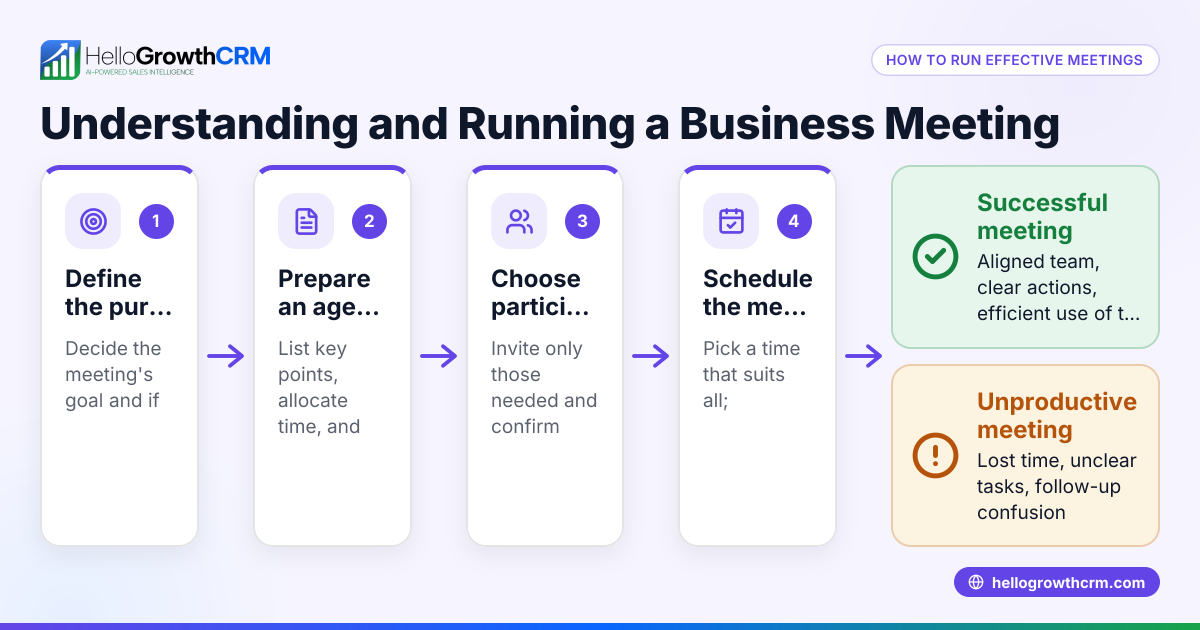
- Identify the purpose of the meeting: Decide whether the meeting is to introduce your product, negotiate pricing, resolve a problem, or check on progress after a sale. Having clear goals keeps the meeting focused and productive.
- Choose the right participants: Include team members and customer contacts who have decision-making power or provide necessary information.
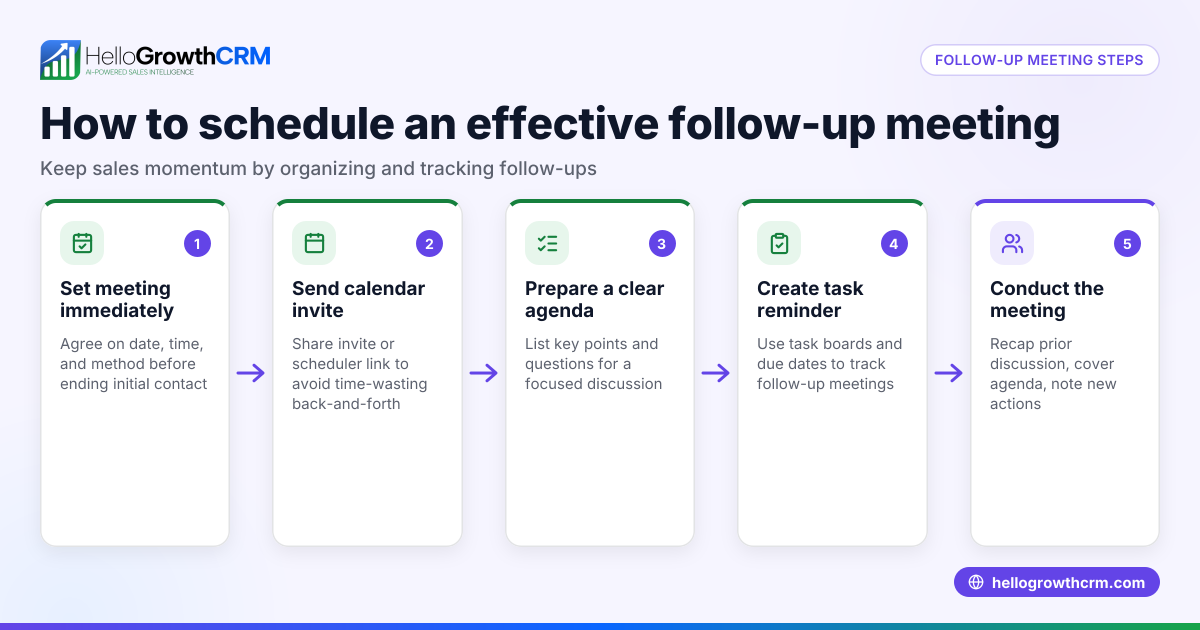
- Schedule the meeting: Offer a few time options or use a meeting scheduler so the customer can pick a convenient slot. Confirm your calendar to avoid double-booking.
- Prepare an agenda: List the topics to discuss, questions to ask, and information to share. Send this agenda to the customer before the meeting to set expectations.
- Gather necessary materials: Prepare presentations, contracts, or demos. If the meeting is virtual, test your equipment and internet connection ahead of time.
- Conduct the meeting: Start on time, follow the agenda, listen actively, and take notes. Confirm next steps and responsibilities before wrapping up.
- Follow up promptly: Send a summary email or message with key points and agreed actions. Schedule the next meeting if needed.
Using a meeting scheduler reduces back-and-forth communication and helps prevent scheduling errors.
Example (fictional figures)
Mark owns a landscaping business in Charlotte, North Carolina. On 07/15/2026, he schedules a customer meeting to discuss a new garden installation project.
- Mark sends a scheduling link to the prospect.
- The prospect selects 07/20/2026 at 3:00 PM.
- Mark prepares an agenda covering design ideas, timeline, and pricing.
- During the meeting, Mark presents a $15,000 proposal.
- The customer requests a 10% discount.
- Mark calculates the discount: $15,000 × 10% = $1,500
- Discounted price: $15,000 - $1,500 = $13,500
- They agree to start work on 08/01/2026.
- Mark sends a follow-up email summarizing the deal and next steps.
This example shows how a clear meeting process helps close sales efficiently while keeping everyone informed.
Common mistakes
- Not setting a clear agenda: Leads to unfocused discussions and wasted time. Prevent this by sending an agenda before the meeting.
- Poor scheduling communication: Causes delays, confusion, or no-shows. Use a meeting scheduler link instead of texting back and forth.
- Failing to prepare materials: Makes the meeting less professional and wastes time. Prepare and test everything before the meeting.
- Ignoring follow-up: Risks losing momentum and customer interest. Always send a summary with next steps promptly.
- Including too many or the wrong participants: Can confuse the discussion or stall decisions. Invite only essential stakeholders.
- Starting late or running overtime: Shows lack of respect for everyone’s time. Start on time and keep to the agenda.
Doing this in HelloGrowthCRM
HelloGrowthCRM offers scheduling and booking features that let prospects pick a meeting slot from a link, eliminating back-and-forth on WhatsApp. After the sale, all service requests and support tickets stay linked to the same customer record as the deal, keeping your team organized and informed. Learn more about the meeting scheduler and the customer health score features.
Frequently asked questions
What is the best way to schedule a customer meeting? Using a scheduling tool that allows customers to pick available times reduces delays and confusion. This avoids back-and-forth messages and helps prevent double-booking.
How long should a customer meeting last? Customer meetings typically aim to be long enough to cover all agenda items efficiently without rushing or dragging out the discussion.
What should I prepare before a customer meeting? Prepare an agenda, relevant documents or presentations, and any questions you need answered. Test your technology setup if the meeting is virtual.
How do I follow up after a customer meeting? Send a summary email or message with key points, decisions made, and next steps. Confirm deadlines and responsible parties.
Can HelloGrowthCRM help me manage customer meetings? Yes, HelloGrowthCRM’s scheduling and booking feature lets prospects pick meeting times from a link, simplifying scheduling. After meetings, you can track service requests on the same customer record.
Why is it important to limit meeting participants? Limiting participants ensures the meeting stays focused and decisions can be made efficiently. Too many people can cause confusion or slow down the process.
Key takeaways
- Define clear goals and prepare an agenda before every customer meeting.
- Use a scheduling tool to let customers pick convenient times and avoid conflicts.
- Prepare all materials and test technology ahead of time.
- Include only essential participants to keep meetings focused.
- Follow up quickly with a summary and agreed next steps.
- HelloGrowthCRM simplifies scheduling and keeps customer interactions organized.
Effective customer meetings build trust and help close deals faster. Start on the Free Forever plan (200 leads, no credit card) to try HelloGrowthCRM’s scheduling and customer management features today.
Ready to put this into practice?
Set up your pipeline, WhatsApp follow-ups, and AI lead scoring in minutes — free, no credit card.
Try HelloGrowthCRM freeGet CRM tips in your inbox
Join thousands of sales professionals who get weekly insights on CRM strategy, AI automation, and pipeline optimization.

The HelloGrowthCRM team publishes guides on CRM strategy, AI sales tools, and revenue operations for small business sales teams.