HelloGrowthCRM software
Built for real small-business sales teams
HelloGrowthCRM helps reps qualify faster, follow up on time, and close more deals—with practical automation in one place.
- AI lead scoring and pipeline visibility
- Built-in dialer, WhatsApp, and email automation
- Sales forecasting and RevOps-ready reporting
A customer service record is a detailed history of every interaction a business has with a customer regarding support, inquiries, complaints, or service requests. It includes dates, communication methods, issue descriptions, actions taken, and resolution status. Maintaining these records helps small businesses respond quickly, avoid duplicated efforts, and improve customer satisfaction.
Why this comes up / what goes wrong
Small-business owners often struggle with managing customer service because interactions happen across multiple channels—phone, email, text, WhatsApp—and without a centralized record, important details get lost. For example, a landscaping contractor might receive service requests via phone calls, texts, and emails but fail to log them all in one place. This causes delays, forgotten follow-ups, and unhappy customers. Without a clear customer service record, teams may duplicate work or miss deadlines, harming the business’s reputation and revenue.
Step-by-step
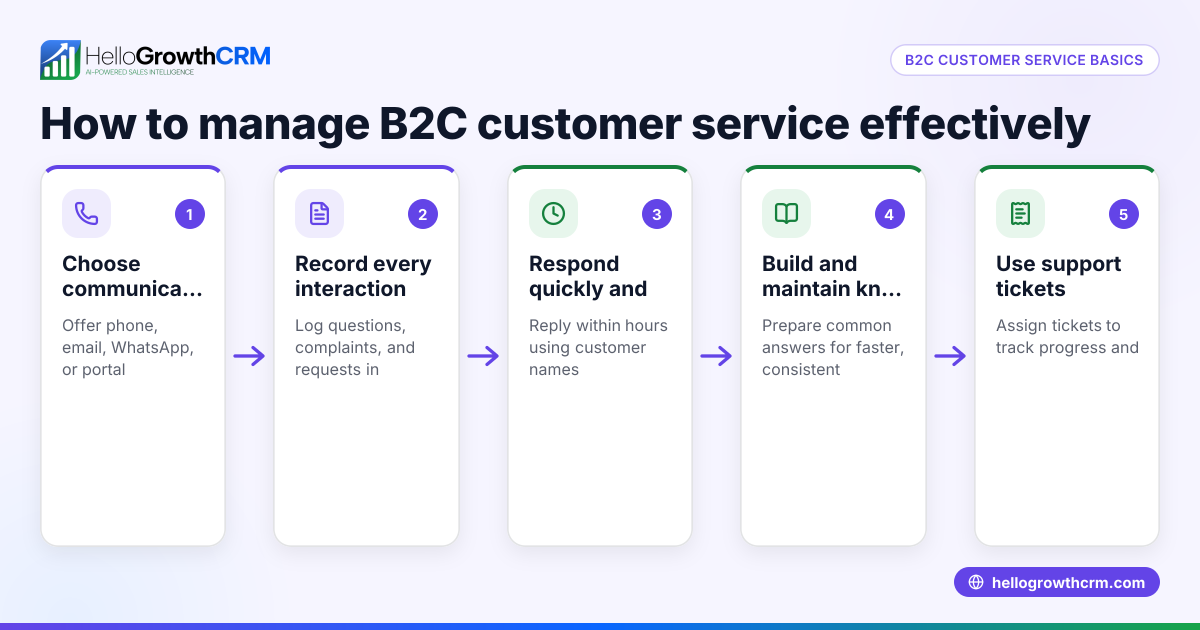
- Gather all customer communications: Collect emails, phone call notes, WhatsApp and SMS messages, and any in-person conversation records related to each customer.
- Create a dedicated service record per customer: Use a digital folder or CRM system labeled with the customer’s name and contact info.
- Log each service request or issue promptly: Note the date, communication channel, issue description, and any immediate actions taken.
- Assign responsibility for handling the request: Specify the team member responsible and set a clear deadline for follow-up or resolution.
- Track the status of each issue: Mark whether it is open, pending, or resolved to avoid losing track.
- Review and update regularly: Check all service records weekly to ensure no requests are overdue and to identify recurring problems.
- Use prioritization tools: Consider applying a customer health score to focus on customers who need urgent attention or have high value.
Example (fictional figures)
GreenScape Services, a landscaping contractor in Charlotte, North Carolina, received a service request on 05/10/2026 from customer John Smith about a malfunctioning lawn sprinkler. Here is how the customer service record entry looks:
- Service request date: 05/10/2026
- Customer: John Smith
- Issue: Lawn sprinkler malfunction
- Communication: WhatsApp message
- Assigned to: Technician Mike
- Estimated resolution date: 05/12/2026
Costs involved:
Service call fee = $150 Parts replacement = $85 Labor (2 hours × $50/hour) = $100
Total cost = $150 + $85 + $100 = $335
On 05/12/2026, GreenScape updates the record to note the repair was completed and John Smith confirmed satisfaction.
Common mistakes
- Scattered records across multiple tools or paper: Prevent by centralizing all service data in one system or folder.
- Failing to update the record after each interaction: Prevent by assigning responsibility and setting reminders.
- Missing follow-up deadlines: Prevent by tracking status clearly and reviewing regularly.
- Ignoring some communication channels like WhatsApp or SMS: Prevent by capturing all channels, including phone, email, WhatsApp, and SMS.
- Not analyzing service records for patterns: Prevent by scheduling periodic reviews and using tools like WhatsApp and SMS CRM to automate message capture.
How to Tell If Your Customer Service Record System Is Working
To know if your customer service record approach is effective, watch for these signs:
- You and your team can quickly find past interactions without searching multiple places.
- Follow-ups happen on time, and customers don’t have to repeat their issues.
- Service requests don’t get lost or forgotten, even during busy periods.
- You notice fewer duplicated efforts or conflicting information among team members.
- Patterns or recurring problems become clear, helping you improve services.
- Customer feedback reflects satisfaction with your responsiveness.
If you spot gaps, revisit your logging process, update routines, or improve centralization. Regularly checking these points helps you maintain smooth, reliable customer support.
Doing this in HelloGrowthCRM
HelloGrowthCRM keeps all service requests and support tickets on the same customer record as the deal, so nothing is lost after the sale. Its customer portal lets clients submit requests directly. Referral tracking and the knowledge base help your team resolve issues faster. Managing tickets and service history in one place improves response times and customer satisfaction. Learn more about HelloGrowthCRM for the United States at hellogrowthcrm.com/usa.
Frequently asked questions
What is the difference between a customer service record and a customer record? A customer record contains basic information like contact details and purchase history. A customer service record focuses on the history of support interactions and service requests. Both are important but serve different purposes.
How do I start a customer service record if I have no system yet? Start by collecting all recent interactions for each customer and logging them in a spreadsheet or notebook. Then organize ongoing communication in one place and assign team members to update it regularly.
Can I use WhatsApp or SMS for customer service records? Yes. Using a CRM that integrates WhatsApp and SMS communication helps you automatically capture messages and link them to the correct customer record, reducing manual work.
Why should I track service requests on the same record as sales? Keeping service requests on the same record as sales gives a full view of the customer relationship, helping your team personalize responses and spot upsell or retention opportunities.
How often should I review customer service records? Review them at least weekly to ensure timely follow-ups and to spot recurring issues. Regular reviews improve service quality.
Key takeaways
- A customer service record logs all support interactions and requests for each customer.
- Centralize and update these records regularly to avoid lost or delayed responses.
- Include all communication channels such as WhatsApp, SMS, email, and phone calls.
- Assign responsibility and deadlines for follow-ups to maintain accountability.
- Use tools like HelloGrowthCRM to keep service requests linked to customer and sales records.
- Regularly review records to improve service quality and identify trends.
Start organizing your customer service records today to improve your team’s efficiency and customer satisfaction. You can Start on the Free Forever plan (200 leads, no credit card) with HelloGrowthCRM to keep customer records and follow-ups together.
Ready to put this into practice?
Set up your pipeline, WhatsApp follow-ups, and AI lead scoring in minutes — free, no credit card.
Try HelloGrowthCRM freeGet CRM tips in your inbox
Join thousands of sales professionals who get weekly insights on CRM strategy, AI automation, and pipeline optimization.

The HelloGrowthCRM team publishes guides on CRM strategy, AI sales tools, and revenue operations for small business sales teams.