HelloGrowthCRM software
Built for real small-business sales teams
HelloGrowthCRM helps reps qualify faster, follow up on time, and close more deals—with practical automation in one place.
- AI lead scoring and pipeline visibility
- Built-in dialer, WhatsApp, and email automation
- Sales forecasting and RevOps-ready reporting
A demo business intelligence (BI) software lets you explore the tool’s features, usability, and fit for your business before buying. To demo BI software effectively, schedule a live session or use a guided interactive demo, focus on key features like data visualization, reporting, and integrations, and prepare questions on scalability and support. This article covers why you need to demo BI, step-by-step evaluation, a realistic example, common demo mistakes, and how HelloGrowthCRM helps with scheduling demos.
Why this comes up / what goes wrong
Small-business owners searching for "demo business intelligence" are usually at the stage of evaluating software to improve how they analyze sales, customer data, and operations. They want to avoid buying a tool that is too complex, lacks essential features, or doesn’t integrate well with their existing systems. Many small teams lose leads or sales opportunities because their current tools are slow or fragmented across email, spreadsheets, and messaging apps.
Without a proper demo, owners risk investing in BI software that their team won’t use or that doesn’t solve their core problems. They also want to see how easy it is to adopt the software, how it handles their specific data sources, and whether it can grow with their business.
Step-by-step
- Identify your business needs. List what you want to learn from BI software, such as sales trends, customer segmentation, or forecasting. This helps focus your demo questions.
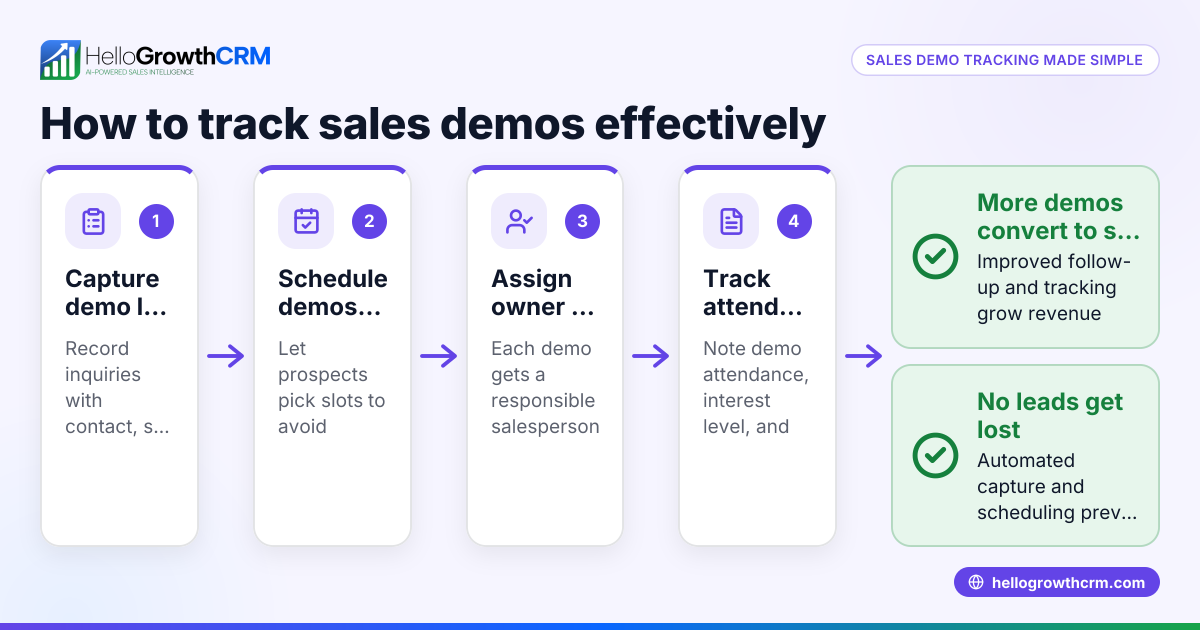
- Schedule the demo efficiently. Use a scheduling tool or a link from the vendor to pick a convenient time without endless back-and-forth emails or messages. This saves time and keeps the process professional.
- Prepare your data examples. Ask if you can upload a sample of your own data or see the software handle data like yours. This tests real applicability.
- Focus on key features during the demo. Check the ease of data visualization, report customization, integration options, and data refresh speed.
- Evaluate usability for your team. Consider if non-technical users can navigate the interface and generate insights without heavy training.
- Ask about support and scalability. Confirm what onboarding help is available, if there is ongoing support, and how the platform scales as your data or team grows.
- Compare pricing and contract terms after the demo. Understand any limits on users, data volume, or features in different plans.
- Get feedback from your team. Share the demo experience and gather input from those who will use the BI tool daily.
Example (fictional figures)
A two-location dental practice in Columbus, Ohio, wants to demo a BI tool to track patient visits and revenue trends.
- Practice revenue last year: $1,200,000
- Average monthly patients: 400
They schedule a demo for 03/15/2026 using a scheduling link to avoid back-and-forth messages.
During the demo, they upload a sample spreadsheet with monthly patient visits and revenue.
They check if the software can:
- Visualize monthly revenue trends clearly.
- Segment patients by treatment type.
- Forecast revenue for the next quarter.
They find the dashboard easy to use and the reports customizable.
They confirm support availability and ask about pricing tiers for up to 5 users.
Finally, they decide to trial the software for 30 days before committing.
Common mistakes
- Not preparing questions or use cases. Prevent by listing your business goals and demo priorities beforehand.
- Skipping the scheduling step. Avoid back-and-forth by using a booking link or calendar invite.
- Ignoring data compatibility. Always check if your current data sources can integrate or be imported.
- Overlooking usability for your team. Include potential users in the demo to evaluate ease of use.
- Not clarifying support and training. Ask about onboarding resources to avoid surprises.
- Focusing only on price. Balance cost with features and long-term value.
Doing this in HelloGrowthCRM
HelloGrowthCRM simplifies scheduling demos with its built-in meeting scheduler. Instead of exchanging multiple WhatsApp messages, prospects pick a convenient slot from a link, speeding up demo booking and reducing friction. This feature is available on the Free Forever plan and all paid tiers. Learn more about the WhatsApp and SMS CRM and the built-in CRM dialer that support your sales process after the demo. For US businesses, see HelloGrowthCRM for the United States.
Frequently asked questions
What should I look for in a business intelligence demo? Focus on how the tool handles your specific data, ease of use, reporting options, and integration with your current systems. Also, check the quality of support and scalability.
How long does a typical BI demo last? Most demos typically last around half an hour to an hour. This is enough time to explore core features and ask questions without overwhelming you.
Can I use my own data during a demo? Many vendors allow uploading sample data or connecting your data sources during a demo. This helps assess real-world fit.
Is scheduling a demo usually complicated? It can be, but using scheduling tools or links, like those in HelloGrowthCRM, makes it easier and faster to book without endless messaging.
What happens after the demo? You typically receive follow-up materials, pricing details, and possibly a trial period to test the software before buying.
Key takeaways
- A business intelligence demo helps you test software fit before buying.
- Prepare your needs, data examples, and questions to get the most from the demo.
- Use scheduling tools or links to book demos efficiently.
- Involve your team to evaluate usability and features.
- Check support, scalability, and pricing after the demo.
- HelloGrowthCRM’s meeting scheduler streamlines demo booking on WhatsApp.
Start your BI journey by scheduling demos efficiently. To try a CRM that includes scheduling and booking capabilities, Start on the Free Forever plan (200 leads, no credit card).
Ready to put this into practice?
Set up your pipeline, WhatsApp follow-ups, and AI lead scoring in minutes — free, no credit card.
Try HelloGrowthCRM freeGet CRM tips in your inbox
Join thousands of sales professionals who get weekly insights on CRM strategy, AI automation, and pipeline optimization.

The HelloGrowthCRM team publishes guides on CRM strategy, AI sales tools, and revenue operations for small business sales teams.