HelloGrowthCRM software
Built for real small-business sales teams
HelloGrowthCRM helps reps qualify faster, follow up on time, and close more deals—with practical automation in one place.
- AI lead scoring and pipeline visibility
- Built-in dialer, WhatsApp, and email automation
- Sales forecasting and RevOps-ready reporting
Email ads are promotional messages sent directly to potential or existing customers' email inboxes to promote products, services, or offers. They are a form of digital advertising designed to engage recipients and drive sales or leads. This article explains why small businesses use email ads, provides step-by-step instructions to create them, highlights common mistakes, and shows how HelloGrowthCRM supports email campaigns.
Why this comes up / what goes wrong
Small business owners often turn to email ads because they want a cost-effective way to reach customers directly. Unlike social media ads or search ads, email ads land in the inbox where the recipient can read them at their convenience. However, many small businesses struggle with slow follow-up, managing contacts across text messages, email, and spreadsheets, or failing to track responses properly. Without a clear process, email ads can go unnoticed, or prospects may slip through the cracks, resulting in lost leads and wasted marketing spend.
Step-by-step
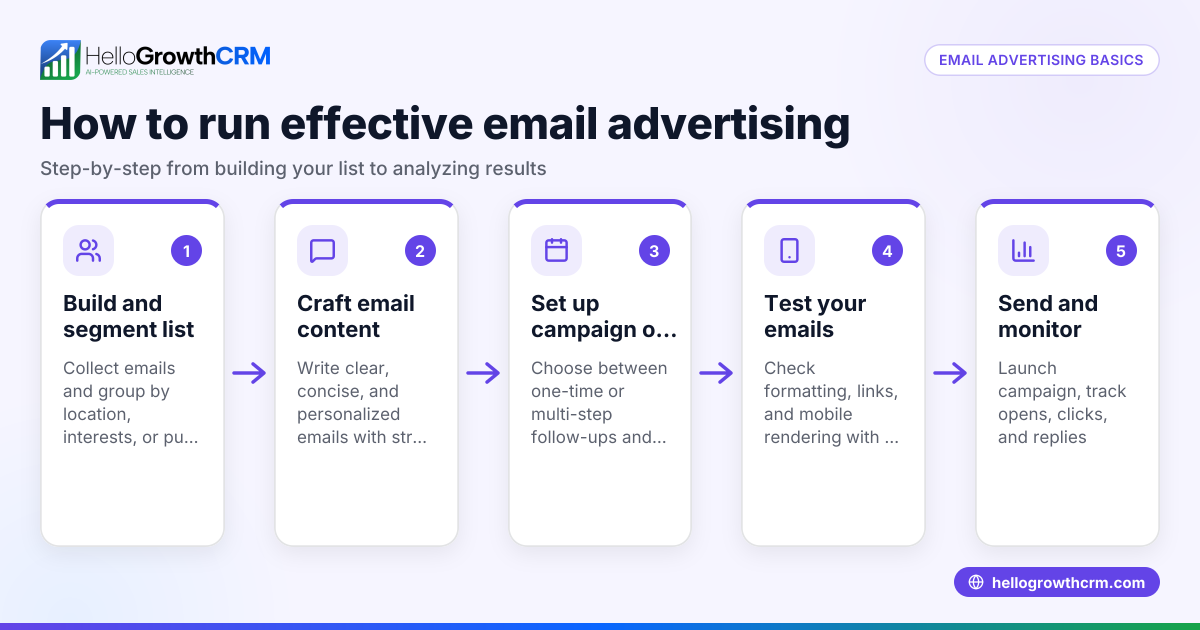
- Build a quality email list: Collect emails from your website, in-store sign-ups, or previous customers. Check that contacts have opted in to receive marketing emails to comply with laws and avoid spam complaints.
- Segment your audience: Group your contacts by factors like purchase history, location, or interest. This helps tailor your email ads to be more relevant and effective.
- Create a compelling email ad: Write a clear subject line and body that highlights your offer or message. Include a strong call to action (like "Book now" or "Shop today") and make sure your email is mobile-friendly.
- Set up an email campaign or sequence: Use tools to schedule your email ads, automate follow-ups, and track responses. Check your email sender reputation and test your emails before sending to avoid deliverability issues.
- Monitor and analyze results: Track metrics like open rates, click-through rates, and conversions. Use this data to refine future email ads.
- Follow up promptly: Respond quickly to any replies or inquiries generated by your email ads to maximize conversions.
For more on automating email outreach, see email automation and sequences.
Example (fictional figures)
A two-location dental practice in Columbus, Ohio, wants to promote a new teeth whitening service.
- They have an email list of 2,000 patients.
- They create an email ad offering a 20% discount.
- They send the email campaign on 08/01/2025.
- Their average conversion rate from email ads is 5%.
- The whitening service costs $300.
Calculations:
2,000 × 5% = 100 patients responding 100 × $300 = $30,000 in sales $30,000 × 20% discount = $6,000 discount given $30,000 - $6,000 = $24,000 revenue after discount
This simple example shows how email ads can generate significant revenue when targeted effectively.
Common mistakes
- Not segmenting the email list: Sending generic emails to everyone lowers engagement. Prevent this by grouping contacts based on relevant criteria.
- Ignoring follow-up: Leads who respond but don't get timely replies often go cold. Use automated sequences to follow up promptly.
- Overloading emails with information: Too much text or unclear calls to action confuse recipients. Keep emails concise and focused.
- Neglecting mobile optimization: Many users read emails on phones. Test emails on mobile devices before sending.
- Not tracking results: Without monitoring open and click rates, you can’t improve. Use analytics tools to measure performance.
For tips on managing replies and follow-up, see WhatsApp and SMS CRM.
Doing this in HelloGrowthCRM
HelloGrowthCRM offers a HelloMail shared inbox where your team can see replies to quotation emails on the deal, preventing missed responses. Its sequences and campaigns feature automates a five-step follow-up over two weeks that stops immediately when a prospect replies. This ensures timely outreach without manual effort. Learn more about these features at email automation and sequences.
Frequently asked questions
What is the difference between email ads and email newsletters? Email ads are promotional messages focused on specific offers or products, aiming to drive immediate action. Newsletters usually provide ongoing content, updates, or information without a direct sales push.
How often should I send email ads? Frequency depends on your audience and industry. Sending too often can annoy recipients, while too infrequently may reduce engagement. A common approach is 1-2 email ads per month, combined with other content.
Do I need special software to send email ads? While you can send emails manually, dedicated tools help automate campaigns, segment lists, and track performance. HelloGrowthCRM includes email sequences and a shared inbox to streamline email marketing.
How can I avoid my email ads going to spam? Use verified opt-in lists, avoid spammy words, include an unsubscribe link, and authenticate your sending domain. Testing emails before sending helps identify issues.
Can I combine email ads with other channels? Yes, combining email with SMS and WhatsApp messaging increases reach and engagement. HelloGrowthCRM supports multi-channel sequences to automate this process.
For more about HelloGrowthCRM in the US market, see HelloGrowthCRM for the United States.
Key takeaways
- Email ads are direct promotional emails designed to generate leads or sales.
- Building a segmented, opted-in email list is essential for success.
- Automate follow-ups with sequences to respond quickly and keep prospects engaged.
- Monitor results to continuously improve your campaigns.
- Avoid common mistakes like neglecting mobile optimization or failing to follow up.
- HelloGrowthCRM supports email ads with a shared inbox and automated sequences.
Start your email ad campaigns today with HelloGrowthCRM. Start on the Free Forever plan (200 leads, no credit card).
Ready to put this into practice?
Set up your pipeline, WhatsApp follow-ups, and AI lead scoring in minutes — free, no credit card.
Try HelloGrowthCRM freeGet CRM tips in your inbox
Join thousands of sales professionals who get weekly insights on CRM strategy, AI automation, and pipeline optimization.

The HelloGrowthCRM team publishes guides on CRM strategy, AI sales tools, and revenue operations for small business sales teams.