HelloGrowthCRM software
Built for real small-business sales teams
HelloGrowthCRM helps reps qualify faster, follow up on time, and close more deals—with practical automation in one place.
- AI lead scoring and pipeline visibility
- Built-in dialer, WhatsApp, and email automation
- Sales forecasting and RevOps-ready reporting
An email ticket is a system-generated record that logs customer emails sent to your support or service team. When a customer emails with a question, problem, or request, the email ticket captures this interaction so your team can track progress, assign responsibility, and ensure timely resolution.
Why this comes up / what goes wrong
Small-business owners often face challenges managing customer emails manually. Without an organized system, emails can be missed, duplicated, or lost in inboxes. This leads to slow responses, frustrated customers, and lost sales opportunities. For businesses handling service requests, quotations, or follow-ups via email, keeping track of each email as a ticket ensures nothing slips through the cracks. The term “email ticket” often comes up when owners want a better way to handle incoming email requests without juggling multiple email accounts or spreadsheets.
Step-by-step
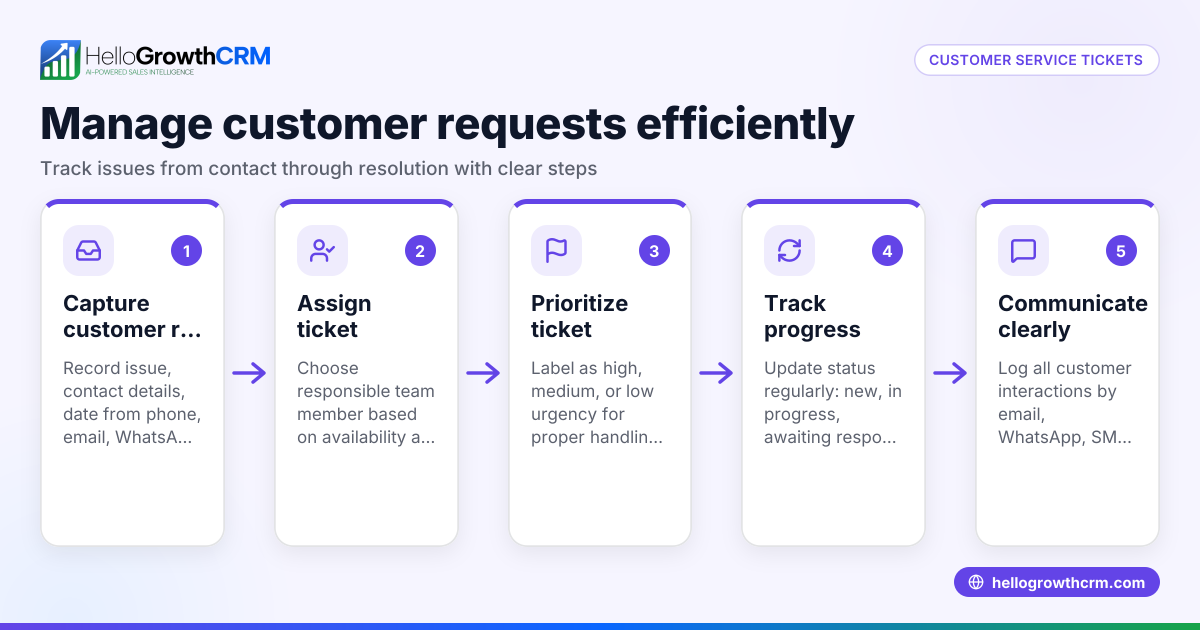
- Set up a dedicated support email address: Use an email like support@yourbusiness.com to centralize customer requests. Check that this address is monitored and accessible to your team.
- Choose an email ticketing system or CRM with ticket features: This system will convert incoming emails into tickets automatically. Confirm it can assign tickets to team members and track status.
- Configure automatic ticket creation: Ensure every incoming email creates a new ticket or updates an existing one if it’s a reply. Verify that the system handles attachments and customer details correctly.
- Assign tickets promptly: Decide who on your team handles which type of request. Check that tickets are assigned quickly to avoid delays.
- Track ticket status and response times: Use your system’s dashboard or reports to monitor open tickets, response times, and resolution rates.
- Follow up with customers via the ticket system: Reply to emails within the ticket to keep all communication in one place. Confirm replies are visible to the whole team to avoid duplicate work.
- Close tickets when resolved: Mark tickets as closed once the customer’s issue is fully addressed. Verify that closed tickets are archived for future reference.
For more on automating follow-ups, see email automation and sequences.
Example (fictional figures)
A plumbing company in Austin, Texas, receives a customer email requesting a quote for a water heater installation on 04/10/2026.
- Customer emails support@austinplumbing.com.
- The email ticketing system creates ticket #1234 automatically.
- The ticket is assigned to John, the estimator.
- John reviews the request and sends a quotation email on 04/11/2026.
- The customer replies with approval on 04/12/2026, which updates ticket #1234.
- John schedules the installation for 04/15/2026 and marks the ticket as resolved after completion.
This process ensures the customer’s request is tracked from inquiry to job completion without losing information.
Common mistakes
- Using personal email accounts instead of a shared inbox: This causes lost or duplicated emails. Prevent by using a shared inbox or email ticketing system.
- Not assigning tickets promptly: Leads to slow responses. Set clear team roles and monitor ticket queues.
- Responding outside the ticket system: Communication gets scattered. Always reply within the ticket to keep history centralized.
- Ignoring follow-up automation: Manual follow-ups can be missed. Use automated sequences to maintain contact until the customer replies (email automation and sequences).
- Closing tickets prematurely: Issues may resurface if closed too soon. Confirm resolution with the customer before closing.
- Failing to track ticket metrics: Without monitoring, issues go unnoticed. Use reporting features to measure team performance.
Doing this in HelloGrowthCRM
HelloGrowthCRM offers a HelloMail shared inbox where replies to quotation emails are visible to the whole team on the deal, preventing lost messages and duplicated effort. After the sale, service requests stay on the same customer record as the deal through the customer portal, referrals, tickets, and knowledge base features. For sales outreach, sequences and campaigns enable a five-step follow-up over two weeks that runs automatically and stops as soon as the prospect replies. Learn more about these tools in WhatsApp and SMS CRM and email automation and sequences.
Frequently asked questions
What is the benefit of using an email ticket system? An email ticket system organizes customer emails into manageable records. It ensures timely responses, prevents lost emails, and allows tracking of issue status. This improves customer satisfaction and team efficiency.
Can I use my existing email client as a ticket system? While you can manually track emails, dedicated ticket systems or CRMs provide automation, assignment, and reporting features that personal email clients lack. This saves time and reduces errors.
How do email tickets help with team collaboration? Email tickets centralize communication. Everyone on the team can see the ticket history, replies, and status, which prevents duplicate replies and confusion.
Is it possible to automate follow-ups on email tickets? Yes. Many CRMs, including HelloGrowthCRM, offer sequences that automatically send follow-up messages until the customer responds, ensuring no lead or request is forgotten.
What happens to tickets after they are closed? Closed tickets are archived for future reference. This helps with customer history, reporting, and identifying recurring issues.
How can I get started with email ticketing without extra costs? Start with a free CRM plan that includes shared inbox features and basic ticket management. HelloGrowthCRM offers a Free Forever plan with 200 leads and no credit card required at Start on the Free Forever plan.
Key takeaways
- An email ticket records customer email requests to track and manage support.
- Use a dedicated support email and ticketing system to avoid lost or delayed responses.
- Assign tickets quickly and keep all communication within the ticket.
- Automate follow-ups with sequences to maintain contact until customer reply.
- Monitor ticket status and close only after confirming resolution.
- HelloGrowthCRM supports email tickets with shared inboxes, customer portals, and automated sequences.
Start managing your customer emails better and avoid lost leads by implementing email ticketing. Start on the Free Forever plan (200 leads, no credit card) today to try HelloGrowthCRM’s tools.
Ready to put this into practice?
Set up your pipeline, WhatsApp follow-ups, and AI lead scoring in minutes — free, no credit card.
Try HelloGrowthCRM freeGet CRM tips in your inbox
Join thousands of sales professionals who get weekly insights on CRM strategy, AI automation, and pipeline optimization.

The HelloGrowthCRM team publishes guides on CRM strategy, AI sales tools, and revenue operations for small business sales teams.