HelloGrowthCRM software
Built for real small-business sales teams
HelloGrowthCRM helps reps qualify faster, follow up on time, and close more deals—with practical automation in one place.
- AI lead scoring and pipeline visibility
- Built-in dialer, WhatsApp, and email automation
- Sales forecasting and RevOps-ready reporting
Email list cleansing is the process of reviewing and cleaning your email contacts by removing invalid, inactive, or incorrect email addresses. This improves your email deliverability, reduces bounce rates, and increases engagement with your marketing campaigns. For small businesses, keeping a clean email list helps you reach real prospects and avoid wasting time and resources.
Why this comes up / what goes wrong
Many small business owners build email lists over time through web forms, events, and purchases. However, email lists naturally degrade as people change addresses, make typos, or stop engaging. Sending emails to invalid addresses leads to bounced messages, hurting your sender reputation with email providers and reducing your chances of landing in inboxes. Additionally, inactive contacts lower your open and click rates, making your campaigns less effective. Without regular cleansing, your email list becomes cluttered with poor contacts, causing lost sales opportunities and wasted effort.
Step-by-step
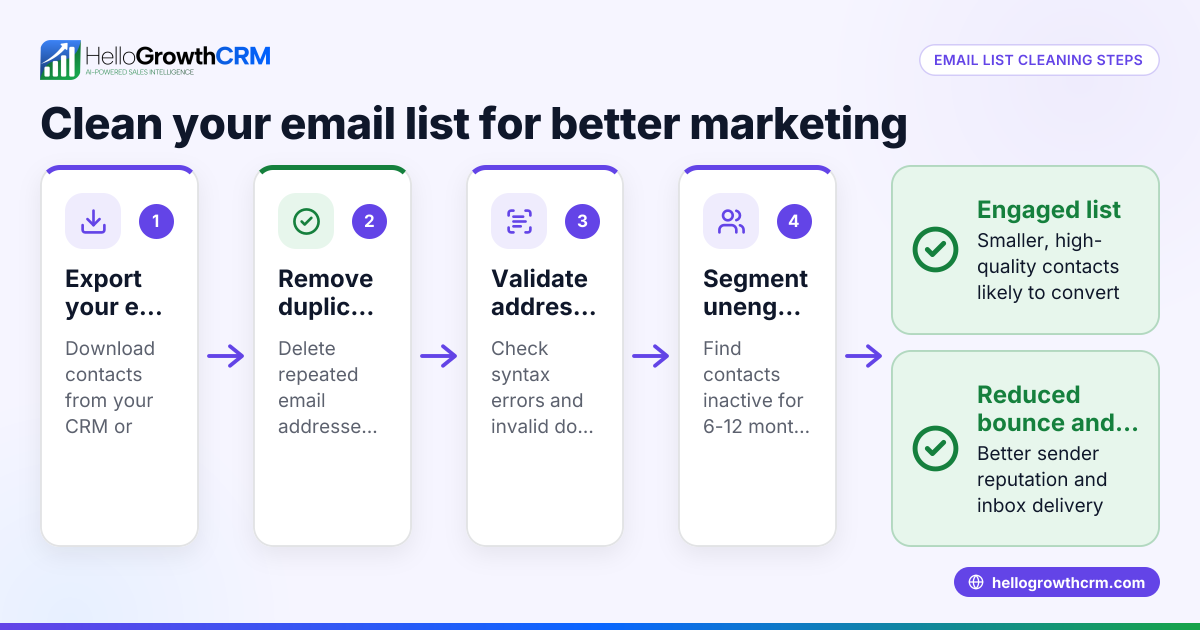
- Export your current email list: Start by exporting your email contacts from your CRM or email marketing tool into a spreadsheet. Check for obvious errors like missing "@" symbols or extra spaces.
- Remove duplicates: Identify and delete duplicate email addresses to avoid sending multiple emails to the same contact.
- Validate email addresses: Use an email validation service or tool to check which emails are valid, invalid, or risky. This step helps identify addresses that will bounce.
- Segment inactive contacts: Find contacts who haven’t opened or clicked any emails in the last 6-12 months. Consider removing or re-engaging them with a special campaign.
- Check for role-based or generic emails: Addresses like info@, sales@, or support@ often do not belong to individuals and may reduce engagement. Decide if you want to keep them.
- Remove or update invalid and risky emails: Delete emails confirmed invalid or update them if you have corrected information.
- Re-engagement campaign: Send a targeted email asking inactive contacts if they want to stay subscribed. Remove those who don’t respond.
- Maintain your list regularly: Schedule email list cleansing every 3-6 months to keep your list healthy.
For ongoing email outreach, consider using tools like email automation and sequences to manage follow-ups efficiently.
Example (fictional figures)
A plumbing company in Austin, Texas, called "Austin Pipe Masters" has 10,000 email contacts as of 04/15/2026. They want to clean their list before a new campaign.
- Total contacts: 10,000
- Duplicates found: 500
- Emails flagged invalid by validation tool: 1,200
- Inactive contacts (no opens in 12 months): 2,000
- Role-based emails: 300
Steps:
- Remove duplicates:
10,000 - 500 = 9,500
- Remove invalid emails:
9,500 - 1,200 = 8,300
- Remove role-based emails:
8,300 - 300 = 8,000
- Send re-engagement to 2,000 inactive contacts.
- Assume 1,200 respond and stay, 800 do not respond and are removed:
8,000 - 800 = 7,200
Final clean list size: 7,200
Austin Pipe Masters reduced their list by 28% but improved quality and engagement potential.
Common mistakes
- Skipping validation and relying on manual checks: Use automated validation tools to catch errors you might miss.
- Not removing duplicates before campaigns: Duplicate emails can annoy contacts and skew metrics.
- Ignoring inactive contacts: Re-engage or remove them to improve campaign performance.
- Keeping role-based emails without purpose: They often lower engagement rates.
- Failing to cleanse regularly: Schedule regular cleaning to maintain list health.
- Not tracking replies in team emails: Use shared inboxes so the whole team sees responses and avoids duplicate follow-ups.
To avoid these mistakes, tools like HelloMail’s shared inbox keep your team coordinated on email replies.
Doing this in HelloGrowthCRM
HelloGrowthCRM supports email list management with features that help your sales team follow up efficiently. The HelloMail shared inbox allows your team to see replies to quotation emails collectively, preventing missed or duplicated responses. Additionally, automated sequences and campaigns let you set up multi-step follow-ups over two weeks that stop as soon as a prospect replies, saving time and improving engagement.
Frequently asked questions
What is the difference between email list cleansing and email list segmentation? Email list cleansing removes invalid or inactive addresses to improve list quality. Segmentation divides your clean list into groups based on criteria like behavior or demographics to send targeted messages.
How often should I clean my email list? Aim to cleanse your email list every 3 to 6 months. Regular cleaning keeps your deliverability high and engagement rates strong.
Can I clean my email list manually without tools? You can manually check for obvious errors and duplicates, but automated validation tools save time and catch hidden issues like invalid domains or syntax errors.
What happens if I don’t clean my email list? You risk higher bounce rates, lower open rates, and damaged sender reputation, which can cause your emails to land in spam folders or be blocked.
How does HelloMail’s shared inbox help with email outreach? HelloMail’s shared inbox lets your team manage inbound email replies together, ensuring no response is missed or duplicated.
Can I use HelloGrowthCRM’s email sequences for follow-up? Yes, automated sequences send follow-ups over two weeks and stop as soon as a prospect replies, making your outreach more efficient.
Learn more about managing outreach with email automation and sequences here.
Key takeaways
- Email list cleansing removes invalid, duplicate, and inactive contacts to improve deliverability.
- Regular cleansing every 3-6 months keeps your email marketing effective.
- Use email validation tools and remove role-based emails for better engagement.
- Re-engagement campaigns help confirm interested contacts before removal.
- Avoid common mistakes like skipping duplicates removal and ignoring replies.
- HelloMail’s shared inbox and automated sequences support efficient email follow-up.
Clean your email list now to boost your marketing results and save time. Ready to manage leads and automate follow-ups? Start on the Free Forever plan (200 leads, no credit card).
Ready to put this into practice?
Set up your pipeline, WhatsApp follow-ups, and AI lead scoring in minutes — free, no credit card.
Try HelloGrowthCRM freeGet CRM tips in your inbox
Join thousands of sales professionals who get weekly insights on CRM strategy, AI automation, and pipeline optimization.

The HelloGrowthCRM team publishes guides on CRM strategy, AI sales tools, and revenue operations for small business sales teams.