HelloGrowthCRM software
Built for real small-business sales teams
HelloGrowthCRM helps reps qualify faster, follow up on time, and close more deals—with practical automation in one place.
- AI lead scoring and pipeline visibility
- Built-in dialer, WhatsApp, and email automation
- Sales forecasting and RevOps-ready reporting
Email search means using tools in your email client or CRM to find particular messages by typing keywords, sender names, dates, or other filters. For small businesses, this is critical to avoid losing leads, missing customer requests, or wasting time scrolling through many emails.
Why this comes up / what goes wrong
Small business owners often juggle multiple email accounts and communications spread across email, text messages, and spreadsheets. Without a clear way to search emails, you might miss important leads or follow-ups. For example, if a customer replied to a quotation but their email is buried in your inbox, you could lose the sale. Disconnected tools and lack of organization make it harder to find emails quickly, causing delays and confusion.
Step-by-step
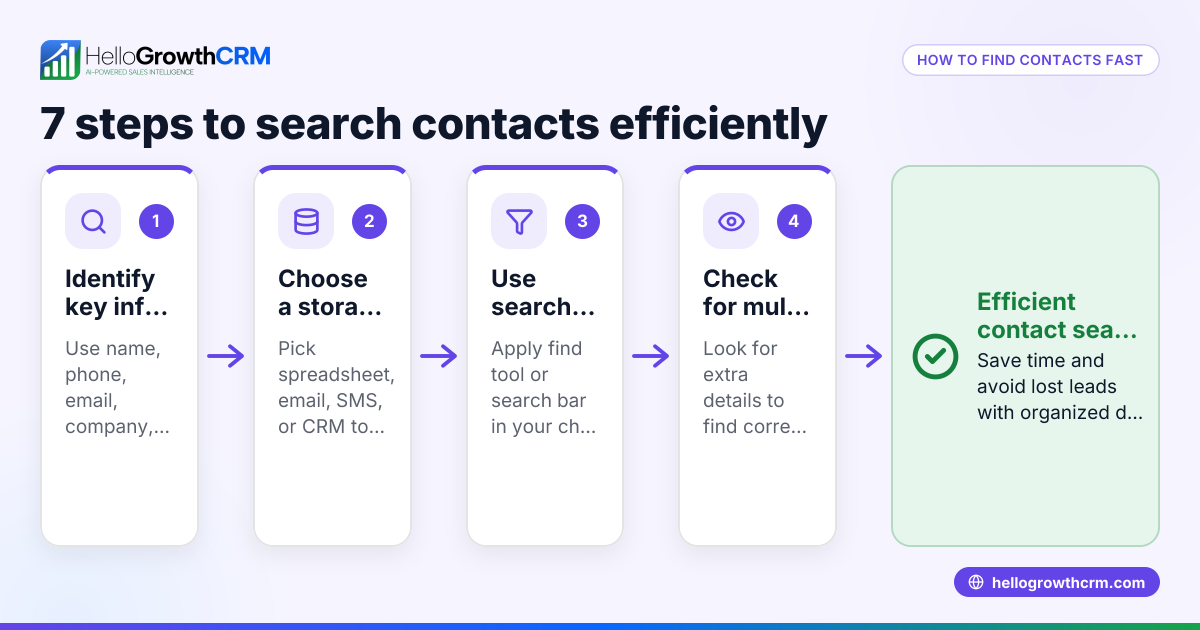
- Open your email client or CRM inbox where your business emails arrive.
- Type keywords in the search bar related to what you want to find, such as a client name, product, or specific phrase.
- Apply filters to narrow your results by date range, sender, recipient, or whether the email has attachments.
- Review the search results carefully by opening emails to confirm their relevance.
- Organize important emails by labeling, starring, or moving them to folders for easy access later.
- Save frequent search queries if your email system allows it, so you can repeat them without retyping.
- Check spam or junk folders if you don’t find the email in your main inbox.
- Use advanced search operators like "from:", "subject:", or "has:attachment" if supported to refine your search further.
Following these steps helps you find emails related to sales quotes, customer questions, or vendor communications quickly and reliably. Using tools like email automation and sequences also supports timely follow-up.
Example (fictional figures)
A two-location dental practice in Columbus, Ohio, receives many appointment requests and supplier emails. On 04/15/2026, the office manager needs to find an email from a supplier about a $12,000 equipment order placed last month.
Step 1: Open the email client. Step 2: Enter keyword: "equipment order" Step 3: Filter by date range: 03/01/2026 to 03/31/2026 Step 4: Filter by sender: supplier@example.com
The search returns 3 emails. The manager opens the email dated 03/10/2026 showing:
Order amount = $12,000 Delivery date = 03/20/2026 Invoice attached = Yes
This confirms the order details quickly without scanning all emails manually.
To illustrate the importance of finding this email promptly, consider the cost of delays:
Lost revenue if the order is delayed by 10 days = $12,000 × 5% (assumed loss rate) = $600
If the manager spends 30 minutes manually searching instead of 5 minutes using filters:
Extra time spent = 30 minutes - 5 minutes = 25 minutes
Assuming the manager’s hourly rate is $40:
Cost of extra time = (25 / 60) × $40 = $16.67
Total potential cost of inefficient search = $600 + $16.67 = $616.67
This example shows how effective email search saves money and time.
Common mistakes
- Not using specific keywords or filters: This causes too many irrelevant results. Prevent this by learning basic search operators and using precise terms.
- Ignoring spam or junk folders: Important emails may be misclassified. Check these folders regularly.
- Failing to organize emails after finding them: Makes future searches harder. Use folders or labels to keep emails sorted.
- Relying only on memory: Guessing subjects or senders leads to missed emails. Keep notes or CRM records.
- Using multiple disconnected tools: Managing emails across platforms causes confusion. Centralize email management where possible.
For better email follow-up and fewer missed replies, use email automation and sequences to automate outreach and reminders.
Doing this in HelloGrowthCRM
HelloGrowthCRM includes a HelloMail shared inbox where your team can manage inbound emails together. Replies to a quotation email are visible to the whole team on the deal, preventing lost messages or duplicated follow-ups. Plus, sequences and campaigns automate multi-step follow-ups over two weeks, stopping immediately once a prospect replies. This reduces manual searching and keeps your sales process moving. Learn more about these features at email automation and sequences.
Frequently asked questions
What is email search? Email search is the process of locating specific emails by typing keywords, applying filters, or using search operators in your email client or CRM. It helps you quickly find relevant messages without scrolling through your inbox.
How can I find an email if I only remember the sender’s name? Enter the sender’s name or email address in the search bar. Add date filters if you know roughly when the email was sent. Many email clients support operators like "from:sender@example.com" to refine results.
Can email search help with managing sales leads? Yes. Efficient email search lets you quickly locate conversations with prospects, follow up on quotations, and track customer requests. Integrating email search with CRM tools like HelloGrowthCRM improves team visibility and automates follow-ups.
What is the difference between email search and email address search? Email search looks for any content in emails based on keywords or filters, while email address search specifically finds emails from or to a particular email address. Both help manage communications effectively.
How do sequences and campaigns in HelloGrowthCRM relate to email search? Sequences automate follow-up emails, reducing the need to manually search for who to contact next. Campaigns broadcast messages to segments, streamlining outreach. Both features complement email search by keeping communication organized and timely. Learn more about managing multi-channel outreach including WhatsApp and SMS at WhatsApp and SMS CRM.
Key takeaways
- Email search helps small businesses find important emails quickly using keywords and filters.
- Use specific keywords, date ranges, and sender filters to narrow results.
- Organize emails after finding them to improve future searches.
- Avoid mistakes like ignoring spam folders or using disconnected tools.
- HelloGrowthCRM’s HelloMail shared inbox and automated sequences simplify managing and following up on emails.
Start managing your emails more effectively today. Start on the Free Forever plan (200 leads, no credit card).
Ready to put this into practice?
Set up your pipeline, WhatsApp follow-ups, and AI lead scoring in minutes — free, no credit card.
Try HelloGrowthCRM freeGet CRM tips in your inbox
Join thousands of sales professionals who get weekly insights on CRM strategy, AI automation, and pipeline optimization.

The HelloGrowthCRM team publishes guides on CRM strategy, AI sales tools, and revenue operations for small business sales teams.