HelloGrowthCRM software
Built for real small-business sales teams
HelloGrowthCRM helps reps qualify faster, follow up on time, and close more deals—with practical automation in one place.
- AI lead scoring and pipeline visibility
- Built-in dialer, WhatsApp, and email automation
- Sales forecasting and RevOps-ready reporting
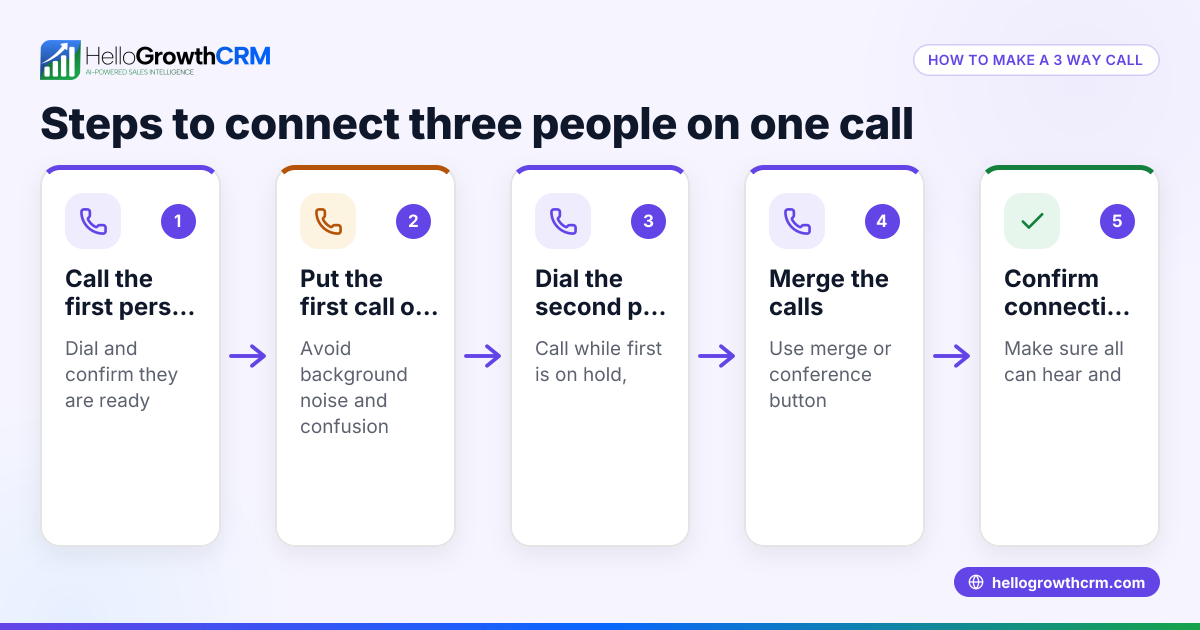
To add someone to a call, begin by calling the first person. Once connected, use your phone’s or calling software’s option labeled “add call” or “merge call” to dial the second person. When they answer, merge the calls so all parties are connected simultaneously. This lets you hold a conference call with multiple participants.
Why this comes up / what goes wrong
Small business owners often need to bring multiple team members or clients into a single call to discuss deals, coordinate projects, or resolve issues quickly. Without adding someone to an existing call, you would need separate calls or complicated conference bridge numbers. However, many struggle because they don’t know how to use their phone or calling app’s features correctly. Calls may drop, participants may not hear each other, or the second call might not connect properly, leading to delays and lost sales opportunities.
Step-by-step
- Start the initial call: Dial the first person as usual and wait for them to answer. Check your connection and audio quality.
- Find the “Add Call” button: On your phone screen or calling app interface, look for a button labeled “Add Call,” “+,” or “Merge.” This is often visible during an active call.
- Dial the second person: Tap “Add Call” and enter the second person’s number or select from contacts. Place the call.
- Wait for the second person to answer: Ensure the second party answers and audio is clear.
- Merge the calls: Tap the “Merge” or “Conference” button to combine both calls into one conference call. Confirm all participants can hear each other.
- Add more participants if needed: Repeat steps 2–5 to add more people, depending on your phone’s limits.
- Manage the call: You can usually see all participants, mute/unmute lines, or drop individuals if necessary.
Check that your phone plan supports conference calls and that you have enough signal strength. Some apps or devices have limits on how many people you can add.
Example (fictional figures)
A bilingual insurance agency in Laval, Quebec, needs to add a claims adjuster to a call with a client. The agent starts the call with the client at 2026-06-10.
- Step 1: Call client at +1 514-555-1234, connected.
- Step 2: Tap “Add Call” button.
- Step 3: Dial claims adjuster at +1 438-555-5678.
- Step 4: Claims adjuster answers.
- Step 5: Tap “Merge” to combine calls.
This lets the client, agent, and adjuster speak together.
Costs for calls depend on the phone plan; assuming local calls are included, no extra charge applies.
Common mistakes
- Not checking call limits: Some phones limit conference calls to 3–5 participants. Prevent this by verifying your device’s capabilities beforehand.
- Failing to confirm audio with all parties: Immediately ask if everyone can hear and be heard to avoid confusion.
- Dropping calls accidentally: Be careful when tapping buttons; avoid hanging up the whole call when trying to drop one participant.
- Ignoring phone plan restrictions: Some plans charge extra for conference calls or don’t support them. Check with your provider.
- Not using a CRM to track calls: Without logging calls, follow-up can be missed. Use tools like HelloGrowthCRM to keep call records.
Doing this in HelloGrowthCRM
HelloGrowthCRM offers a built-in dialer that lets your sales team call leads directly from the CRM. When using the dialer, you can work through your call list efficiently, and the outcome of each call is logged automatically on the lead record. This helps you keep track of who you spoke with and when, making follow-up easier. While HelloGrowthCRM’s dialer supports calling, adding someone to a call depends on your phone or device capabilities. Learn more about the built-in CRM dialer and how it integrates with your sales workflow.
Frequently asked questions
Can I add more than two people to a call? Yes, most modern phones and apps allow multiple participants, often up to 5 or more, but check your device’s limit.
Do conference calls cost extra in Canada? That depends on your phone plan. Many plans include conference calls with no extra charge, but verify with your carrier.
What if I can’t find the add call button? Look for a plus sign (+) or a button labeled “Add Call” or “Merge” during an active call. If you don’t see it, consult your phone’s manual or support site.
Can I add someone to a call on WhatsApp or SMS? WhatsApp supports group calls with video or audio, but SMS does not support calls. For sales teams using WhatsApp and SMS, a CRM like HelloGrowthCRM for Canada can help manage messages alongside calls.
How do I keep track of calls with multiple participants? Using a CRM with a call log feature helps. HelloGrowthCRM logs each call outcome linked to contacts and deals, so your team stays organized.
Key takeaways
- Start the call with one person before adding others.
- Use the phone or app’s “Add Call” or “Merge” feature to create a conference.
- Confirm audio quality with all participants immediately.
- Check your device and plan limits on conference calls.
- Avoid accidental call drops by careful button usage.
- Use a CRM like HelloGrowthCRM to log calls and outcomes.
Adding someone to a call is straightforward once you know the steps and your device’s features. For teams managing sales calls, using a CRM with a built-in dialer can streamline your work.
Start on the Free Forever plan (200 leads, no credit card) at HelloGrowthCRM to try calling and managing leads today.
Ready to put this into practice?
Set up your pipeline, WhatsApp follow-ups, and AI lead scoring in minutes — free, no credit card.
Try HelloGrowthCRM freeGet CRM tips in your inbox
Join thousands of sales professionals who get weekly insights on CRM strategy, AI automation, and pipeline optimization.

The HelloGrowthCRM team publishes guides on CRM strategy, AI sales tools, and revenue operations for small business sales teams.