HelloGrowthCRM software
Built for real small-business sales teams
HelloGrowthCRM helps reps qualify faster, follow up on time, and close more deals—with practical automation in one place.
- AI lead scoring and pipeline visibility
- Built-in dialer, WhatsApp, and email automation
- Sales forecasting and RevOps-ready reporting
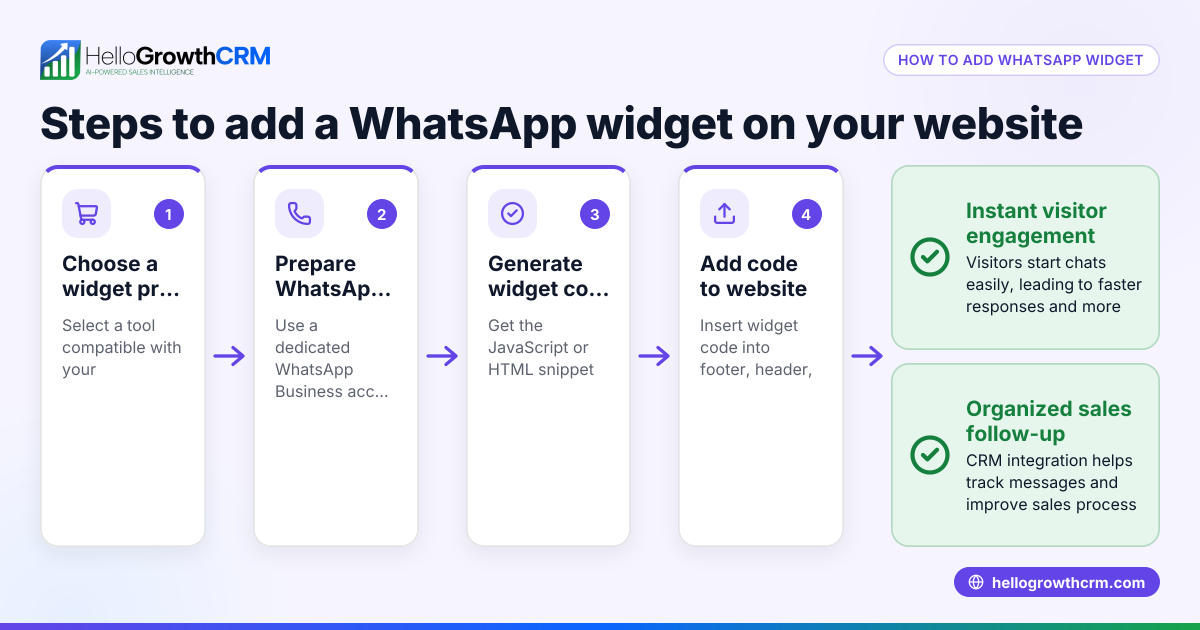
To add WhatsApp chat to your website in the USA, you need to generate a WhatsApp link or widget that visitors can click to start a chat. Then, you embed that link or widget on your website using your website builder or by adding HTML code. This allows customers to reach you instantly via WhatsApp, improving lead engagement.
Why this comes up / what goes wrong
Small-business owners often want to add WhatsApp chat to their websites because many customers prefer messaging over phone calls or emails. WhatsApp is widely used in the US, and adding chat can reduce lost leads from slow follow-up. However, business owners may struggle with the technical steps or worry about disrupting their website’s design. They also want to ensure the chat link works correctly and that messages reach them reliably.
Step-by-step
- Get your WhatsApp phone number ready. Use the number linked to your WhatsApp Business or personal WhatsApp account you want customers to contact.
- Create your WhatsApp chat link. Use the format
https://wa.me/followed by your full phone number in international format without plus signs or spaces. For example, if your US number is (123) 456-7890, the link ishttps://wa.me/11234567890. - Add a default message (optional). To have a pre-filled message when customers click, add
?text=followed by URL-encoded text. For example:https://wa.me/11234567890?text=Hello%20I%20have%20a%20question%20about%20your%20services. - Create a chat button or widget on your website. You can:
- Add a simple clickable text or button linking to your WhatsApp URL.
- Use a website builder’s widget feature to add a WhatsApp chat button.
- Use third-party WhatsApp chat plugins compatible with your website platform.
- Embed the link or widget in your website code or builder. For HTML, add an anchor tag like
<a href="https://wa.me/11234567890" target="_blank">Chat with us on WhatsApp</a>. - Test the chat link on desktop and mobile. Click the link to ensure it opens WhatsApp or WhatsApp Web and starts a chat.
- Add a visible call to action near the chat link. For example, “Chat with us on WhatsApp for quick support.”
- Monitor incoming messages and respond promptly to avoid losing leads.
Example (fictional figures)
Phoenix Home Realty, a residential real estate team in Phoenix, Arizona, wants to add WhatsApp chat to their website.
- Their WhatsApp Business number is (602) 555-1234.
- Convert this to international format: 1 (country code) + 6025551234 = 16025551234.
- Their WhatsApp link is
https://wa.me/16025551234. - They want a default message: “Hello, I’m interested in your listings.” URL-encoded, this is
Hello%2C%20I%27m%20interested%20in%20your%20listings.
Final link: https://wa.me/16025551234?text=Hello%2C%20I%27m%20interested%20in%20your%20listings.
They add this HTML code to their website’s contact page: <a href="https://wa.me/16025551234?text=Hello%2C%20I%27m%20interested%20in%20your%20listings." target="_blank">Chat with Phoenix Home Realty on WhatsApp</a>
They test the link on desktop and mobile to confirm it opens WhatsApp and pre-fills the message.
Common mistakes
- Using the wrong phone number format. Always use the full international format without plus signs or spaces. Prevent by double-checking your country code and number.
- Not testing the link on both desktop and mobile. WhatsApp Web behaves differently than the mobile app. Prevent by clicking the link on multiple devices.
- Embedding the link incorrectly in website code. Missing quotes or wrong tags can break the link. Prevent by using simple anchor tags and previewing the page.
- Not adding a clear call to action. Visitors may miss the chat option. Prevent by placing visible buttons or text near the link.
- Ignoring incoming WhatsApp messages. Slow responses cause lost leads. Prevent by setting reminders or using tools to log conversations.
Doing this in HelloGrowthCRM
HelloGrowthCRM supports WhatsApp and SMS messaging by logging WhatsApp conversations directly on the lead record. This means every WhatsApp message with a lead is saved in one place, and follow-ups can be sent as WhatsApp messages from the CRM. This helps sales teams respond faster and keep track of conversations without switching apps. Learn more about WhatsApp and SMS CRM and how HelloGrowthCRM fits for the United States.
Frequently asked questions
Can I add WhatsApp chat without a WhatsApp Business account? Yes, you can use a personal WhatsApp number to create a chat link, but WhatsApp Business offers additional tools for managing chats and automated messages.
Does adding WhatsApp chat slow down my website? A simple clickable link or button has minimal impact on load times. Using third-party widgets may affect speed depending on their design.
Can I customize the WhatsApp chat button appearance? Yes, if you add your own HTML and CSS or use website builder tools, you can style the button to match your site’s look.
Is WhatsApp chat secure for business communications? WhatsApp uses end-to-end encryption for messages. However, keep in mind that WhatsApp is not a CRM, so integrating with tools like HelloGrowthCRM helps securely track and manage conversations.
Can HelloGrowthCRM help me manage WhatsApp chats from my website? Yes, HelloGrowthCRM logs WhatsApp conversations on lead records and lets you send follow-ups as WhatsApp messages, streamlining your sales communication.
Key takeaways
- Use your full international phone number to create a WhatsApp chat link.
- Embed the link or widget in your website’s HTML or builder with a clear call to action.
- Test the chat link on both desktop and mobile devices.
- Avoid common mistakes like wrong number format and ignoring incoming messages.
- HelloGrowthCRM logs WhatsApp conversations and supports follow-ups within the CRM.
Start adding WhatsApp chat today to engage your website visitors faster. To manage your WhatsApp conversations and leads efficiently, start on the Free Forever plan (200 leads, no credit card).
Ready to put this into practice?
Set up your pipeline, WhatsApp follow-ups, and AI lead scoring in minutes — free, no credit card.
Try HelloGrowthCRM freeGet CRM tips in your inbox
Join thousands of sales professionals who get weekly insights on CRM strategy, AI automation, and pipeline optimization.

The HelloGrowthCRM team publishes guides on CRM strategy, AI sales tools, and revenue operations for small business sales teams.