HelloGrowthCRM software
Built for real small-business sales teams
HelloGrowthCRM helps reps qualify faster, follow up on time, and close more deals—with practical automation in one place.
- AI lead scoring and pipeline visibility
- Built-in dialer, WhatsApp, and email automation
- Sales forecasting and RevOps-ready reporting
A booking calendar for a website is an online tool that lets visitors pick a time slot to book appointments or meetings directly on your site, removing the need for back-and-forth calls or messages. This article explains why small businesses use booking calendars, how to add one step-by-step, common mistakes to avoid, and how HelloGrowthCRM’s scheduling feature can simplify the process.
Why this comes up / what goes wrong
Small business owners often find managing appointments by phone, email, or WhatsApp slows down their sales process and causes lost leads. Without a booking calendar on the website, potential customers may give up after waiting for a reply or struggle to find a convenient time to meet. This leads to missed opportunities and inefficient use of staff time. A booking calendar streamlines scheduling by letting prospects self-book, reducing delays and confusion.
Step-by-step
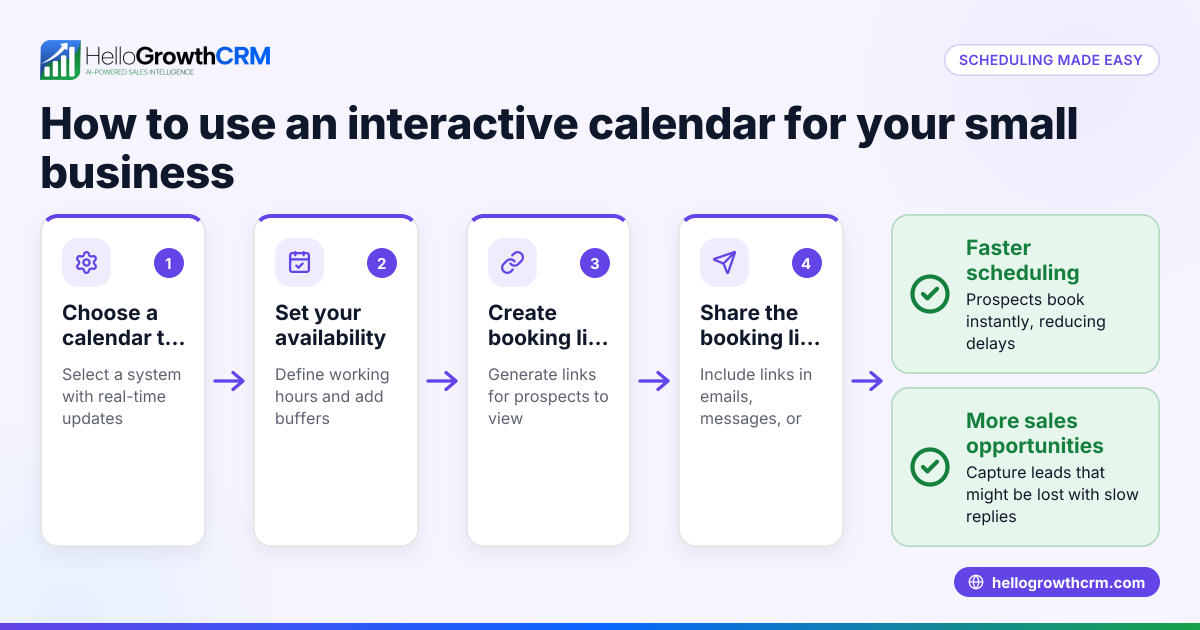
- Choose a booking calendar tool: Select a tool that fits your business needs, integrates with your website, and supports your communication channels. Check if it allows custom time slots and automatic notifications.
- Set your availability: Define your working hours, breaks, and days off within the calendar tool to prevent double bookings or out-of-hours appointments.
- Create booking types: Specify different appointment types (e.g., consultation, service visit) with durations and any preparation notes.
- Integrate the calendar with your website: Embed the booking calendar on a dedicated page or as a widget so visitors can easily find and use it.
- Link to communication channels: Ensure the booking system sends confirmations and reminders via email, WhatsApp, or SMS to both your team and customers.
- Test the booking process: Make test bookings to check the user experience, notification delivery, and calendar updates.
- Train your team: Make sure everyone involved knows how to access bookings, update availability, and follow up with prospects.
- Monitor and optimise: Regularly review booking data to spot no-shows, peak times, or technical issues and adjust settings accordingly.
For a smoother process, consider a tool like HelloGrowthCRM’s meeting scheduler that integrates booking with WhatsApp and SMS communication.
Example (fictional figures)
A Glasgow-based solar-panel installer wants to set up a booking calendar on their website to schedule free consultation visits. They work Monday to Friday, 09:00 to 17:00, with a 1-hour lunch break from 12:00 to 13:00. They offer 1-hour consultations.
- Weekly working hours: 8 hours per day × 5 days = 40 hours
- Lunch break: 1 hour per day × 5 days = 5 hours
- Available booking hours: 40 - 5 = 35 hours per week
If they want to reserve 5 slots per week for internal meetings, available slots for consultations are:
35 hours - 5 hours = 30 hours
Number of 1-hour slots available for booking = 30 slots per week
If each consultation generates an average revenue of £250:
£250 × 30 = £7,500 potential weekly revenue from bookings
By adding a booking calendar, the installer can maximise appointment bookings efficiently and avoid missed leads.
Common mistakes
- Not setting clear availability: Prevent double bookings by accurately blocking out breaks and busy periods.
- Ignoring time zone differences: If you serve clients in different UK regions or abroad, confirm the calendar shows the correct time zone.
- Skipping test bookings: Always test the booking process yourself to catch errors before customers do.
- Not linking to communication channels: Without confirmation messages via WhatsApp or SMS, customers may forget appointments.
- Failing to train the team: Ensure your sales or telesales staff know how to manage bookings and follow up promptly.
- Leaving no-shows untracked: Monitor no-shows and send reminders to reduce them.
Using a CRM that combines scheduling with WhatsApp and SMS, like HelloGrowthCRM’s WhatsApp and SMS CRM, helps avoid many of these errors.
Doing this in HelloGrowthCRM
The scheduling and booking feature lets prospects pick a slot from a link instead of exchanging messages back and forth on WhatsApp. This shortens the path from initial interest to conversation. Additionally, a founder without a sales manager can get someone working the follow-up queue every week through the Managed RevOps support. Learn more about these features at meeting scheduler.
Frequently asked questions
What is a booking calendar for a website? A booking calendar is an online tool embedded in your website that allows visitors to select available time slots for appointments or meetings without needing to call or email. It automates scheduling and reduces delays.
How do I add a booking calendar to my website? First, choose a booking tool that fits your needs. Then set your availability, create appointment types, and embed the calendar on your site. Test the process and train your team to manage bookings effectively.
Can a booking calendar send reminders? Yes, most booking calendars send automatic confirmation and reminder messages via email, SMS, or WhatsApp to reduce no-shows and keep customers informed.
Is a booking calendar suitable for small businesses? Absolutely. It saves time, improves customer experience, and helps small teams manage appointments without needing extra staff.
How does HelloGrowthCRM help with booking calendars? Its scheduling feature lets prospects book meetings via a link, integrating with WhatsApp and SMS to streamline communication. Managed RevOps also helps founders by handling follow-ups and pipeline hygiene.
Do I need technical skills to set up a booking calendar? Most modern booking tools are user-friendly and don’t require coding. If you use HelloGrowthCRM, the setup is straightforward with support available.
Key takeaways
- A booking calendar lets website visitors self-schedule appointments, reducing lead loss.
- Set clear availability and appointment types before embedding the calendar.
- Test the booking process and train your team to manage it well.
- Use reminders via WhatsApp, SMS, or email to reduce no-shows.
- Avoid common mistakes like ignoring time zones or skipping tests.
- Scheduling features and Managed RevOps support simplify booking and follow-up.
Start simplifying your appointment scheduling today. Start on the Free Forever plan (200 leads, no credit card).
Ready to put this into practice?
Set up your pipeline, WhatsApp follow-ups, and AI lead scoring in minutes — free, no credit card.
Try HelloGrowthCRM freeGet CRM tips in your inbox
Join thousands of sales professionals who get weekly insights on CRM strategy, AI automation, and pipeline optimization.

The HelloGrowthCRM team publishes guides on CRM strategy, AI sales tools, and revenue operations for small business sales teams.