HelloGrowthCRM software
Built for real small-business sales teams
HelloGrowthCRM helps reps qualify faster, follow up on time, and close more deals—with practical automation in one place.
- AI lead scoring and pipeline visibility
- Built-in dialer, WhatsApp, and email automation
- Sales forecasting and RevOps-ready reporting
To automate customer email campaigns in Singapore, start by defining your campaign goals, segmenting your customer list, creating email sequences that send automatically, scheduling the emails, and monitoring customer responses. This guide covers each step in detail, includes a worked example for a local business, explains common mistakes, and describes how HelloGrowthCRM’s email automation features can help.
Why this comes up / what goes wrong
Many small-business owners in Singapore manage sales and marketing manually through WhatsApp, email, or spreadsheets. This approach often leads to slow follow-up and lost leads because sending timely, consistent emails is difficult without automation. Without automated campaigns, tracking customer engagement is cumbersome, and businesses miss opportunities to nurture leads effectively. Automating email campaigns saves time, maintains regular contact, and improves customer follow-up without extra manual work.
Step-by-step
- Define your campaign goal: Decide what you want to achieve, such as promoting a new product, re-engaging inactive customers, or onboarding new clients. Clear goals will guide your messaging and schedule.
- Segment your customer list: Group customers by relevant criteria like purchase history, location, or engagement level. Segmentation ensures your emails are relevant and personalised.
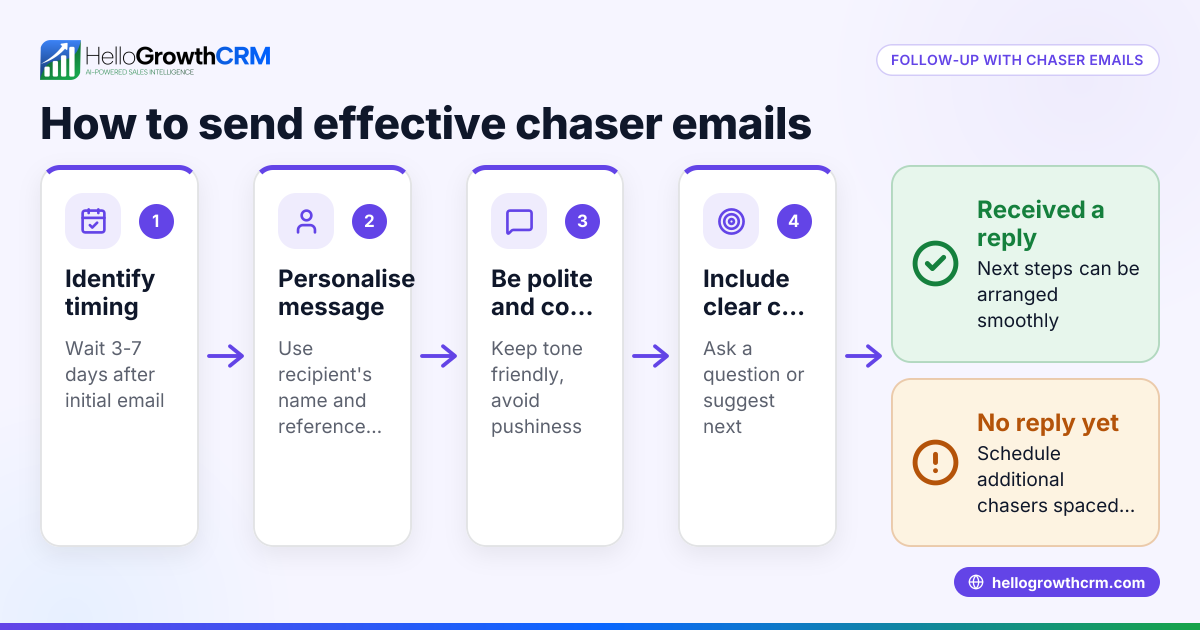
- Create your email content: Write clear, concise emails with strong calls to action. Plan a sequence of 3-5 emails spaced over days or weeks to build interest and encourage responses.
- Set up automation sequences: Use an email automation tool to schedule your emails. Each email should send automatically after a set delay, and the sequence should stop if the customer replies.
- Test your emails and schedule: Send test emails to check formatting, links, and timing. Confirm that the schedule aligns with your campaign goals.
- Launch the campaign: Start your automated sequence and monitor delivery and open rates.
- Track and respond: Use shared inbox features to view replies and assign follow-up tasks. Adjust your sequences based on engagement data.
Check that your CRM supports multi-step sequences and shared inboxes for efficient reply management. For more on automation, see email automation and sequences.
Example (fictional figures)
An interior-design studio in Tanjong Pagar plans an email campaign starting 01/07/2024 to promote a new eco-friendly furniture line. They have 1,000 customers segmented by previous purchase type.
- Campaign goal: Increase sales of eco-friendly products over two months.
- Email sequence: 5 emails over 14 days.
Step 1: Segment customers who bought furniture last year (600 customers).
Step 2: Create email sequence:
- Email 1 (Day 0): Introduction to eco-friendly line
- Email 2 (Day 3): Benefits and testimonials
- Email 3 (Day 7): Special discount offer
- Email 4 (Day 10): Reminder of offer expiry
- Email 5 (Day 14): Last chance to buy
Step 3: Schedule emails in automation tool.
Step 4: Monitor replies daily; stop sequence if customer replies.
Projected additional revenue:
- Average sale per customer: S$1,200
- Estimated customers who respond: 60
- Additional revenue = 60 × S$1,200 = S$72,000
This example shows how automation sends timely emails without manual effort, helping increase sales efficiently.
Common mistakes
- Sending irrelevant emails to all customers: Prevent by carefully segmenting your list.
- Overloading customers with too many emails: Limit sequences to 3-5 emails spaced over days.
- Ignoring replies and engagement: Use a shared inbox to track and respond promptly.
- Not testing emails before launch: Always send test emails to check formatting and links.
- Failing to monitor campaign performance: Regularly review open and response rates to optimise your sequences. Learn more about managing customer interactions with customer health score.
Doing this in HelloGrowthCRM
HelloGrowthCRM offers Sequences and campaigns that automate multi-step outreach workflows, sending up to five follow-up emails over two weeks. The sequence automatically stops when a prospect replies, saving manual effort. The HelloMail shared inbox shows all replies on the deal record, so your sales team stays coordinated without switching apps. After the sale, service requests and support tickets remain linked to the customer record in the customer portal, keeping all information in one place. For details, visit email automation and sequences and HelloGrowthCRM for Singapore.
Frequently asked questions
How often should I send automated emails in a campaign? Aim for 3-5 emails spaced over 1-2 weeks. This frequency keeps your brand top of mind without overwhelming recipients.
Can I personalise automated emails? Yes, personalise emails using customer data like name, purchase history, or location to increase engagement.
What if a customer replies during the sequence? Automation should stop sending further emails to that customer. Use a shared inbox to manage replies and assign follow-up tasks.
Is segmentation necessary for email campaigns? Yes, segmentation ensures your messages are relevant, which improves open rates and conversions.
Can I track how well my email campaign performs? Most automation tools provide metrics like open rates, click rates, and replies. Use these to adjust your sequences.
Key takeaways
- Define clear goals before automating your email campaign.
- Segment your customer list for personalised messaging.
- Create multi-step email sequences spaced over days or weeks.
- Use automation tools that stop sequences when prospects reply.
- Monitor replies with a shared inbox to coordinate your team.
- Test emails and track performance to improve results.
Automating your customer email campaigns can save time and improve sales follow-up. You can start now on the Free Forever plan (200 leads, no credit card) at HelloGrowthCRM.
Ready to put this into practice?
Set up your pipeline, WhatsApp follow-ups, and AI lead scoring in minutes — free, no credit card.
Try HelloGrowthCRM freeGet CRM tips in your inbox
Join thousands of sales professionals who get weekly insights on CRM strategy, AI automation, and pipeline optimization.

The HelloGrowthCRM team publishes guides on CRM strategy, AI sales tools, and revenue operations for small business sales teams.