HelloGrowthCRM software
Built for real small-business sales teams
HelloGrowthCRM helps reps qualify faster, follow up on time, and close more deals—with practical automation in one place.
- AI lead scoring and pipeline visibility
- Built-in dialer, WhatsApp, and email automation
- Sales forecasting and RevOps-ready reporting
To convert a quotation to an invoice in the USA, you begin by confirming the customer’s acceptance of your quotation. Next, create an invoice document that lists all the products or services agreed upon, their prices, any applicable taxes, payment terms, and a reference to the original quotation. This formalizes the sale and enables you to request payment clearly and accurately.
Why this comes up / what goes wrong
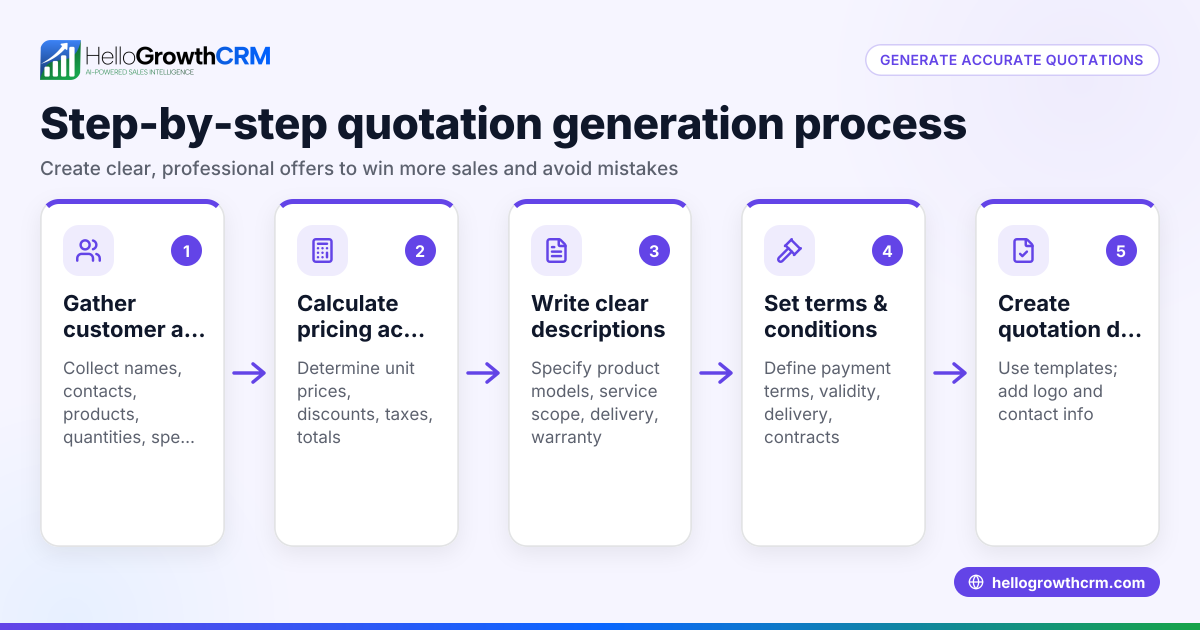
Small business owners often provide quotations to potential clients to outline prices and terms before work starts or goods are delivered. Once the client agrees, converting that quotation into an invoice is essential to request payment and keep your records accurate. Problems occur when quotations are not converted properly, leading to confusion about amounts due, late or missing payments, or duplicate billing. Having clear, reliable steps helps avoid these issues and keeps your cash flow steady.
Step-by-step
- Confirm quotation acceptance: Make sure the customer has accepted the quotation. This can be a written confirmation, an email reply, or a recorded verbal agreement. Do not invoice without this step.
- Review quotation details: Check that all products or services, quantities, and prices on the quotation match what the customer agreed to.
- Create the invoice document: Include a unique invoice number and invoice date. The invoice date is usually the day you send the invoice.
- Reference the quotation: Add the quotation number or code on the invoice so it’s clear which quotation the invoice relates to.
- Add payment terms: Specify how and when payment is due, for example, “Net 30 days” means payment is due 30 days after the invoice date.
- Calculate and add taxes: Apply any applicable sales tax based on your state and local tax rules. (NEEDS EXPERT REVIEW)
- Calculate totals: Sum the prices of all items and add the tax amount to get the total amount due.
- Send the invoice: Deliver the invoice to the customer by email, mail, or through your billing system.
- Track payment: Follow up to ensure payment is received by the due date.
Using a CRM with quoting and invoicing features can help manage these steps efficiently. For example, HelloGrowthCRM offers quotes, proposals, invoices, and payment tracking all from the deal record, showing quotation status alongside follow-up tasks. Learn more about the built-in CRM dialer and WhatsApp and SMS CRM to streamline communication.
Example (fictional figures)
A landscaping contractor in Charlotte, North Carolina, sends a quotation on 05/01/2024 for lawn care services:
- Lawn mowing (10 visits): $500
- Hedge trimming: $300
- Mulching: $200
Quotation total = $500 + $300 + $200 = $1,000
The client accepts the quotation on 05/05/2024. To convert this to an invoice:
- Invoice date: 05/06/2024
- Invoice number: INV-2024-1001
- Reference quotation number: QUO-2024-2001
Assuming an illustrative sales tax rate of 7%: $1,000 × 7% = $70 (sales tax) $1,000 + $70 = $1,070 (total invoice amount)
The invoice states payment terms: Net 30 days (due by 06/05/2024).
Common mistakes
- Invoicing before acceptance: Avoid sending an invoice before the customer agrees to the quotation to prevent disputes.
- Not referencing the quotation: Always include the quotation number on the invoice to keep records clear and traceable.
- Incorrect tax calculations: Verify your local sales tax rates carefully to avoid undercharging or overcharging. (NEEDS EXPERT REVIEW)
- Omitting payment terms: Clearly state when and how payment is due to avoid delays.
- Failing to track invoice status: Use tools to monitor whether invoices are sent, viewed, and paid to manage follow-ups effectively.
Tools like HelloGrowthCRM help prevent these mistakes by linking quotations and invoices on the same screen with follow-up task reminders.
Doing this in HelloGrowthCRM
HelloGrowthCRM lets you create and send quotes, proposals, invoices, and record payments all from the deal record. The quotation sent shows its status—sent, viewed, or accepted—on the same screen as your follow-up task. This helps you know exactly when to convert the quotation to an invoice and keeps your sales process organized. For more details, visit the HelloGrowthCRM for the United States page.
Frequently asked questions
Can I convert a quotation to an invoice automatically? Yes. Some CRM systems, including HelloGrowthCRM, allow you to generate an invoice directly from an accepted quotation, reducing manual entry and errors.
What details must an invoice include in the USA? An invoice should include your business name and contact information, a unique invoice number, invoice date, customer details, a list of goods or services with prices, taxes, total amount due, and payment terms. (NEEDS EXPERT REVIEW)
Is it necessary to add taxes on the invoice? Yes, if your products or services are subject to sales tax in your state, you must apply the correct sales tax rate. Check your local tax laws to ensure accuracy. (NEEDS EXPERT REVIEW)
How do I handle partial payments? Record any partial payments against the invoice to keep track of outstanding balances. HelloGrowthCRM supports payment reconciliation tied to invoices.
Can I send invoices via WhatsApp or SMS? Yes. HelloGrowthCRM integrates WhatsApp and SMS messaging, allowing you to send invoices and payment reminders through these channels, improving communication efficiency.
Key takeaways
- Confirm customer acceptance before creating an invoice.
- Reference the original quotation number on the invoice.
- Include all agreed products or services, prices, taxes, and payment terms.
- Use a CRM like HelloGrowthCRM to link quotations and invoices and track their status.
- Double-check tax calculations and invoice details to avoid errors.
- Follow up promptly on invoice payments to maintain cash flow.
Start converting quotations to invoices today with a system that keeps your sales organized and efficient. Start on the Free Forever plan (200 leads, no credit card).
Ready to put this into practice?
Set up your pipeline, WhatsApp follow-ups, and AI lead scoring in minutes — free, no credit card.
Try HelloGrowthCRM freeGet CRM tips in your inbox
Join thousands of sales professionals who get weekly insights on CRM strategy, AI automation, and pipeline optimization.

The HelloGrowthCRM team publishes guides on CRM strategy, AI sales tools, and revenue operations for small business sales teams.