HelloGrowthCRM software
Built for real small-business sales teams
HelloGrowthCRM helps reps qualify faster, follow up on time, and close more deals—with practical automation in one place.
- AI lead scoring and pipeline visibility
- Built-in dialer, WhatsApp, and email automation
- Sales forecasting and RevOps-ready reporting
To correct an invoice mistake in the UK, you must create a formal correction document such as a credit note or a corrected invoice that clearly references the original invoice number. Send this correction to your customer promptly and update your accounting records accordingly. This article covers why invoice errors occur, a detailed step-by-step correction process, a worked example with realistic UK figures, common mistakes to avoid, and tips on managing invoices and quotes efficiently.
Why this comes up / what goes wrong
Small business owners often face invoice mistakes caused by rushed data entry, incorrect pricing, wrong customer details, or missing information. For instance, a letting agency in Manchester might invoice the wrong rental period or apply an incorrect VAT rate. Such errors can delay payments, cause disputes, and complicate bookkeeping. Correcting invoice mistakes quickly and clearly is vital to maintain good customer relations and accurate financial records.
Step-by-step
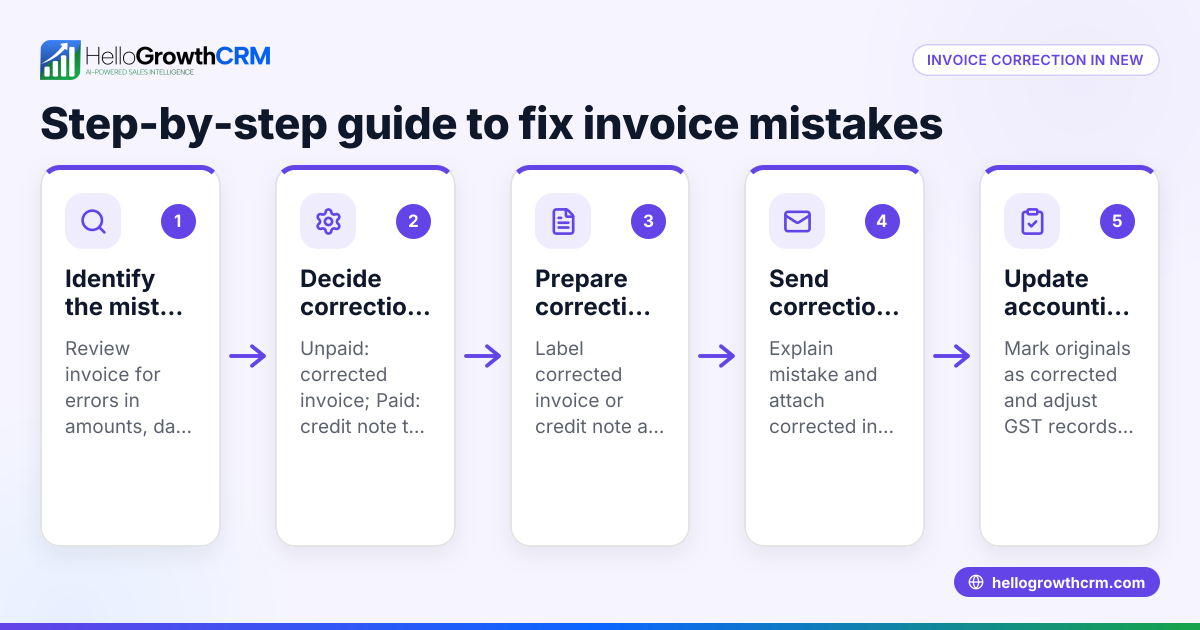
- Identify the mistake: Carefully review the original invoice to pinpoint the incorrect details, such as the date, amount, description, or customer information.
- Choose the correction method: Normally, you will either issue a credit note to cancel the incorrect invoice or send a corrected invoice that references the original invoice number.
- Prepare the correction document:
- For a credit note, include the original invoice number, the reason for correction, and the amount to be credited.
- For a corrected invoice, mark it clearly as "Corrected Invoice" and reference the original invoice number.
- Verify calculations: Double-check all totals, VAT amounts (if applicable), and payment terms to ensure accuracy.
- Send the correction promptly: Email or deliver the credit note or corrected invoice to your customer with a clear explanation of the changes.
- Update your records: Mark the original invoice as corrected or cancelled in your accounting system and keep the correction document for your records.
- Follow up if necessary: Confirm that the customer has received and accepted the correction to avoid payment delays.
- Review your invoicing process: Consider using tools that integrate quotes, invoices, and payments to reduce future errors.
Example (fictional figures)
A letting agency in Manchester invoiced a tenant incorrectly for rent:
- Original invoice date: 01/05/2024
- Invoice number: INV-2024-1001
- Incorrect rent amount invoiced: £1,200
- Correct rent amount: £1,000
Correction steps:
- Issue a credit note for the overcharged amount:
£1,200 - £1,000 = £200 credit
- Prepare a corrected invoice referencing INV-2024-1001 with the correct rent amount of £1,000.
- Send both the credit note and corrected invoice to the tenant with an explanation.
- Update records to mark INV-2024-1001 as corrected.
This process ensures the tenant is informed, the overcharge is formally reversed, and your accounts reflect the accurate amounts.
Common mistakes
- Not referencing the original invoice: Always include the original invoice number on credit notes or corrected invoices to prevent confusion.
- Delaying the correction: Send corrections promptly to maintain customer trust and avoid payment delays.
- Failing to update records: Ensure your accounting and invoicing systems reflect all corrections.
- Incorrect credit note amounts: Check calculations thoroughly before issuing credit notes.
- Using informal corrections: Use formal documents like credit notes or corrected invoices rather than emails or verbal agreements.
- Ignoring VAT implications: If VAT applies, ensure the correction documents show the correct VAT amounts.
Using a CRM that integrates quoting and invoicing can help keep all documents linked and visible, reducing errors. See HelloGrowthCRM for the United Kingdom for tools that help manage quotes and invoices.
Doing this in HelloGrowthCRM
HelloGrowthCRM provides a built-in quoting and proposal tool to build, send, and track commercial documents such as invoices and payments from a deal record. When you send a quotation, its status (sent, viewed, accepted) appears on the same screen as your follow-up task, helping you manage corrections efficiently. Learn more about HelloGrowthCRM’s WhatsApp and SMS CRM and its built-in CRM dialer for streamlined communication and follow-up.
Frequently asked questions
Can I just cancel an incorrect invoice? You cannot simply cancel an invoice without issuing a credit note or corrected invoice referencing the original. This ensures your records and the customer's records match for accounting and VAT purposes.
Do I need to send a credit note if I resend a corrected invoice? Usually, yes. A credit note cancels the original invoice amount, and the corrected invoice shows the accurate charge. This keeps your accounting clear.
How soon should I send the correction? Send corrections as soon as you discover the mistake to avoid confusion and delays in payment.
What if the customer already paid the wrong invoice? Issue a credit note for the overpaid amount. If the customer has not yet paid, send a corrected invoice with the right amount.
Can a CRM help with invoice corrections? Yes. A CRM with integrated quoting and invoicing helps manage and resend invoices and quotes linked to deals, making corrections easier and keeping your follow-up organised. See HelloGrowthCRM for the United Kingdom for details.
Key takeaways
- Always issue a credit note or corrected invoice referencing the original invoice number.
- Send correction documents promptly and update your records accordingly.
- Double-check all calculations and VAT amounts on correction documents.
- Use formal correction documents, not informal messages.
- Track invoice and quote status in one place to avoid mistakes.
- Tools like HelloGrowthCRM help manage quotes, invoices, and payments from a single deal screen.
To start managing your invoices and corrections efficiently, Start on the Free Forever plan (200 leads, no credit card).
Ready to put this into practice?
Set up your pipeline, WhatsApp follow-ups, and AI lead scoring in minutes — free, no credit card.
Try HelloGrowthCRM freeGet CRM tips in your inbox
Join thousands of sales professionals who get weekly insights on CRM strategy, AI automation, and pipeline optimization.

The HelloGrowthCRM team publishes guides on CRM strategy, AI sales tools, and revenue operations for small business sales teams.