HelloGrowthCRM software
Built for real small-business sales teams
HelloGrowthCRM helps reps qualify faster, follow up on time, and close more deals—with practical automation in one place.
- AI lead scoring and pipeline visibility
- Built-in dialer, WhatsApp, and email automation
- Sales forecasting and RevOps-ready reporting
Invoice services for small businesses enable you to create, send, and track invoices efficiently, helping ensure timely payments and organized records. This article explains why invoice services are important for local service businesses, how to select the right one step-by-step, common mistakes to avoid, and includes a practical US business example.
Why this comes up / what goes wrong
Small service businesses in the US, such as landscapers, consultants, or home repair professionals, often handle invoicing themselves without dedicated accounting staff. They may use manual methods like spreadsheets, email, or text messages, which can cause lost invoices, delayed payments, or errors. Slow or inconsistent invoicing affects cash flow and client relationships. Using an invoice service tailored to small businesses helps streamline billing, improve payment speed, and reduce administrative work.
Step-by-step
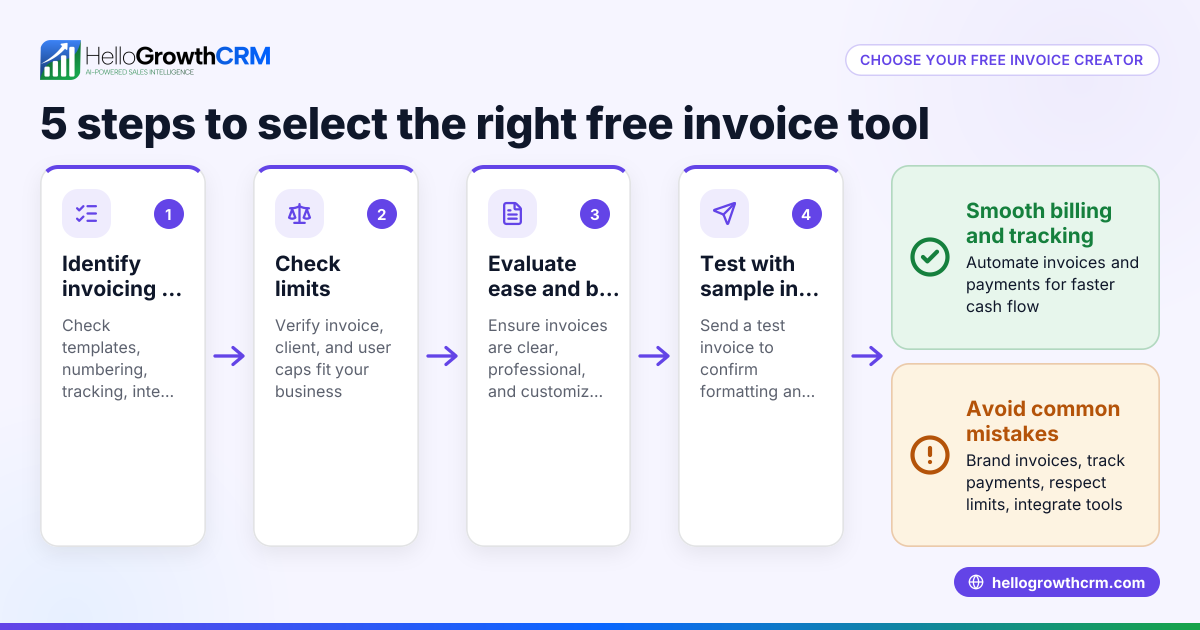
- Identify your invoicing needs: Determine if you require simple invoice creation, recurring billing, payment tracking, or integration with your CRM or accounting software. Check if mobile access or invoice customization is important.
- Check compliance and payment options: Ensure the service supports US tax requirements and accepts common payment methods such as credit card, ACH, or PayPal. Confirm it provides clear records for tax filing.
- Evaluate ease of use and automation: Look for services that automate invoice reminders, support templates, and allow quick sending via email or text.
- Consider integration capabilities: If you use a CRM or sales software, select invoice services that integrate smoothly to avoid duplicate data entry and keep sales data connected.
- Assess customer support and scalability: Choose a provider with responsive support and plans that grow as your business expands.
- Test with a free trial or demo: Before committing, try the service to ensure it fits your workflow and team usage.
- Review pricing and contract terms: Understand fees, transaction costs, and cancellation policies.
For local service businesses, these steps help avoid common invoicing pitfalls. For example, some CRM systems provide invoice generation tied to deals and payment reconciliation, streamlining your sales-to-cash process. Learn more about Local service businesses.
Example (fictional figures)
A landscaping company in Charlotte, North Carolina, "GreenScape Solutions," bills clients for lawn care and seasonal cleanups.
- Total monthly services provided: $12,500
- Number of clients invoiced monthly: 25
- Average invoice amount: $12,500 ÷ 25 = $500
GreenScape sends invoices on the 1st of each month, with payment terms of 15 days.
If 20 clients pay by the due date, the amount collected on time is:
$500 × 20 = $10,000
The remaining 5 clients owe:
$500 × 5 = $2,500
GreenScape follows up on unpaid invoices promptly with reminders. Using an invoice service that automates reminders reduces collection time and improves cash flow.
This example shows how an invoice service helps track payments and manage follow-ups effectively.
Common mistakes
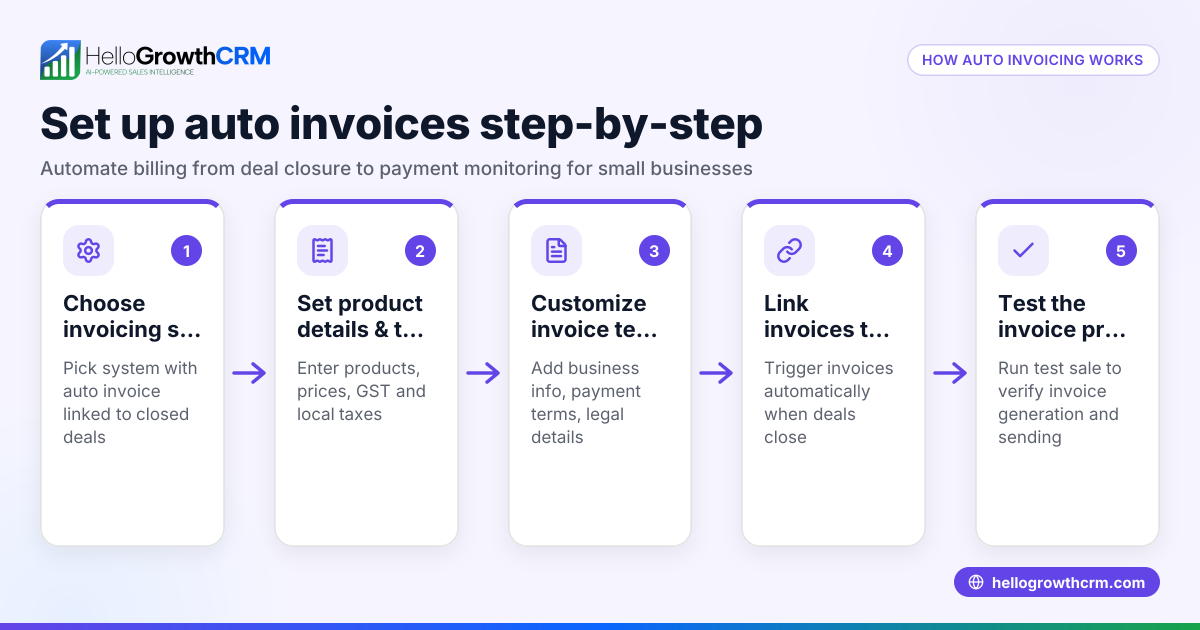
- Delaying invoice sending: Send invoices promptly after service delivery. Use automated invoicing to avoid delays.
- Not tracking invoice status: Without tracking, unpaid invoices may be missed. Choose services with status updates (sent, viewed, paid).
- Ignoring payment options: Limiting payment methods can slow payments. Offer credit card, ACH, or digital wallets.
- Manual data entry errors: Re-entering data from quotes or deals causes mistakes. Use integrated systems to sync data.
- Overlooking follow-up tasks: Without scheduled follow-ups, collections lag. Use task boards or reminders to manage follow-ups.
- Choosing overly complex software: Avoid tools with unnecessary features that complicate your process. Opt for user-friendly solutions.
For more on avoiding invoicing errors and managing sales workflows, see HelloGrowthCRM for the United States.
Doing this in HelloGrowthCRM
HelloGrowthCRM offers built-in quoting, proposals, invoices, and payment tracking tied directly to your deals. You can build and send commercial documents from the deal record, and see the quotation’s status (sent, viewed, accepted) alongside your follow-up tasks. This helps keep your invoicing and sales follow-up tightly coordinated.
Additionally, if you don’t have a sales manager, HelloGrowthCRM’s Managed RevOps service assigns a revenue specialist who handles weekly follow-ups, pipeline hygiene, and KPI reporting to keep your revenue operations on track. Learn more about these features at HelloGrowthCRM for the United States.
Frequently asked questions
What are the best invoice services for small businesses? The best invoice services offer ease of use, automation, payment tracking, and integration with your sales or accounting tools. Some CRM platforms provide invoice generation tied to deals and payment reconciliation, which is especially useful for small service businesses.
Can I automate invoice reminders? Yes, many invoice services allow you to automate reminders for unpaid invoices, helping improve payment speed without manual effort.
Do invoice services support multiple payment methods? Most modern services support credit cards, ACH transfers, and digital wallets. Confirm the options before choosing to make payment convenient for your clients.
How do I handle invoicing if I don’t have an accountant? Choose an invoice service that is user-friendly and offers clear records and reports. Services integrated with CRM systems can reduce manual work and errors.
Is it necessary to integrate invoicing with my CRM? Integration reduces double data entry and keeps your sales pipeline and payments in sync. For small businesses, this saves time and reduces errors.
For more detailed advice, see free CRM for small business.
Key takeaways
- Choose invoice services that match your business size and invoicing complexity.
- Automate invoice creation, sending, and reminders to improve cash flow.
- Track invoice status and payment within one system to avoid missed payments.
- Avoid manual data entry errors by integrating invoicing with your CRM or sales tools.
- Offer multiple payment options to clients for faster payments.
- Use Managed RevOps or similar services if you lack dedicated sales staff to keep follow-ups consistent.
Start managing your invoices more efficiently and stay on top of payments by trying HelloGrowthCRM’s invoicing features.
Start on the Free Forever plan (200 leads, no credit card).
Ready to put this into practice?
Set up your pipeline, WhatsApp follow-ups, and AI lead scoring in minutes — free, no credit card.
Try HelloGrowthCRM freeGet CRM tips in your inbox
Join thousands of sales professionals who get weekly insights on CRM strategy, AI automation, and pipeline optimization.

The HelloGrowthCRM team publishes guides on CRM strategy, AI sales tools, and revenue operations for small business sales teams.