HelloGrowthCRM software
Built for real small-business sales teams
HelloGrowthCRM helps reps qualify faster, follow up on time, and close more deals—with practical automation in one place.
- AI lead scoring and pipeline visibility
- Built-in dialer, WhatsApp, and email automation
- Sales forecasting and RevOps-ready reporting
To issue a credit note in the USA, you must create a formal document that references the original invoice and clearly states the amount being credited back to the customer. This document serves as proof that you have reduced the amount owed by the customer due to reasons like returned goods, billing errors, or discounts. After preparing the credit note, send it to your customer so they can update their records and adjust future payments accordingly.
Why this comes up / what goes wrong
Small business owners often face situations where they need to issue credit notes because something has gone wrong with a sale. For example, a customer might return a product due to defects, cancel a service, or there might have been an error in billing. Without issuing a credit note, customers may be confused about refunds or account balances, leading to disputes or delayed payments. Sometimes businesses delay issuing credit notes due to unclear internal processes or fear of making accounting errors. This can cause cash flow problems and strain customer relationships.
Step-by-step
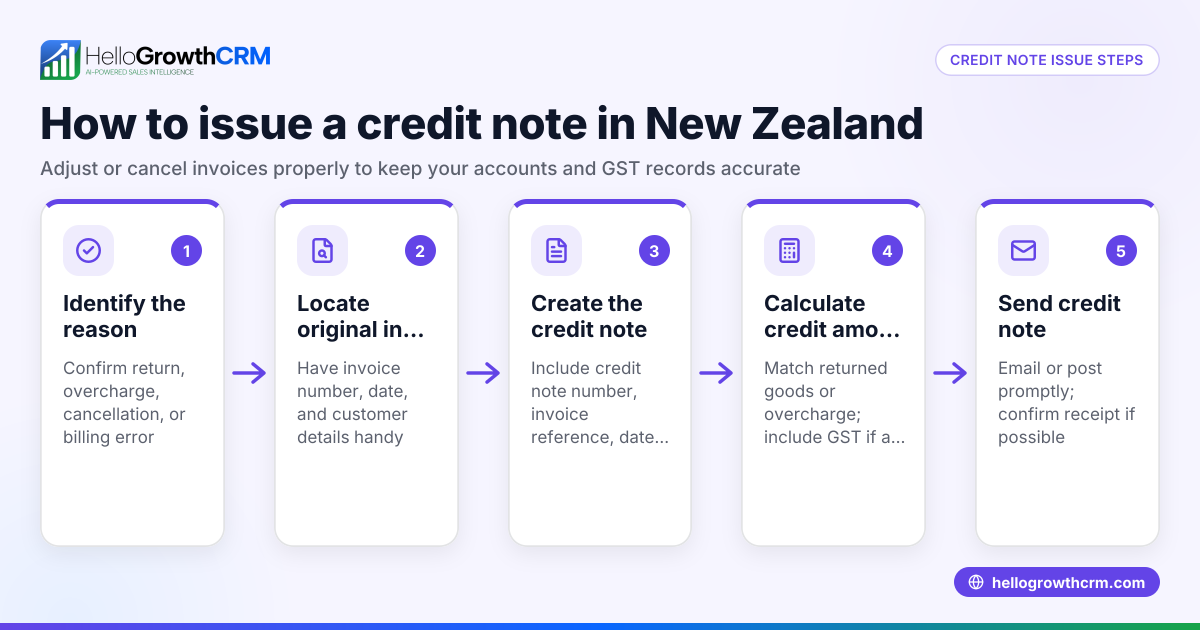
- Identify the need for a credit note: Confirm why you need to issue a credit note, such as a product return, service cancellation, or correcting an invoice error.
- Locate the original invoice: Find the invoice number, date, and details to reference in the credit note. This is essential for clarity.
- Prepare the credit note document: Include all necessary details:
- Title the document clearly as “Credit Note” or “Credit Memo.”
- Reference the original invoice number and date.
- Include your business name, address, and contact information.
- Include the customer’s name and address.
- State the date the credit note is issued.
- Explain the reason for issuing the credit.
- List the items or services credited, including quantities and amounts.
- Calculate and show the total amount credited, including currency ($).
- Check for sales tax implications: If sales tax was charged on the original invoice, adjust the tax amount proportionally in the credit note. This ensures your tax reporting remains accurate. NEEDS EXPERT REVIEW
- Send the credit note to the customer promptly: Email or mail a copy to your customer so they can update their records without delay.
- Record the credit note in your accounting system: Adjust your sales records and accounts receivable to reflect the credit. This keeps your financial statements accurate.
- Follow up if necessary: Confirm the customer has received the credit note and updated their balance to avoid confusion.
For managing sales communications and follow-ups efficiently, consider tools like a WhatsApp and SMS CRM or a built-in CRM dialer to keep your team organized and responsive.
Example (fictional figures)
A B2B software reseller in Denver, Colorado, issued an invoice on 04/15/2024 to a customer for $5,000 for a software license plus $400 sales tax, totaling $5,400. The customer returned one license worth $1,000 before payment.
- Original invoice total = $5,000 + $400 = $5,400
- Credit note amount for returned license = $1,000
- Sales tax on returned license (assumed 8%) = $1,000 × 8% = $80
- Total credit note amount = $1,000 + $80 = $1,080
The credit note issued on 05/01/2024 states:
- Reference original invoice #12345 dated 04/15/2024
- Reason: Returned one software license
- Amount credited: $1,080
This reduces the customer’s balance to $5,400 - $1,080 = $4,320.
Common mistakes
- Not referencing the original invoice: Always include the original invoice number to avoid confusion and ensure proper record-keeping.
- Delaying the credit note: Issue the credit note promptly to prevent payment disputes and maintain good customer relations.
- Incorrect sales tax calculations: Verify sales tax adjustments carefully to ensure tax reporting accuracy. NEEDS EXPERT REVIEW
- Failing to send the credit note to the customer: Always confirm delivery by email or mail to avoid misunderstandings.
- Not updating accounting records: Ensure your books reflect the credit to maintain accurate financial statements.
Using a CRM system designed for the US market, like HelloGrowthCRM for the United States, can help keep your sales process organized and ensure timely follow-ups.
Frequently asked questions
What is the difference between a credit note and a refund? A credit note is a document that adjusts the customer’s account balance, often used for future purchases or account adjustments. A refund is the actual return of money to the customer. Both serve different purposes but can be related.
Is a credit note legally required in the USA? There is no federal law mandating credit notes, but they are considered a best practice for clear communication and accounting accuracy. Specific state or industry rules may apply. NEEDS EXPERT REVIEW
Can I issue a credit note for partial returns? Yes, credit notes can cover full or partial returns, billing errors, or discounts. Always specify the exact amount and reason in the document.
How do I handle sales tax on credit notes? Adjust the sales tax proportionally to the credited amount to ensure your tax reporting matches actual sales. NEEDS EXPERT REVIEW
How does a credit note affect my accounting? It reduces your accounts receivable and sales revenue accordingly. Record it in your accounting system to keep your financial statements accurate.
Key takeaways
- Issue a credit note by referencing the original invoice and stating the credit amount and reason clearly.
- Include all relevant details: dates, customer information, itemized credits, and tax adjustments.
- Send the credit note promptly to avoid payment confusion and disputes.
- Update your accounting records to reflect the credit accurately.
- Avoid common mistakes like missing invoice references, delayed issuance, and incorrect tax calculations.
Manage your leads and sales follow-ups efficiently with tools like HelloGrowthCRM for the United States and its WhatsApp and SMS CRM.
For a simple start, Start on the Free Forever plan (200 leads, no credit card).
Ready to put this into practice?
Set up your pipeline, WhatsApp follow-ups, and AI lead scoring in minutes — free, no credit card.
Try HelloGrowthCRM freeGet CRM tips in your inbox
Join thousands of sales professionals who get weekly insights on CRM strategy, AI automation, and pipeline optimization.

The HelloGrowthCRM team publishes guides on CRM strategy, AI sales tools, and revenue operations for small business sales teams.