HelloGrowthCRM software
Built for real small-business sales teams
HelloGrowthCRM helps reps qualify faster, follow up on time, and close more deals—with practical automation in one place.
- AI lead scoring and pipeline visibility
- Built-in dialer, WhatsApp, and email automation
- Sales forecasting and RevOps-ready reporting
Reconciling invoice and payment records means matching every invoice you issue to a customer with the payments you have received for it. This ensures your records are accurate, helps detect unpaid or partially paid invoices, and resolves discrepancies before they affect your cash flow.
Why this comes up / what goes wrong
Many UAE small businesses sell across multiple channels such as WhatsApp, phone calls, and spreadsheets. Without a centralised system, payments can be recorded late, duplicated, or missed. Partial payments may not be tracked properly, and invoice numbers might be confused. These issues cause cash flow problems, customer disputes, and errors in your financial reports.
You might find that your payment records don’t match your invoices because payments were made without clear references, or partial payments were not recorded. Sometimes invoices are sent but not followed up, or payments are logged in different places. This confusion makes it hard to know which invoices are settled and which are outstanding.
Step-by-step
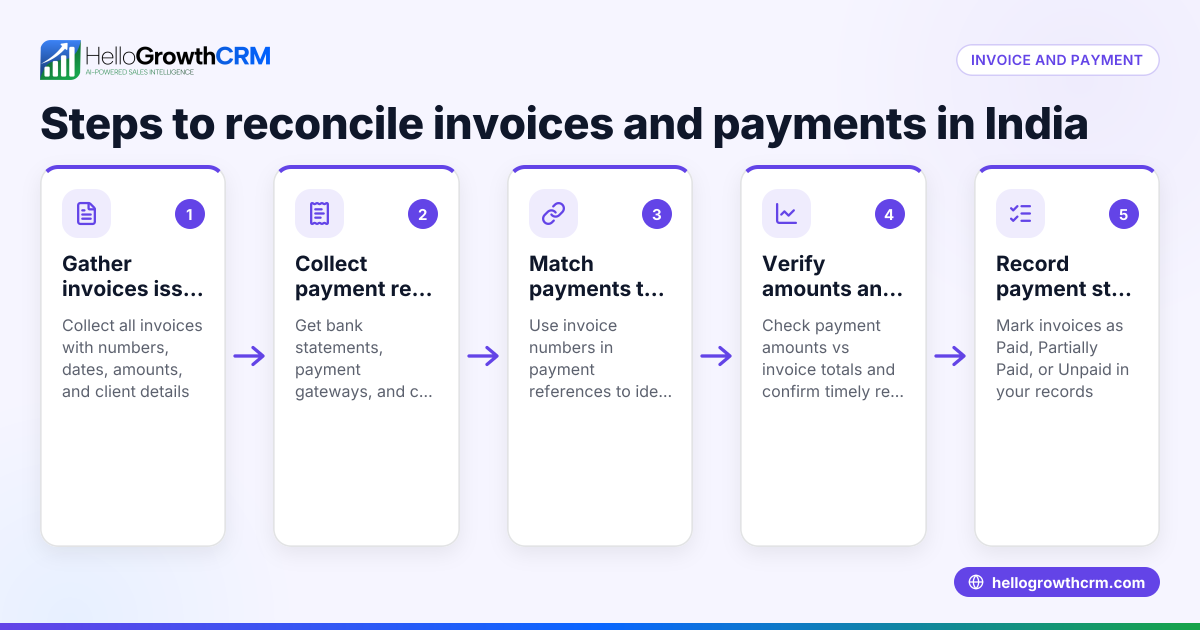
- Gather all issued invoices: Collect invoices from your invoicing system, spreadsheets, or printed copies. Each invoice should have a unique number, issue date, customer name, and total amount.
- Collect all payment records: Obtain your payment data from bank statements, cash receipts, and payment apps. Note payment dates, amounts, and any reference numbers.
- Match payments to invoices:
- Start with the oldest unpaid invoice.
- Check if a payment amount equals the invoice total or part of it.
- Confirm the payment date is on or after the invoice date.
- Verify the payment reference matches the invoice number or customer name.
- Record payment status:
- Mark invoices as "Paid" when fully settled.
- For partial payments, update the outstanding balance.
- If no matching payment exists, mark the invoice as "Unpaid".
- Investigate discrepancies:
- Identify overpayments, underpayments, or missing payments.
- Contact customers or your accounts team to clarify or resolve.
- Update your accounting records: Adjust accounts receivable and cash accounts to reflect reconciled invoices and payments.
- Schedule regular reconciliation: Perform this weekly or monthly to avoid backlog and errors.
Using task boards or checklists helps manage follow-ups on unpaid invoices or payment disputes effectively. See how activities and task boards can assist.
Example (fictional figures)
A business setup consultancy in Business Bay, Dubai, issued an invoice on 01/05/2024 for AED 15,000 to a client. The client made two payments: AED 10,000 on 05/05/2024 and AED 5,000 on 20/05/2024.
- Invoice total = AED 15,000
- Payment 1 = AED 10,000
- Payment 2 = AED 5,000
Step 1: Match Payment 1 to invoice: AED 10,000 is less than AED 15,000, so mark invoice as partially paid, balance = AED 15,000 - AED 10,000 = AED 5,000
Step 2: Match Payment 2 to invoice balance: AED 5,000 matches the remaining balance, so mark invoice as fully paid.
Step 3: Update records: Invoice status = Paid Total payments received = AED 10,000 + AED 5,000 = AED 15,000
This confirms the invoice and payments fully reconcile.
Common mistakes
- Ignoring partial payments: Always record partial payments and update the invoice balance to avoid confusion.
- Not verifying payment references: Confirm payment references match invoice numbers to prevent misallocation.
- Delaying reconciliation: Regular reconciliation prevents backlog and errors.
- Mixing sales channels without central tracking: Use a system that consolidates WhatsApp, calls, and spreadsheets to avoid missing payments.
- Manual follow-ups without task management: Use task boards to schedule and track follow-ups instead of relying on memory. See activities and task boards.
Doing this in HelloGrowthCRM
HelloGrowthCRM supports your reconciliation process by allowing you to create and send quotes, proposals, and invoices directly from a deal record. The invoice status (sent, viewed, accepted) is visible alongside follow-up tasks, helping you track progress in one place. Payments received are linked to invoices and deals, making it easier to match payments and invoices. Each follow-up becomes a task with a due date, and your daily calls are organised as a list, reducing memory load. WhatsApp conversations with leads are logged on lead records, and follow-ups can be sent as WhatsApp or SMS messages, keeping communication clear and documented. Learn more about the WhatsApp and SMS CRM and the built-in CRM dialer.
Frequently asked questions
How often should I reconcile invoices and payments? Reconcile at least monthly or more often if you have a high volume of sales. Regular reconciliation prevents errors and helps maintain healthy cash flow.
What if a customer overpays an invoice? Record the overpayment clearly. Decide whether to refund the customer or apply the excess as credit toward future invoices. Keep documentation of the agreement.
Can I reconcile payments made through WhatsApp or phone calls? Yes, but ensure you record payment details promptly and accurately. HelloGrowthCRM can help log these conversations and payments systematically.
What should I do if an invoice remains unpaid for a long time? Use task boards or reminders to schedule follow-ups. Contact the customer to resolve disputes or arrange payment plans.
Is reconciliation different in the UAE compared to other countries? The basic process is the same, but you should ensure compliance with UAE invoicing and payment regulations. NEEDS EXPERT REVIEW
Key takeaways
- Collect and organise invoice and payment records carefully.
- Match payments to invoices by amount, date, and reference.
- Record payment status accurately, including partial payments.
- Investigate and resolve discrepancies promptly.
- Use task boards and CRM tools to manage follow-ups and communication.
Start reconciling your invoices and payments today with better organisation. You can Start on the Free Forever plan (200 leads, no credit card) to manage quotes, invoices, payments, and follow-ups in one place.
Ready to put this into practice?
Set up your pipeline, WhatsApp follow-ups, and AI lead scoring in minutes — free, no credit card.
Try HelloGrowthCRM freeGet CRM tips in your inbox
Join thousands of sales professionals who get weekly insights on CRM strategy, AI automation, and pipeline optimization.

The HelloGrowthCRM team publishes guides on CRM strategy, AI sales tools, and revenue operations for small business sales teams.