HelloGrowthCRM software
Built for real small-business sales teams
HelloGrowthCRM helps reps qualify faster, follow up on time, and close more deals—with practical automation in one place.
- AI lead scoring and pipeline visibility
- Built-in dialer, WhatsApp, and email automation
- Sales forecasting and RevOps-ready reporting
To resend a message, you need to find the original message in your messaging system, select it, and choose the option to resend or forward it to the correct recipient. This process ensures your message reaches the recipient again without rewriting it. This article explains why resending messages is common in small businesses, provides detailed steps to do it correctly, highlights common errors, includes a practical example with numbers, and shows how HelloGrowthCRM supports message follow-ups.
Why this comes up / what goes wrong
Small business owners often need to resend messages because the original message was missed, deleted, or not delivered. For example, a sales lead may not respond if the message was overlooked or lost in their inbox. Sometimes, messages sent via text or WhatsApp get buried in long conversations or technical glitches cause delivery failures. Resending ensures your communication is noticed and increases the chance of engagement. However, without a clear process, you may resend to the wrong contact, duplicate messages, or lose track of follow-ups.
Step-by-step
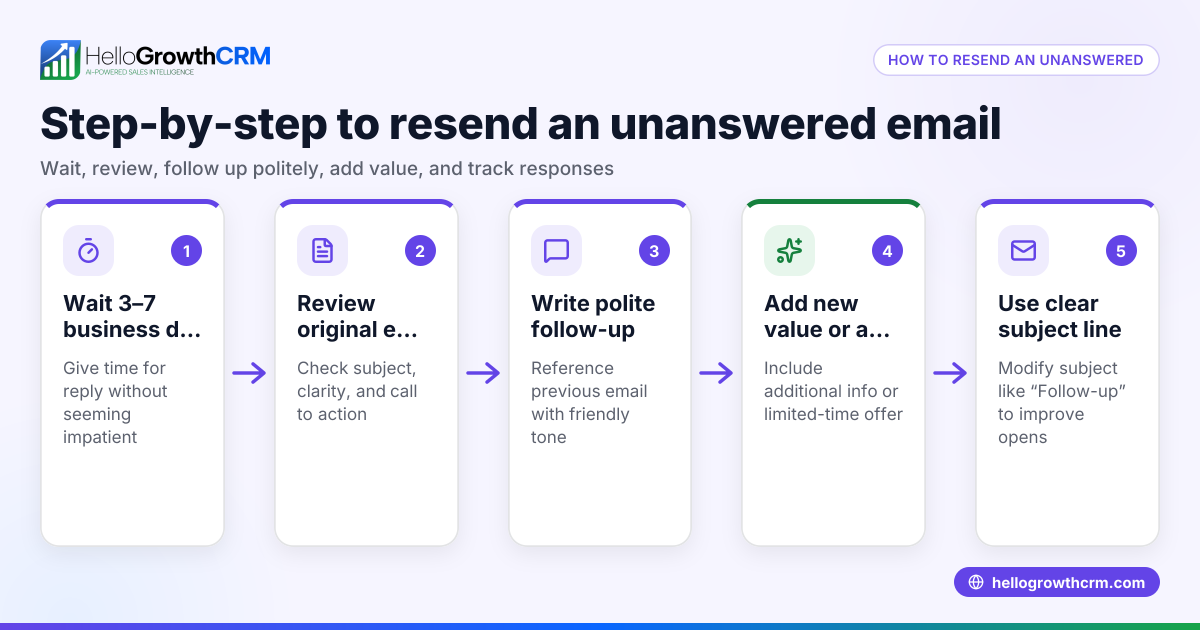
- Locate the original message: Open your messaging app or platform and find the message you want to resend. Check the date, content, and recipient to confirm it’s the right one.
- Select the message: Tap or click on the message to highlight it. Most platforms offer options like "forward," "resend," or "copy message."
- Choose resend or forward: Select the option to resend or forward the message. This keeps the original content intact.
- Confirm the recipient: Enter or select the correct recipient’s contact information. Double-check the phone number, email, or WhatsApp contact to avoid sending it to the wrong person.
- Add context if needed: If the message needs explanation (e.g., "Resending in case you missed it"), add a brief note before sending.
- Send the message: Hit send and wait for confirmation that the message was delivered.
- Log the resend: Keep a record of the resend in your CRM or communication log to track follow-ups and avoid unnecessary repeats.
Remember to check message delivery status if your platform supports it, especially for WhatsApp or SMS messages.
Example (fictional figures)
A two-location dental practice in Columbus, Ohio, sent appointment reminders via SMS but noticed some patients did not confirm. They decide to resend the reminder for a $150 cleaning appointment scheduled on 07/15/2026.
- Original message sent on 07/10/2026: "Reminder: Your dental cleaning appointment is on 07/15/2026 at 10:00 AM."
- Locate the message in the SMS app.
- Select and forward it to the patient’s correct phone number.
- Add a note: "Resending in case you missed this. Please confirm."
- Send the message.
This resend helps reduce no-shows and keeps the schedule full.
Common mistakes
- Resending to the wrong recipient: Always double-check contact details before sending. Use contact lists or CRM records to verify.
- Resending without context: Add a brief note explaining why you are resending to avoid confusion or annoyance.
- Sending duplicate messages repeatedly: Track your resends in a CRM or log to avoid spamming the same contact.
- Ignoring message delivery status: Confirm the message was delivered before resending again.
- Not logging resends: Without logging, you risk losing track of communication, leading to missed follow-ups.
- Using multiple platforms without integration: This can cause inconsistent records and duplicated efforts. Consider a CRM that logs all messages.
Doing this in HelloGrowthCRM
HelloGrowthCRM supports WhatsApp and SMS messaging where conversations with a lead are logged on the lead record. This means when you resend messages or follow up, all communication stays organized in one place. You can send follow-ups as WhatsApp or SMS messages directly from the CRM, ensuring your team knows what was sent and when. Learn more about the WhatsApp and SMS CRM features.
Frequently asked questions
Can I resend a message on any messaging platform? Most messaging platforms allow you to forward or resend messages, but the exact steps vary. Check your app’s help section for details. Using a CRM like HelloGrowthCRM can centralize this process.
How do I avoid annoying customers when resending messages? Add a polite note explaining the resend and limit how often you resend. Tracking your messages helps avoid over-contacting.
What if the message was never delivered? Check the delivery status if available. If undelivered, verify the contact details and resend. Persistent delivery failures may require contacting the customer through another channel.
Can I resend messages to multiple recipients at once? Some platforms and CRMs support bulk messaging. Be cautious to personalize messages when possible and comply with communication laws.
Does HelloGrowthCRM support resending messages automatically? HelloGrowthCRM allows sending follow-ups as WhatsApp or SMS messages logged on the lead record, helping manage resends efficiently.
Is it better to resend or create a new message? Resending keeps the original content consistent, but sometimes a new message with updated information or context is better. Choose based on the situation.
Key takeaways
- Locate and select the original message carefully before resending.
- Always confirm the recipient’s contact details to avoid mistakes.
- Add context to explain why you are resending.
- Track resends to prevent duplicates and spamming.
- Use delivery status to decide when to resend.
- HelloGrowthCRM logs WhatsApp and SMS conversations for easy follow-up management.
Resending messages can improve your communication and lead engagement when done correctly. To start managing your messages and follow-ups efficiently, Start on the Free Forever plan (200 leads, no credit card).
Ready to put this into practice?
Set up your pipeline, WhatsApp follow-ups, and AI lead scoring in minutes — free, no credit card.
Try HelloGrowthCRM freeGet CRM tips in your inbox
Join thousands of sales professionals who get weekly insights on CRM strategy, AI automation, and pipeline optimization.

The HelloGrowthCRM team publishes guides on CRM strategy, AI sales tools, and revenue operations for small business sales teams.