HelloGrowthCRM software
Built for real small-business sales teams
HelloGrowthCRM helps reps qualify faster, follow up on time, and close more deals—with practical automation in one place.
- AI lead scoring and pipeline visibility
- Built-in dialer, WhatsApp, and email automation
- Sales forecasting and RevOps-ready reporting
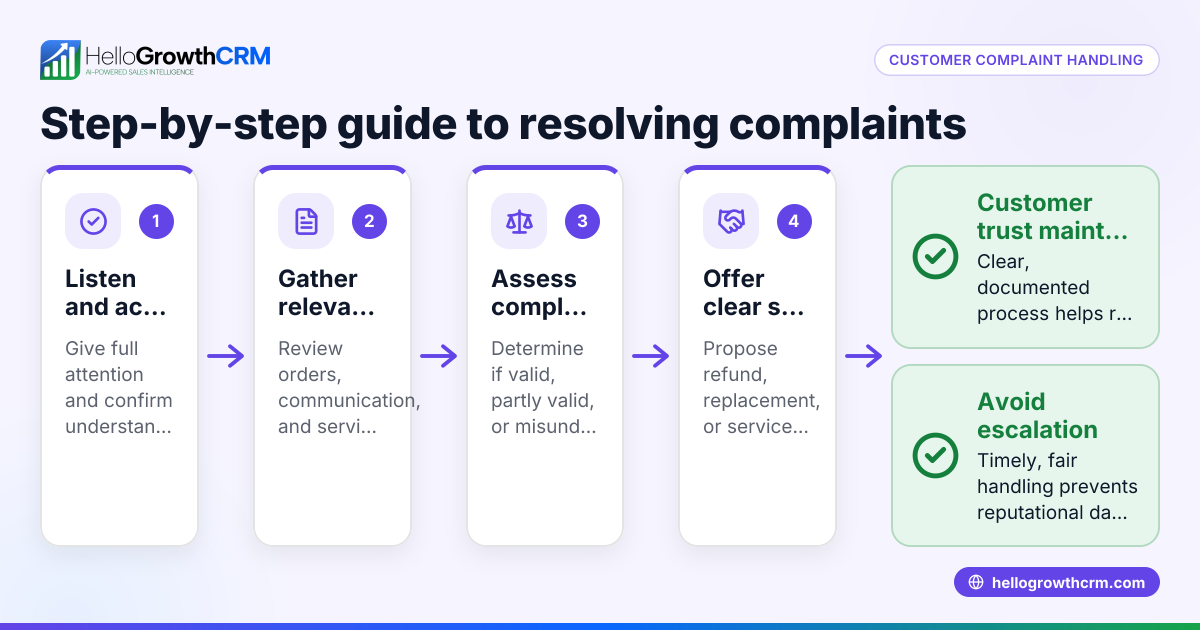
To track customer complaints in the USA, you need a clear process to log, organize, and follow up on each issue promptly. This prevents complaints from being lost, ensures customers feel heard, and helps your business resolve problems efficiently. Below are the reasons this matter arises, detailed steps to track complaints, a fictional example with USD figures and calculations, common mistakes to avoid, how HelloGrowthCRM supports complaint tracking, and answers to common questions.
Why this comes up / what goes wrong
Small business owners often receive customer complaints through various channels such as phone calls, emails, text messages, or WhatsApp. Without a centralized method to track these complaints, some get overlooked or delayed. This can lead to dissatisfied customers, lost sales, and damage to your business reputation. Many businesses rely on spreadsheets or notes, which do not easily support tracking complaint status, assigning responsibility, or scheduling follow-ups. Having a reliable system to organize complaints ensures timely responses and better customer satisfaction.
Step-by-step
- Collect complaint details immediately: Record the customer's name, contact information, date and time of the complaint, the communication channel (phone, email, WhatsApp, SMS), and a clear description of the issue.
- Assign a unique complaint ID: Create a number or code for each complaint to track it easily.
- Log the complaint in a tracking system: Use a CRM, helpdesk software, or a structured spreadsheet with fields for complaint status, priority, and the assigned staff member.
- Categorize the complaint: Identify the complaint type (product defect, service delay, billing issue) to help analyze trends later.
- Set a response deadline: Define how quickly the complaint should be addressed based on its priority.
- Assign responsibility: Designate a team member to handle the complaint and follow up.
- Track status updates: Update the complaint record as it moves through stages like received, in progress, resolved, and closed.
- Communicate with the customer: Keep the customer informed at each step via their preferred channel (email, WhatsApp, SMS).
- Document resolution details: Record what actions were taken to fix the issue and any compensation offered.
- Analyze complaint data regularly: Review complaint trends to identify areas for product or service improvement.
Check that every complaint record includes complete information, an assigned owner, and clear status updates to avoid losing track.
Example (fictional figures)
A landscaping contractor in Charlotte, North Carolina receives a complaint on 04/10/2024 about a missed lawn mowing appointment. They log the complaint as follows:
- Customer: John Smith
- Contact: john.smith@email.com
- Complaint ID: LC1001
- Date received: 04/10/2024
- Channel: Email
- Issue: Missed appointment on 04/09/2024
- Priority: Medium
- Assigned to: Service Manager
- Response deadline: 04/11/2024 (2 days)
The manager updates the status:
- 04/11/2024: Called customer, apologized, rescheduled appointment for 04/13/2024
- 04/13/2024: Service completed
- 04/14/2024: Complaint closed
Costs involved:
- Original service fee: $150
- Compensation offered (10% discount): $150 × 10% = $15
- Final amount charged: $150 - $15 = $135
This process ensures the complaint is tracked from receipt to resolution without delay or confusion.
Common mistakes
- Not recording all complaint details: Prevent this by using a standard form or digital entry fields to capture all necessary information.
- Failing to assign ownership: Prevent by clearly designating team members responsible for each complaint.
- Ignoring follow-up deadlines: Prevent by setting reminders or alerts in your tracking system.
- Using multiple unlinked tools: Prevent by consolidating complaint tracking in one system that supports communication channels like WhatsApp and SMS. See how a WhatsApp and SMS CRM helps.
- Not analyzing complaint data: Prevent by scheduling regular reviews to identify recurring issues.
- Lack of customer communication: Prevent by updating customers at each step to maintain trust.
Doing this in HelloGrowthCRM
HelloGrowthCRM offers a customer portal where customers can submit complaints directly. After the sale, service requests such as complaints stay on the same customer record as the deal, making tracking easier. The system supports tickets and a knowledge base to help resolve issues efficiently. Using HelloGrowthCRM keeps all complaint information centralized and accessible for your team.
Frequently asked questions
How do I organize customer complaints from different channels? Use a centralized system that can log complaints from phone, email, WhatsApp, and SMS. This prevents missed or duplicated records and keeps all information in one place.
What information should I collect for each complaint? Collect customer contact details, complaint date and time, communication channel, detailed description, complaint ID, status, priority, assigned staff, and resolution notes. This ensures clear tracking and accountability.
How often should I review complaint data? Review complaint data weekly or monthly to identify trends and recurring problems. This helps improve products and services and reduce future complaints.
Can I automate reminders for complaint follow-ups? Yes, many CRM systems allow you to set reminders or alerts for pending complaints to ensure timely responses.
What if a complaint escalates? Update the complaint status and assign it to a higher-level manager or specialist. Document all communications and resolutions clearly to maintain transparency.
How does tracking complaints improve customer satisfaction? Tracking ensures no complaint is forgotten, responses are timely, and customers feel heard. It also helps your business fix root causes, leading to better service.
Key takeaways
- Log all complaint details immediately with a unique ID.
- Use a centralized system to track status, priority, and ownership.
- Communicate regularly with customers during resolution.
- Set deadlines and reminders to avoid delays.
- Analyze complaint data to improve your business.
- HelloGrowthCRM supports complaint tracking with tickets and a customer portal.
Start tracking customer complaints today to improve your service and customer trust. You can Start on the Free Forever plan (200 leads, no credit card) with HelloGrowthCRM to organize complaints and follow-ups efficiently.
Ready to put this into practice?
Set up your pipeline, WhatsApp follow-ups, and AI lead scoring in minutes — free, no credit card.
Try HelloGrowthCRM freeGet CRM tips in your inbox
Join thousands of sales professionals who get weekly insights on CRM strategy, AI automation, and pipeline optimization.

The HelloGrowthCRM team publishes guides on CRM strategy, AI sales tools, and revenue operations for small business sales teams.