HelloGrowthCRM software
Built for real small-business sales teams
HelloGrowthCRM helps reps qualify faster, follow up on time, and close more deals—with practical automation in one place.
- AI lead scoring and pipeline visibility
- Built-in dialer, WhatsApp, and email automation
- Sales forecasting and RevOps-ready reporting
Invoice best practices mean sending invoices that are clear, accurate, and timely to ensure prompt payment and maintain good customer relationships. You should include all essential details such as your contact information, the buyer’s details, item descriptions, prices, payment terms, and due dates. Following up on unpaid invoices and tracking payment status is also key. This article covers why invoicing challenges arise, the steps to invoice properly, a detailed example with figures, common errors to avoid, and how to manage invoicing effectively.
Why this comes up / what goes wrong
Small and mid-sized business owners often face invoicing challenges because they juggle many roles and systems. They might use spreadsheets, email, or text messages to send invoices, which can lead to errors, delays, or lost documents. Slow follow-up on unpaid invoices causes cash flow problems. Without a clear system, teams may duplicate efforts or miss important details like payment terms or client contacts. Evaluating invoice best practices helps owners choose software or services that reduce errors, speed up billing, and improve collections.
Step-by-step
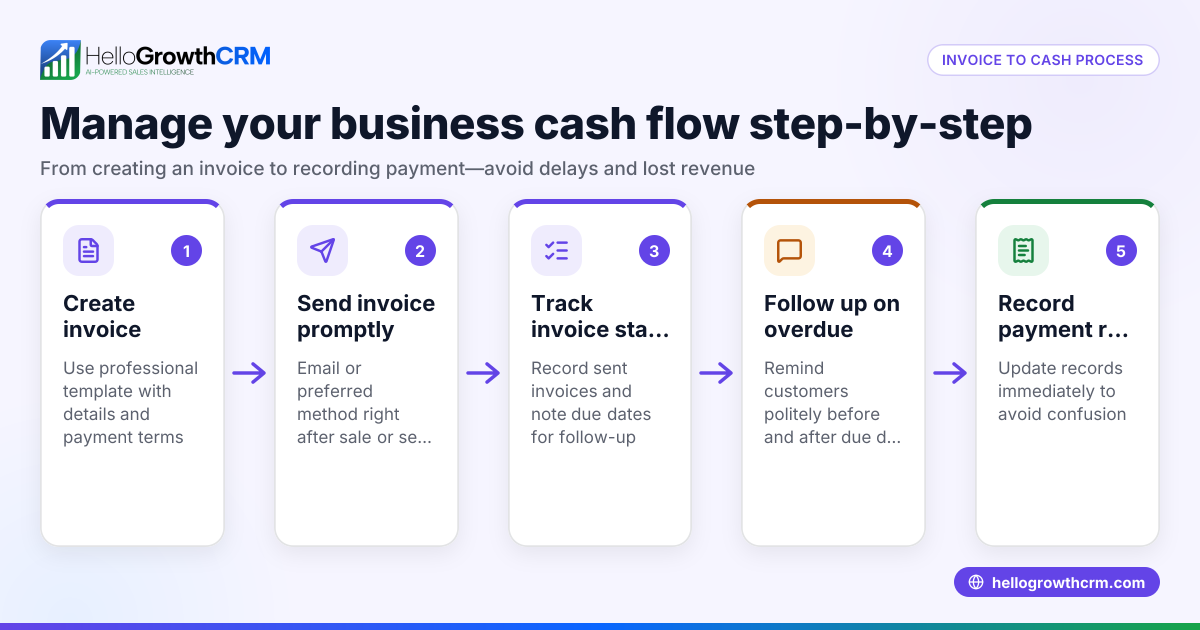
- Prepare the invoice with complete information: Include your business name, address, and contact info; the client’s details; invoice number; date of issue; itemized list of products or services with quantities and prices; payment terms; and due date.
- Calculate totals and taxes clearly: Sum the line items, apply any discounts, and add applicable sales tax. Double-check calculations.
- Send the invoice promptly: Deliver the invoice as soon as the product is delivered or service completed. Use email or an invoicing system to track delivery.
- Confirm receipt and track status: Follow up to ensure the client received and viewed the invoice. Note if it has been paid or is overdue.
- Send reminders for overdue invoices: Use polite, timely reminders starting a few days after the due date.
- Record payments and reconcile: When payment arrives, record it against the invoice to keep accounts accurate.
- Keep organized records: Store invoices and payment records securely for easy access and tax purposes.
Using integrated tools can help automate many of these steps and keep all information in one place. For example, tools with a built-in CRM dialer and WhatsApp and SMS CRM features can support customer communication and follow-up effectively. Learn more about these features here and here.
Example (fictional figures)
A plumbing company in Austin, Texas, completes a $2,500 job on 05/10/2026. They prepare an invoice as follows:
- Job price: $2,500
- Sales tax (assumed illustrative rate 8.25%): $2,500 × 8.25% = $206.25
- Total invoice amount: $2,500 + $206.25 = $2,706.25
The invoice number is 2026-0510-AUSTINPLUMB. The due date is 05/24/2026 (14 days later). They email the invoice immediately and set a reminder to follow up on 05/25/2026 if unpaid. When payment of $2,706.25 arrives on 05/22/2026, they record it against invoice 2026-0510-AUSTINPLUMB to keep accounts balanced.
Common mistakes
- Incomplete invoice details: Missing client info or payment terms can delay payment. Prevent by using a checklist or template.
- Late invoicing: Waiting too long to send invoices harms cash flow. Send invoices immediately after delivery.
- Ignoring follow-up: Not reminding clients leads to late payments. Schedule polite reminders after due dates.
- Manual tracking errors: Using spreadsheets without automation risks mistakes and lost data. Use integrated tools.
- Mixing communication channels: Sending invoices via multiple platforms without tracking causes confusion. Use a single system to keep communication clear.
Doing this efficiently
Efficient invoicing involves using tools that allow you to create and track invoices and payments from one place. For example, some CRMs provide quoting, proposal, invoice, and payment tracking tied to deals, with the status of sent, viewed, or accepted documents visible alongside follow-up tasks. This approach helps reduce errors and speeds up collections. Learn more about solutions designed for US businesses here.
Frequently asked questions
What should every invoice include? Every invoice should include your business and client contact details, a unique invoice number, issue date, itemized list of products or services with prices, total amount due including taxes, payment terms, and the due date.
How soon should I send an invoice? Send invoices promptly after delivering the product or service—ideally within 24 hours—to encourage timely payment and avoid confusion.
How do I handle late payments? Send polite reminders starting a few days after the due date. If payment is significantly overdue, consider a phone call or adjusting payment terms for future orders.
Can I automate invoicing? Yes, using integrated invoicing tools within CRM software lets you automate invoice creation, sending, tracking, and follow-up reminders, reducing errors and saving time.
Is it better to use email or paper invoices? Email invoices are faster, easier to track, and more cost-effective for most small businesses. Paper invoices may be needed for some clients but can slow down payment.
Key takeaways
- Include all essential details on every invoice to avoid payment delays.
- Send invoices promptly after completing work.
- Track invoice status and follow up on overdue payments systematically.
- Avoid manual errors by using integrated invoicing and CRM tools.
- Use a single platform for communication and invoicing to reduce confusion.
- Efficient invoicing tools combine quotes, invoices, payments, and follow-up tasks in one place.
Start improving your invoicing process today. You can start on the Free Forever plan (200 leads, no credit card) to explore tools that help streamline your sales and invoicing workflows.
Ready to put this into practice?
Set up your pipeline, WhatsApp follow-ups, and AI lead scoring in minutes — free, no credit card.
Try HelloGrowthCRM freeGet CRM tips in your inbox
Join thousands of sales professionals who get weekly insights on CRM strategy, AI automation, and pipeline optimization.

The HelloGrowthCRM team publishes guides on CRM strategy, AI sales tools, and revenue operations for small business sales teams.