HelloGrowthCRM software
Built for real small-business sales teams
HelloGrowthCRM helps reps qualify faster, follow up on time, and close more deals—with practical automation in one place.
- AI lead scoring and pipeline visibility
- Built-in dialer, WhatsApp, and email automation
- Sales forecasting and RevOps-ready reporting
An invoice collection email is a message you send to customers who have not yet paid an invoice by its due date. It serves as a formal reminder and encourages timely payment to keep your cash flow steady. This article covers why you need invoice collection emails, how to write and send them step-by-step, a practical example with figures, common pitfalls to avoid, and how HelloGrowthCRM can assist with managing this process.
Why this comes up / what goes wrong
Small-business owners often face delayed payments because customers forget or postpone paying invoices. Without a clear, polite, and timely invoice collection email, unpaid invoices can pile up, affecting your ability to pay your own bills or invest in growth. Many businesses rely on manual reminders via email or phone, which can be inconsistent or inefficient. Slow follow-up or lack of clarity in communication increases the risk of losing revenue.
Step-by-step
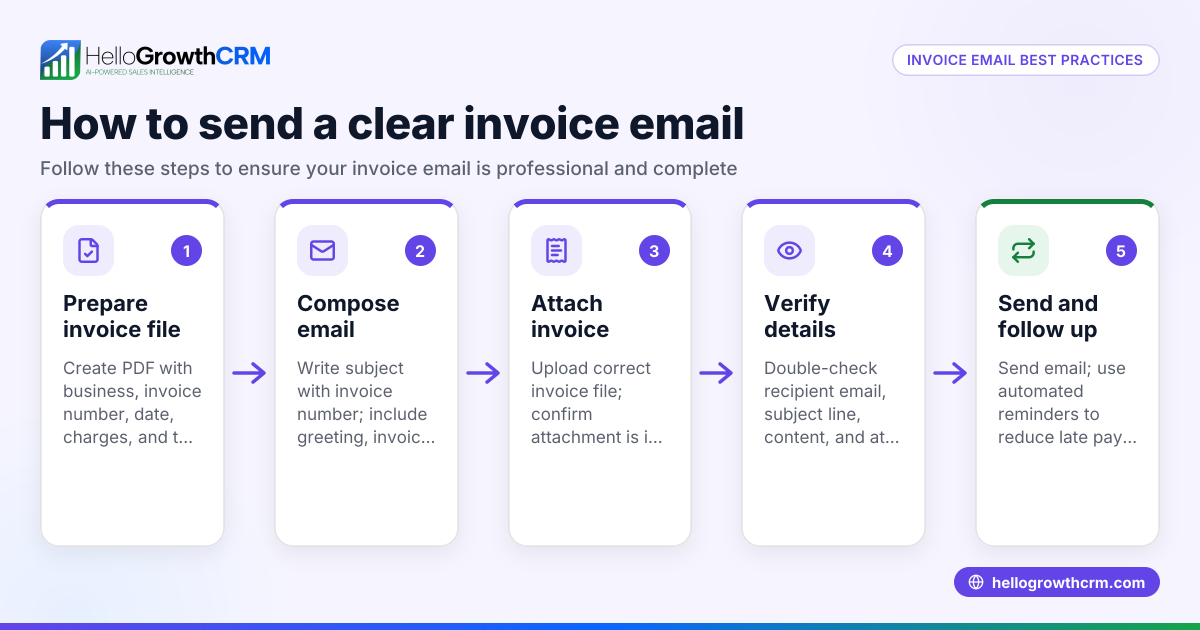
- Verify the invoice details: Confirm the invoice number, amount due, due date, and payment instructions are correct before writing.
- Choose a clear subject line: Use something like "Invoice #12345 Payment Reminder" to make the purpose obvious.
- Greet the customer politely: Use their name and a friendly tone.
- State the purpose clearly: Mention the invoice number, original due date, and amount due.
- Include payment instructions: Specify how and where to pay, including accepted methods.
- Request prompt payment: Politely ask for payment by a specific date.
- Offer assistance: Invite them to contact you if they have questions or issues.
- Close professionally: Thank them and sign off with your contact details.
- Send the email and track it: Use tools or CRM features to know when it’s opened or replied to.
- Follow up if needed: If no response after a few days, send a second reminder or call.
For automation and managing follow-ups, see email automation and sequences.
Example (fictional figures)
A two-location dental practice in Columbus, Ohio, sent an invoice on 05/01/2026 for $3,500. The payment was due on 05/15/2026 but remains unpaid as of 05/22/2026. Here's how to write the collection email:
Subject: Invoice #2024-0567 Payment Reminder
Dear Ms. Smith,
We hope you are well. This is a friendly reminder that invoice #2024-0567, dated 05/01/2026, for $3,500 was due on 05/15/2026. We kindly ask you to arrange payment at your earliest convenience.
Payment can be made via check or credit card. Please let us know if you need any assistance or a copy of the invoice.
Thank you for your prompt attention to this matter.
Best regards, Dental Care Clinic Contact: (555) 123-4567
Calculation for the amount due: $3,500 (invoice amount) = $3,500 total due
This clear, polite email reminds the customer and invites communication to resolve any issues.
Common mistakes
- Being too vague: Not specifying invoice number or amount leads to confusion. Always include exact details.
- Using a harsh or accusatory tone: This can damage customer relationships. Keep the tone polite and professional.
- Waiting too long to send a reminder: Send the first collection email soon after the due date to avoid delays.
- Not tracking emails or responses: Without tracking, you may miss replies or need to duplicate effort. Use CRM tools to monitor.
- Failing to include payment instructions: Customers may delay if unsure how to pay. Be explicit about payment methods.
- Ignoring follow-ups: One email may not be enough. Plan a sequence of reminders if payment is still outstanding.
For managing email follow-ups efficiently, check email automation and sequences.
Doing this in HelloGrowthCRM
HelloGrowthCRM helps you manage invoice collection emails with several features:
- HelloMail shared inbox: Your team sees all replies to quotation and invoice emails in one place, avoiding missed messages.
- Quotes, proposals, invoices and payments received: Send and track invoices directly from the deal screen. See invoice status (sent, viewed, accepted) alongside follow-up tasks.
- Sequences and campaigns: Set up a five-step automated follow-up sequence over two weeks that stops immediately when the customer replies.
Learn more about these features on WhatsApp and SMS CRM and HelloGrowthCRM for the United States.
Frequently asked questions
What should I include in an invoice collection email? Include the invoice number, amount due, original due date, payment instructions, and a polite request for payment. Also offer help if the customer has questions.
When should I send the first invoice collection email? Send it shortly after the invoice due date passes, ideally within a few days, to keep payments on track.
How many follow-up emails should I send? A typical sequence includes 2-5 reminders spaced over one to two weeks. Stop sending once the customer responds.
Can I automate invoice collection emails? Yes, using email automation and sequences in a CRM like HelloGrowthCRM, you can set timed follow-ups that run until a reply is received.
Is it okay to be firm in invoice collection emails? Politeness is key to maintaining good customer relationships. Be clear but respectful, avoiding threats or aggressive language.
Key takeaways
- An invoice collection email reminds customers to pay overdue invoices clearly and politely.
- Include invoice details, payment instructions, and a request for prompt payment.
- Send the first reminder soon after the due date and follow up with a sequence if needed.
- Avoid vague messages, harsh tone, and ignoring follow-ups.
- Use CRM tools like HelloGrowthCRM for shared inbox, invoice tracking, and automated follow-ups.
Start managing your invoice collection emails effectively and keep your cash flow steady. Start on the Free Forever plan (200 leads, no credit card).
Ready to put this into practice?
Set up your pipeline, WhatsApp follow-ups, and AI lead scoring in minutes — free, no credit card.
Try HelloGrowthCRM freeGet CRM tips in your inbox
Join thousands of sales professionals who get weekly insights on CRM strategy, AI automation, and pipeline optimization.

The HelloGrowthCRM team publishes guides on CRM strategy, AI sales tools, and revenue operations for small business sales teams.