HelloGrowthCRM software
Built for real small-business sales teams
HelloGrowthCRM helps reps qualify faster, follow up on time, and close more deals—with practical automation in one place.
- AI lead scoring and pipeline visibility
- Built-in dialer, WhatsApp, and email automation
- Sales forecasting and RevOps-ready reporting
The number of visits to a website is the total count of times people access your site, regardless of whether they are new or returning visitors. Each visit represents a session where a user interacts with your website. This metric helps you understand how often your website attracts traffic and gauges the effectiveness of your marketing efforts.
Why this comes up / what goes wrong
Small-business owners often want to know their website visits because this number reflects how well their marketing and outreach efforts are working. Without understanding this metric, owners may miss opportunities to improve sales or customer engagement. For example, if you run a B2B software reseller in Denver, Colorado, knowing your traffic volume helps you decide if you need more advertising, better content, or changes to your sales approach.
Many owners struggle because they confuse visits with unique visitors or page views, or they rely on incomplete or inconsistent data from multiple tools. This can lead to wrong conclusions about customer interest or campaign success. Also, some do not check if their tracking setup is correct, causing underreporting of visits.
Step-by-step
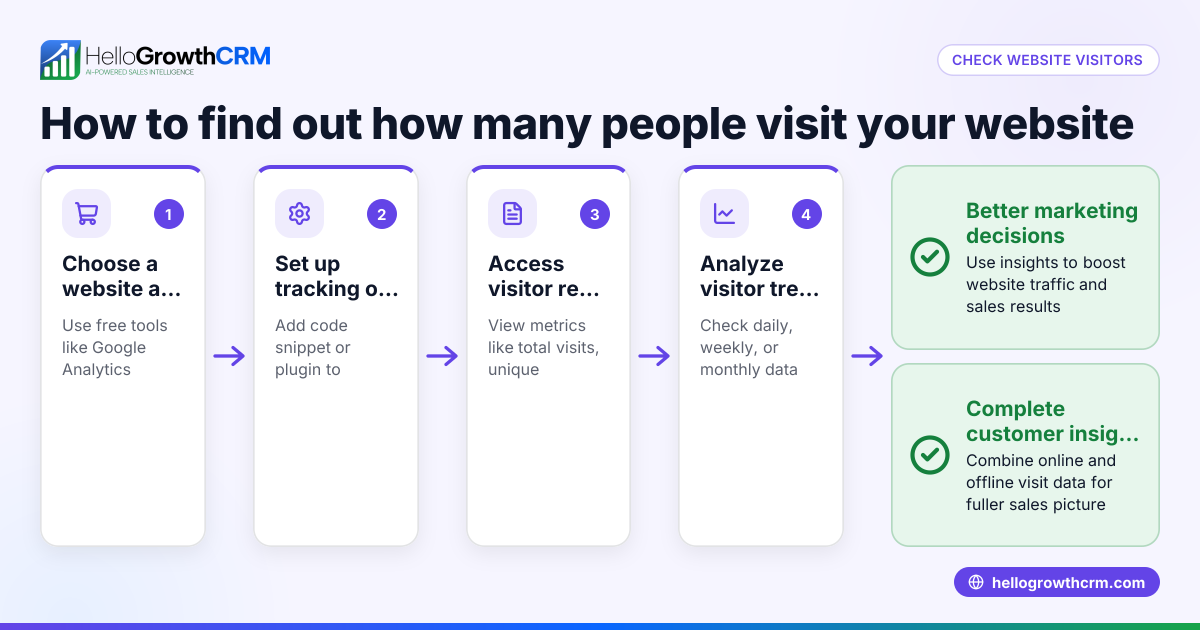
- Choose a web analytics tool: Select a reliable analytics platform such as Google Analytics. Check if your website already has one installed or set it up.
- Install or verify tracking code: Make sure the tracking code is properly installed on all pages of your website. This code records each visit accurately.
- Define the time period for analysis: Decide if you want to track visits daily, weekly, or monthly. Consistent time frames help you compare performance over time.
- Access the visits data: In your analytics tool, find the metric labeled "Sessions" or "Visits." This number counts each time someone starts browsing your site.
- Analyze traffic patterns: Look for spikes during marketing campaigns or drops after website changes. This reveals what affects your visits.
- Compare visits with other metrics: Review bounce rate, page views, and conversion rates to get a complete picture of visitor behavior.
- Use insights to improve strategy: If visits are low, consider boosting SEO, running targeted ads, or enhancing your website content.
Example (fictional figures)
A Denver-based B2B software reseller tracked visits to their website during March 2026:
- Total visits in March 2026: 12,000
- Number of days in March: 31
- Average visits per day = 12,000 ÷ 31 = 387
- They ran a marketing campaign from 03/10/2026 to 03/20/2026 (11 days)
- Visits during campaign: 6,000
- Visits outside campaign period: 12,000 - 6,000 = 6,000
- Average daily visits during campaign = 6,000 ÷ 11 = 545
- Average daily visits outside campaign = 6,000 ÷ 20 = 300
This shows their campaign increased daily visits from 300 to 545, indicating effective outreach and engagement.
Common mistakes
- Confusing visits with unique visitors: Visits count each session, including repeat visits by the same person, while unique visitors count distinct individuals. Prevent this by checking both metrics in your analytics tool.
- Ignoring tracking setup errors: Missing or incorrect tracking code causes undercounting. Regularly verify your website’s analytics setup to ensure accurate data.
- Overlooking time zones and date ranges: Inconsistent time zone settings or mismatched date ranges can cause misleading trends. Always align these settings before comparing data.
- Using multiple unintegrated analytics tools: Different platforms may report different figures. Use one primary analytics tool for consistency and reliability.
- Not linking visits to business goals: Visits alone don’t guarantee success. Combine visit data with lead capture and sales results to evaluate real impact. For managing leads and sales follow-up efficiently, consider tools with a WhatsApp and SMS CRM.
Frequently asked questions
What is the difference between visits and page views? Visits count how many times users enter your website, while page views count every page loaded during those visits. One visit can include multiple page views as a user browses through your site.
How can I increase the number of visits to my website? Focus on improving SEO, running targeted advertising campaigns, sharing content on social media, and using email marketing. Tracking visits helps you measure which efforts are most effective.
Are visits the same as unique visitors? No. Visits count every session including repeat visits by the same individual, while unique visitors count distinct people visiting your site over a specified period.
Why do my analytics show fewer visits than expected? Possible reasons include missing tracking codes, visitors using ad blockers, or filters applied in your analytics tool. Double-check your setup and filter settings.
How often should I check my website visits? Weekly or monthly reviews are common. Regular monitoring helps detect trends early and lets you adjust your marketing and sales strategies promptly.
For managing your sales follow-up and lead capture more effectively, explore tools with a built-in CRM dialer and learn how HelloGrowthCRM supports US businesses at HelloGrowthCRM for the United States.
Key takeaways
- The number of visits counts how often users access your website, including repeat visits.
- Use a reliable analytics tool with proper tracking code installed on all pages.
- Analyze visits alongside bounce rate, page views, and conversions for better insights.
- Avoid common mistakes like confusing visits with unique visitors or ignoring tracking errors.
- Regularly review visits to adjust marketing strategies and improve business outcomes.
Start tracking your website visits today to better understand your audience and grow your business. To manage your leads and sales with an easy-to-use CRM, start on the Free Forever plan (200 leads, no credit card).
Ready to put this into practice?
Set up your pipeline, WhatsApp follow-ups, and AI lead scoring in minutes — free, no credit card.
Try HelloGrowthCRM freeGet CRM tips in your inbox
Join thousands of sales professionals who get weekly insights on CRM strategy, AI automation, and pipeline optimization.

The HelloGrowthCRM team publishes guides on CRM strategy, AI sales tools, and revenue operations for small business sales teams.