HelloGrowthCRM software
Built for real small-business sales teams
HelloGrowthCRM helps reps qualify faster, follow up on time, and close more deals—with practical automation in one place.
- AI lead scoring and pipeline visibility
- Built-in dialer, WhatsApp, and email automation
- Sales forecasting and RevOps-ready reporting
A sales lead tracker Excel template for UAE businesses is a practical tool that organises your enquiries, follow-ups, and sales pipeline in one spreadsheet. It helps small and mid-sized companies avoid losing leads due to scattered notes or slow follow-up. This article covers why you need this tool, how to create and use it step-by-step, a worked example with realistic UAE figures, common errors to avoid, and how HelloGrowthCRM can simplify this process digitally.
Why this comes up / what goes wrong
Many UAE small-business owners and sales teams juggle leads using WhatsApp, phone calls, and multiple Excel sheets, which leads to lost or forgotten enquiries. Without a structured sales lead tracker, it’s easy to miss follow-ups or lose track of where each lead stands. A ready-to-use Excel template provides a single, clear format to log leads, assign owners, set next steps, and monitor progress. This prevents leads from slipping through cracks and improves sales team accountability.
Step-by-step
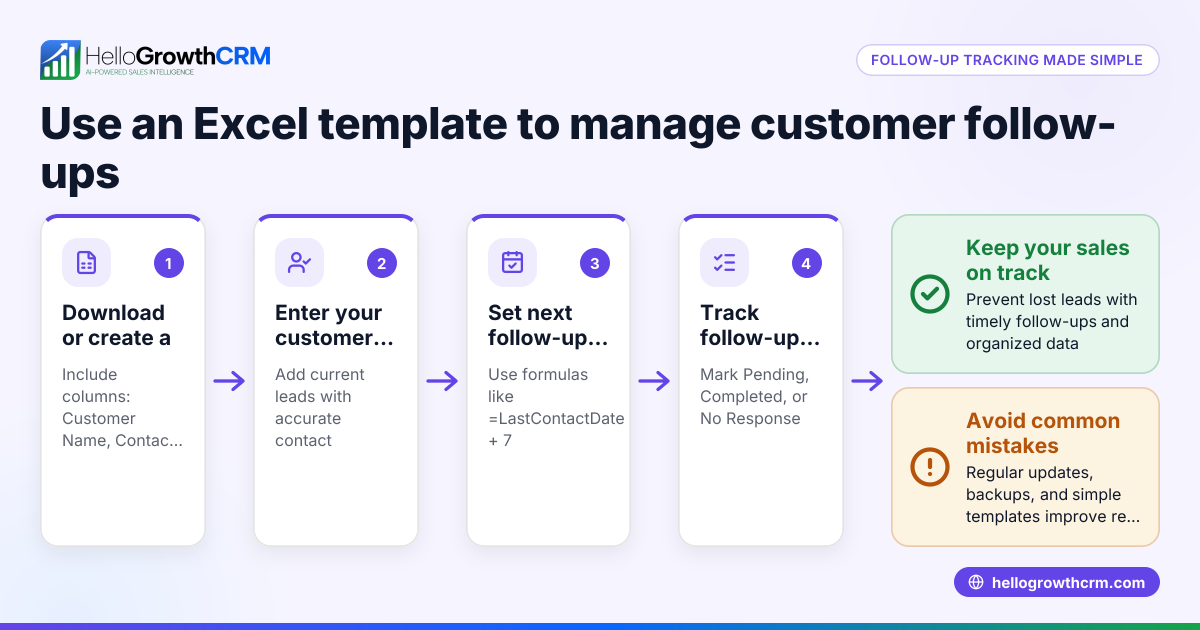
- Download a sales lead tracker template: Start with a free Excel template designed for sales leads. You can find free sales templates at sales templates. Choose one with columns for lead contact info, source, status, follow-up date, and notes.
- Set up columns relevant to your UAE business: Typical columns include Lead Name, Contact Number, Email, Lead Source (e.g., website, WhatsApp), Date of Enquiry, Lead Owner (salesperson), Lead Status (new, contacted, qualified), Next Follow-up Date, and Notes.
- Enter existing leads: Input all current leads from your WhatsApp chats, calls, and forms into the tracker. This centralises data and avoids duplication.
- Assign lead owners: Allocate each lead to a team member responsible for follow-up. This clarifies accountability.
- Schedule follow-ups: Use the Next Follow-up Date column to plan calls or messages. Sort or filter by this date daily to prioritise tasks.
- Update lead status regularly: Change the Lead Status as conversations progress (e.g., contacted, interested, closed won, closed lost).
- Review and report weekly: Use Excel filters or pivot tables to summarise lead counts by status, source, or owner. This helps spot bottlenecks.
- Back up your tracker: Save copies regularly to avoid data loss.
- Consider automating with free tools: For more efficiency, explore free sales tools and calculators at free sales tools and calculators.
Example (fictional figures)
A business-setup consultancy in Business Bay, Dubai receives leads from its website and WhatsApp. They use this Excel tracker:
| Lead Name | Contact Number | Lead Source | Date of Enquiry | Lead Owner | Lead Status | Next Follow-up Date | Notes |
|---|---|---|---|---|---|---|---|
| Ahmed Ali | +971 50 123 4567 | Website | 01/06/2024 | Sara | New | 03/06/2024 | Interested in mainland setup |
Sara calls Ahmed on 03/06/2024 and updates status:
Lead Status: Contacted
Next Follow-up Date: 10/06/2024
Notes: Sent proposal, waiting for reply
This simple log helps Sara track leads without missing follow-ups.
Common mistakes
- Not updating the tracker daily: Leads go cold if follow-ups are missed. Prevent by setting daily review reminders.
- Using inconsistent data formats: Mixing phone number formats or date styles causes confusion. Use a standard format (e.g., +971 50 123 4567, DD/MM/YYYY).
- Ignoring lead ownership: Without assigned owners, leads get neglected. Assign leads clearly and communicate this to the team.
- Overloading the tracker with unnecessary columns: Too many columns make it hard to use. Stick to essential fields for clarity.
- Failing to back up the file: Losing your tracker means lost data. Save backups on cloud storage or external drives.
- Not prioritising leads by follow-up date: Leads may be contacted late or forgotten. Sort or filter by next follow-up date daily.
Doing this in HelloGrowthCRM
HelloGrowthCRM offers free sales tools and calculators including pipeline templates you can download without an account. It captures every enquiry from forms, calls or WhatsApp as a lead with an owner and next step, instead of scattered notes. Its AI lead scoring helps telecallers focus on leads most likely to convert first. This digital approach reduces manual errors and speeds up follow-up.
Frequently asked questions
Can I customise the sales lead tracker Excel template for my UAE business? Yes, Excel templates are flexible. Add or remove columns based on your sales process, such as lead source types common in UAE markets or specific follow-up stages.
How do I keep my sales lead tracker updated when using WhatsApp for sales? Manually enter WhatsApp enquiries into the tracker daily or consider HelloGrowthCRM, which integrates WhatsApp leads directly to reduce manual entry.
What are the key columns I should include in a UAE sales lead tracker? Include Lead Name, Contact Number (with UAE country code), Lead Source, Date of Enquiry, Lead Owner, Lead Status, Next Follow-up Date, and Notes.
Is there a way to automate lead prioritisation in Excel? Excel can use formulas or conditional formatting to highlight leads with upcoming follow-ups, but automation is limited. For smarter prioritisation, tools like HelloGrowthCRM use AI lead scoring.
Where can I find free sales templates for UAE businesses? HelloGrowthCRM offers free sales templates and calculators at sales templates and free sales tools and calculators that are suitable for UAE businesses.
Key takeaways
- Use a ready-made Excel sales lead tracker template to organise leads clearly.
- Include essential columns: lead info, source, owner, status, and follow-up dates.
- Update the tracker daily and assign each lead an owner.
- Avoid common mistakes like inconsistent data and missed follow-ups.
- Consider HelloGrowthCRM for automated lead capture and AI lead scoring.
Start organising your sales leads effectively today. You can also Start on the Free Forever plan (200 leads, no credit card) with HelloGrowthCRM and see how digital tools improve your sales follow-up.
Ready to put this into practice?
Set up your pipeline, WhatsApp follow-ups, and AI lead scoring in minutes — free, no credit card.
Try HelloGrowthCRM freeGet CRM tips in your inbox
Join thousands of sales professionals who get weekly insights on CRM strategy, AI automation, and pipeline optimization.

The HelloGrowthCRM team publishes guides on CRM strategy, AI sales tools, and revenue operations for small business sales teams.