HelloGrowthCRM software
Built for real small-business sales teams
HelloGrowthCRM helps reps qualify faster, follow up on time, and close more deals—with practical automation in one place.
- AI lead scoring and pipeline visibility
- Built-in dialer, WhatsApp, and email automation
- Sales forecasting and RevOps-ready reporting
Scheduling programs for small businesses are software solutions that allow you to organize, book, and manage appointments or meetings with customers and prospects. Instead of juggling phone calls, texts, or emails to find a meeting time, these programs let clients pick from your available slots online. This saves time, reduces errors, and improves customer experience.
Why this comes up / what goes wrong
Small business owners often struggle to keep track of appointments and follow-ups using manual methods like spreadsheets, text messages, or emails. This leads to missed meetings, slow follow-ups, and lost sales opportunities. Without a centralized scheduling tool, coordinating times with clients can become a frustrating back-and-forth, causing delays and confusion. Sales teams working on WhatsApp or email may waste hours confirming meetings instead of selling. As your business grows, these inefficiencies multiply, making it hard to scale.
Step-by-step
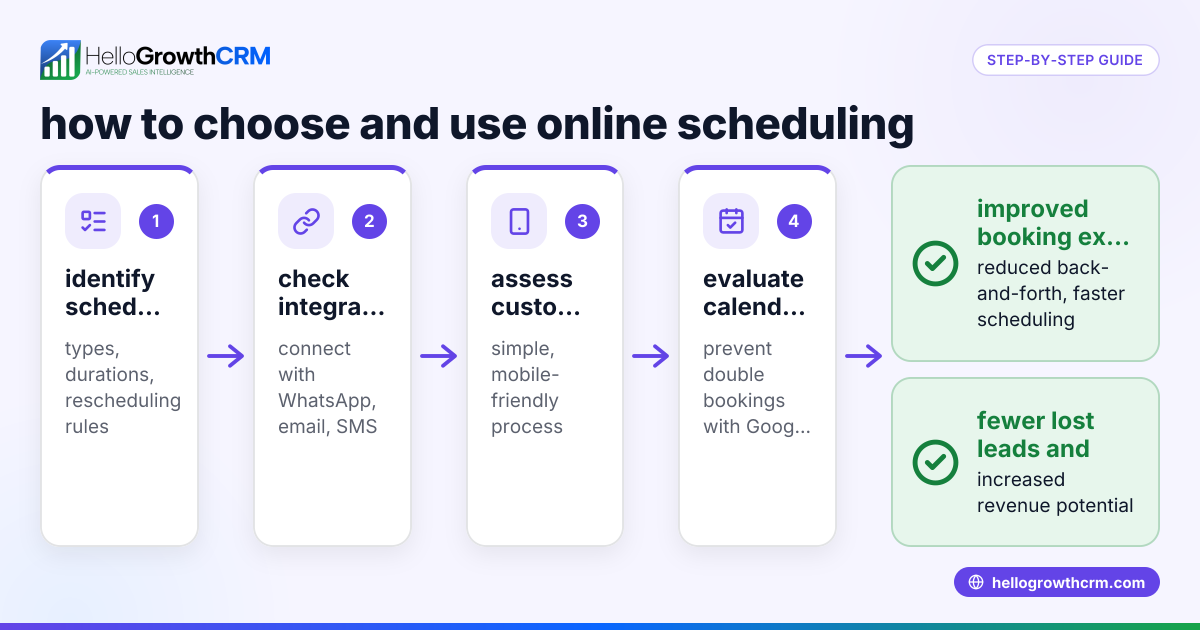
- Identify your scheduling needs: Determine what types of appointments or meetings you need to schedule (e.g., sales calls, consultations, service visits). Check if you need features like automatic reminders, calendar integrations, or payment collection.
- Research scheduling programs: Look for software designed for small businesses that offer easy booking links, calendar syncing, and mobile access. Consider programs that integrate with your existing tools like WhatsApp or email.
- Test scheduling tools: Try free versions or demos to see how the booking process works from both your side and the customer’s. Check if the interface is simple and if notifications work reliably.
- Set up your availability: Define your working hours and buffer times between appointments to avoid overlaps. Configure settings for cancellations and rescheduling.
- Create booking links: Generate shareable links that prospects or clients can use to pick a time slot without needing to message you back and forth.
- Communicate the booking process: Add booking links to your email signature, website, WhatsApp messages, or social media to make scheduling easy for customers.
- Monitor and adjust: Track appointment attendance and customer feedback. Adjust your scheduling rules or availability to improve efficiency.
- Train your team: Ensure everyone involved understands how to use the scheduling program and follows up promptly on booked appointments.
When choosing a scheduling program, consider options like HelloGrowthCRM’s meeting scheduler that integrates booking links directly with WhatsApp to reduce friction in communication. Learn more about WhatsApp and SMS CRM.
Example (fictional figures)
A B2B software reseller in Denver, Colorado, wants to reduce the time spent coordinating sales calls. They decide to implement an online scheduling tool starting 07/01/2026.
- Sales reps currently spend 10 hours per week coordinating calls.
- Average hourly cost of a sales rep is $40.
Calculation of weekly savings:
10 hours × $40 = $400 saved weekly
Annual savings:
$400 × 52 weeks = $20,800 saved annually
By using the scheduling program, they reduce back-and-forth messages by 80%, improving follow-up speed and increasing booked appointments.
Common mistakes
- Not setting clear availability: Leaving open slots without buffer times causes appointment overlaps. Prevent by defining strict working hours and breaks.
- Ignoring mobile usability: Choosing a scheduling program not optimized for mobile frustrates customers who mostly use smartphones. Test mobile experience before committing.
- Failing to communicate booking links: If customers don’t know how to book, the tool won’t help. Share links on multiple channels like email, WhatsApp, and your website.
- Not training the team: Staff unaware of the scheduling process may miss appointments or fail to follow up. Provide clear instructions and regular refreshers.
- Overcomplicating the booking process: Too many required fields or complicated steps discourage bookings. Keep the process simple and quick.
- Neglecting follow-up: Scheduling alone won’t close deals if follow-up is slow. Assign responsibility to someone managing the follow-up queue regularly.
Avoid these mistakes to get the most from your scheduling program. For sales teams using WhatsApp, consider a CRM with integrated scheduling and follow-up features like HelloGrowthCRM.
Doing this in HelloGrowthCRM
HelloGrowthCRM offers a scheduling and booking feature that lets prospects pick a meeting slot from a link, eliminating the back-and-forth on WhatsApp. This shortens the path from interest to conversation and helps your sales team focus on selling. Additionally, the Managed RevOps service provides founders without sales managers with weekly follow-up support to keep the lead queue moving efficiently. Learn more about these features at WhatsApp and SMS CRM.
Frequently asked questions
What is the best scheduling program for a small business? The best scheduling program depends on your business needs, such as calendar integration, ease of use, and communication channels. Look for tools that offer simple booking links, mobile access, and integrate with your sales communication platforms like WhatsApp. Trying free versions helps find the right fit. See options in free CRM for small business.
How do scheduling programs save time for small businesses? They automate appointment booking by letting clients select available time slots online, eliminating the need for manual coordination through calls or messages. This reduces errors, missed appointments, and frees up time for sales or service staff.
Can scheduling programs integrate with WhatsApp? Some scheduling tools integrate with WhatsApp by allowing you to share booking links directly in chats, streamlining the appointment process. HelloGrowthCRM, for example, is WhatsApp-native and supports meeting scheduling through links sent on WhatsApp.
How do I encourage customers to use online scheduling? Make booking links easy to find by adding them to your website, email signature, and WhatsApp messages. Explain the benefits like instant confirmation and flexible rescheduling to motivate customers.
Is it necessary to have a sales manager to manage scheduling and follow-up? Not necessarily. HelloGrowthCRM offers Managed RevOps support to help founders without sales managers by providing weekly follow-up and pipeline management, ensuring leads are nurtured consistently.
Key takeaways
- Scheduling programs let customers book appointments online, reducing manual coordination.
- Define clear availability and keep the booking process simple to avoid confusion.
- Share booking links widely on email, WhatsApp, and your website.
- Train your team and assign follow-up responsibility to prevent missed opportunities.
- HelloGrowthCRM offers scheduling and booking integrated with WhatsApp plus Managed RevOps support.
Start improving your appointment management today. Start on the Free Forever plan (200 leads, no credit card) and see how scheduling can streamline your sales process.
Ready to put this into practice?
Set up your pipeline, WhatsApp follow-ups, and AI lead scoring in minutes — free, no credit card.
Try HelloGrowthCRM freeGet CRM tips in your inbox
Join thousands of sales professionals who get weekly insights on CRM strategy, AI automation, and pipeline optimization.

The HelloGrowthCRM team publishes guides on CRM strategy, AI sales tools, and revenue operations for small business sales teams.