HelloGrowthCRM software
Built for real small-business sales teams
HelloGrowthCRM helps reps qualify faster, follow up on time, and close more deals—with practical automation in one place.
- AI lead scoring and pipeline visibility
- Built-in dialer, WhatsApp, and email automation
- Sales forecasting and RevOps-ready reporting
Online scheduling for small business means letting customers pick appointment times through an online link, removing the need for back-and-forth calls or messages. This article explains why small businesses need it, how to choose the right solution step-by-step, common pitfalls to avoid, and a realistic example to guide you.
Why this comes up / what goes wrong
Small business owners often juggle many roles, including managing appointments and customer communication. Without online scheduling, they rely on phone calls, texts, or emails to book meetings, which wastes time and causes missed opportunities. Customers get frustrated waiting for responses or having to coordinate times manually. This is especially common in service businesses like consultants, salons, or real estate agents, where timely booking affects sales and customer satisfaction. Slow or complicated booking processes can lead to lost leads and lower revenue.
Step-by-step
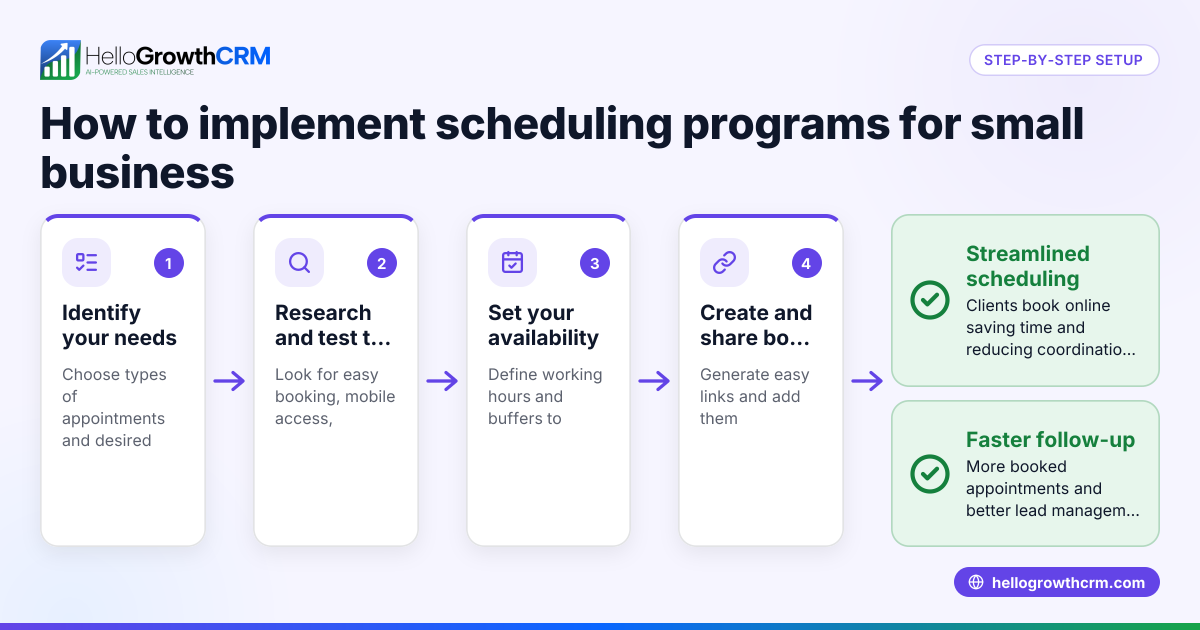
- Identify your scheduling needs: List the types of appointments you offer, how long each lasts, and whether you allow rescheduling or cancellations. Knowing this helps narrow down suitable tools.
- Check integration capabilities: Make sure the scheduling tool connects with your main communication channels such as WhatsApp, email, or SMS. This integration streamlines reminders and follow-ups.
- Assess ease of use for customers: The booking process should be simple, mobile-friendly, and require minimal steps to avoid losing customers during booking.
- Evaluate calendar synchronization: Confirm the tool syncs with your existing calendars (Google Calendar, Outlook, etc.) to prevent double bookings and scheduling conflicts.
- Review pricing and plans: Look for options that fit your budget without hidden fees. Many tools offer free tiers or affordable plans suited for small businesses.
- Test automation features: Automated reminders and follow-ups reduce no-shows and improve customer engagement. Check if the tool supports SMS or email notifications.
- Consider support and scalability: Choose a solution that offers reliable customer support and can grow with your business needs.
- Try before you buy: Use free trials or free tiers to test the tool’s usability and features before committing.
Example (fictional figures)
A B2B software reseller in Denver, Colorado, named TechSolutions, wants to reduce lost leads caused by slow appointment booking. They offer 30-minute demos priced at $500 each.
- They schedule about 20 demos per week.
- They estimate that slow manual booking leads to lost demos, but the exact percentage is unknown.
If TechSolutions improves booking speed and reduces lost demos by 50%, they can estimate the revenue saved.
Calculations:
20 demos × $500 = $10,000 potential weekly revenue
Assuming 4 demos lost per week before scheduling improvement.
Reducing lost demos by 50% means 4 × 50% = 2 demos saved
Revenue saved weekly = 2 × $500 = $1,000
Annual revenue saved = $1,000 × 52 weeks = $52,000
This example shows how improving scheduling can recover significant revenue by reducing booking friction.
Common mistakes
- Choosing a tool without calendar sync: This causes double bookings and confusion. Always verify calendar integration.
- Ignoring mobile usability: Many customers book on phones; a poor mobile experience loses bookings. Test the booking page on different devices.
- Not automating reminders: Forgetting to remind customers causes no-shows. Use tools with automated SMS or email reminders.
- Overcomplicating the booking process: Too many steps or required fields discourage customers. Keep it simple.
- Neglecting follow-up management: After booking, follow-ups ensure attendance and upsells. Use a CRM or managed support.
- Underestimating support needs: Small businesses may need help setting up or troubleshooting. Choose vendors with reliable customer service.
Learn more about managing follow-ups and sales with a free CRM for small business.
Doing this in HelloGrowthCRM
HelloGrowthCRM offers scheduling and booking pages where prospects pick a slot from a link, eliminating back-and-forth on WhatsApp. This feature is available on all plans, including Free. For founders without sales managers, HelloGrowthCRM’s Managed RevOps service assigns a specialist to work the follow-up queue weekly, ensuring leads are contacted promptly and pipelines stay clean. This helps small businesses turn bookings into closed deals efficiently. Learn more about WhatsApp and SMS CRM and HelloGrowthCRM for the United States.
Frequently asked questions
What is online scheduling for small business? Online scheduling lets customers book appointments through a web link at their convenience, reducing the need for calls or texts. It saves time and improves customer experience.
How do I choose the right scheduling tool? Look for features like calendar sync, ease of use, mobile friendliness, automation for reminders, and integration with your communication channels. Also, consider pricing and customer support.
Can online scheduling reduce no-shows? Yes, tools with automated reminders by email or SMS help reduce no-shows by keeping appointments top of mind for customers.
Is online scheduling suitable for all small businesses? Most service-oriented small businesses benefit from it, especially those with frequent appointments like consultants, salons, or real estate agents. Product sellers may have less need.
How does HelloGrowthCRM support scheduling? HelloGrowthCRM provides meeting scheduling pages that let prospects pick slots from a link, integrating with WhatsApp to avoid back-and-forth. Managed RevOps support helps founders keep follow-ups on track.
Key takeaways
- Online scheduling streamlines booking by letting customers pick appointment times online.
- Choose tools with calendar sync, mobile usability, and automated reminders.
- Avoid common mistakes like complex booking flows and lack of follow-up.
- A practical example shows how scheduling can recover lost revenue.
- HelloGrowthCRM offers scheduling features and managed follow-up support for small businesses.
Start simplifying your appointments today. Start on the Free Forever plan (200 leads, no credit card).
Ready to put this into practice?
Set up your pipeline, WhatsApp follow-ups, and AI lead scoring in minutes — free, no credit card.
Try HelloGrowthCRM freeGet CRM tips in your inbox
Join thousands of sales professionals who get weekly insights on CRM strategy, AI automation, and pipeline optimization.

The HelloGrowthCRM team publishes guides on CRM strategy, AI sales tools, and revenue operations for small business sales teams.