HelloGrowthCRM software
Built for real small-business sales teams
HelloGrowthCRM helps reps qualify faster, follow up on time, and close more deals—with practical automation in one place.
- AI lead scoring and pipeline visibility
- Built-in dialer, WhatsApp, and email automation
- Sales forecasting and RevOps-ready reporting
Scheduling software for coaches enables clients to book sessions easily by choosing available time slots directly from a link. This removes the need for back-and-forth coordination via calls or messages, saving time and reducing missed bookings.
Why this comes up / what goes wrong
Coaches often manage multiple clients and appointments while also running their business, sometimes without dedicated administrative help. Without proper scheduling tools, they spend excessive time coordinating sessions through email, text, or WhatsApp messages. This back-and-forth wastes valuable time, delays bookings, and frustrates clients who want quick and simple scheduling.
Additionally, inconsistent scheduling practices can lead to double bookings or missed sessions, which harm a coach’s reputation and revenue. Many general scheduling tools do not integrate well with the communication channels coaches prefer, like WhatsApp or SMS, leading to fragmented workflows and poor adoption.
Coaches need scheduling software tailored to their workflow that supports easy client booking, integrates with messaging apps, and helps small teams collaborate efficiently.
Step-by-step
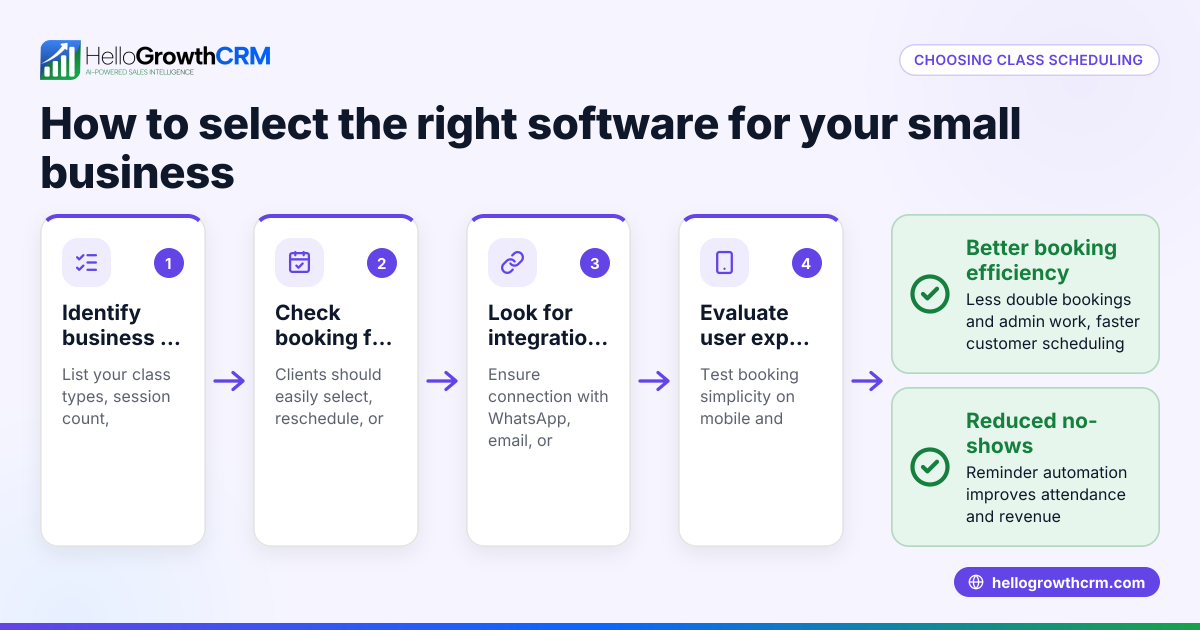
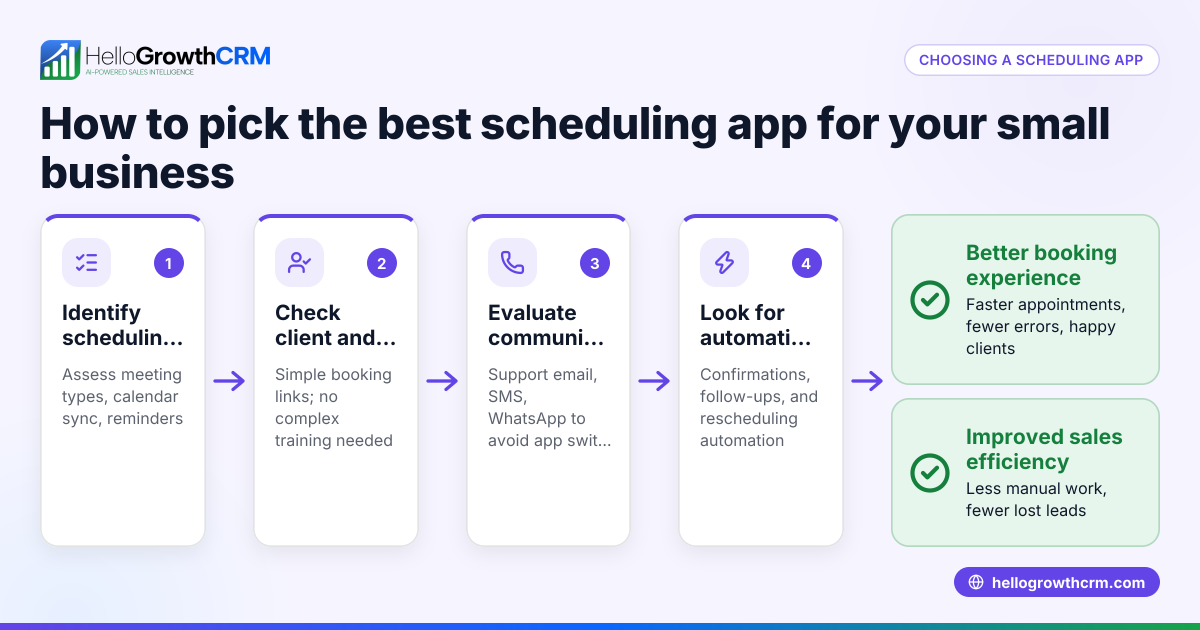
- Identify your scheduling needs: Determine whether you offer one-on-one coaching, group sessions, or both. Decide if you need recurring appointments and varying session lengths.
- Check client booking experience: Choose software that allows clients to pick available time slots via a simple link, avoiding account creation or complicated steps. Verify it works smoothly on mobile devices.
- Look for integration with communication tools: Since many coaches use WhatsApp or SMS, select software that complements these channels to keep client conversations centralized.
- Evaluate team collaboration features: If you work with assistants or co-coaches, ensure the software supports shared calendars, booking assignments, and task tracking to prevent scheduling conflicts.
- Assess automation and follow-up support: Automated reminders and follow-ups reduce no-shows and keep clients engaged.
- Compare pricing and plans: Some software offers free tiers with basic features, while others charge for team access or automation. Pick software that fits your budget and growth plans.
- Test user interface and support quality: A simple, intuitive interface speeds up adoption. Responsive customer support helps resolve issues quickly.
- Review reporting and analytics: Insights on bookings, cancellations, and client activity help optimize your schedule and sales pipeline.
Following these steps helps coaches shortlist scheduling software that fits their business model and client communication style. For software integrating well with WhatsApp and SMS, consider options like WhatsApp and SMS CRM.
Example (fictional figures)
Mike runs a coaching business in Denver, Colorado, offering 30-minute sessions at $120 each. He schedules about 25 sessions monthly.
- Before using scheduling software, Mike spends 3 hours weekly coordinating appointments via WhatsApp.
- He adopts scheduling software that lets clients pick slots from a booking link.
- Time saved per week: 3 hours × 4 weeks = 12 hours per month.
- Mike values his time at $60 per hour.
- Monthly time savings value calculation:
12 hours × $60/hour = $720
- Monthly revenue from sessions:
25 sessions × $120 = $3,000
- Software cost: $40 per month.
- Net monthly benefit calculation:
$720 (time savings) - $40 (software cost) = $680 net benefit.
This example shows how scheduling software frees Mike’s time to focus on coaching or growing his business.
Common mistakes
- Choosing software without client-friendly booking: Avoid systems requiring clients to create accounts or navigate complex steps. Prevent this by testing the booking process yourself.
- Ignoring communication tool integration: Not integrating scheduling with WhatsApp or SMS results in scattered conversations. Select software that complements your messaging channels, like WhatsApp and SMS CRM.
- Overlooking team collaboration needs: If you work with others, pick software supporting shared calendars and booking assignments to avoid double bookings.
- Neglecting follow-up automation: Without automated reminders, no-shows increase. Choose software with built-in notifications.
- Underestimating onboarding time: Complex software can reduce adoption. Prioritize simple, intuitive interfaces.
Doing this in HelloGrowthCRM
HelloGrowthCRM offers scheduling and booking where prospects pick a slot from a link instead of back-and-forth on WhatsApp. This feature shortens the path from interest to conversation and suits coaches relying on WhatsApp for client communication. Additionally, its Managed RevOps service provides weekly follow-up execution and pipeline hygiene, helping founders without sales managers keep leads moving efficiently. Learn more about these capabilities at HelloGrowthCRM for the United States and WhatsApp and SMS CRM.
Frequently asked questions
What features should I prioritize in scheduling software for coaching? Prioritize easy client booking via a link, integration with WhatsApp or SMS, automated reminders, and support for multiple calendars if you have a team. Also, consider reporting tools to track session bookings and cancellations.
Can scheduling software integrate with WhatsApp? Some scheduling software complements WhatsApp by allowing booking links to be shared easily and syncing client communication. HelloGrowthCRM offers scheduling and booking that shortens the path from interest to conversation alongside WhatsApp communication. See WhatsApp and SMS CRM.
Is automated follow-up important? Yes. Automated reminders reduce no-shows and help maintain client engagement. Scheduling software with built-in follow-up automation saves you time and improves reliability.
How do I handle scheduling when working with co-coaches or assistants? Choose software that supports shared calendars and booking assignments to avoid conflicts. This ensures all team members see the schedule and manage their sessions efficiently.
Are there free scheduling software options for coaches? Many scheduling tools offer free tiers with basic features like booking links. However, advanced features like team collaboration or automation often require paid plans. HelloGrowthCRM includes scheduling on its Free plan for up to 200 leads, making it a good starting point. See HelloGrowthCRM for the United States.
Key takeaways
- Scheduling software for coaches lets clients pick appointment slots directly, reducing time lost in back-and-forth.
- Integration with WhatsApp and SMS streamlines communication and keeps client conversations centralized.
- Automated reminders and follow-ups reduce no-shows and improve client engagement.
- Team features like shared calendars prevent double bookings and improve collaboration.
- Testing booking flow and interface usability ensures smooth adoption.
- HelloGrowthCRM offers scheduling and booking with WhatsApp integration plus Managed RevOps support for follow-up.
Start simplifying your coaching appointments today. Start on the Free Forever plan (200 leads, no credit card) and see how scheduling software can save you time and grow your business.
Ready to put this into practice?
Set up your pipeline, WhatsApp follow-ups, and AI lead scoring in minutes — free, no credit card.
Try HelloGrowthCRM freeGet CRM tips in your inbox
Join thousands of sales professionals who get weekly insights on CRM strategy, AI automation, and pipeline optimization.

The HelloGrowthCRM team publishes guides on CRM strategy, AI sales tools, and revenue operations for small business sales teams.