HelloGrowthCRM software
Built for real small-business sales teams
HelloGrowthCRM helps reps qualify faster, follow up on time, and close more deals—with practical automation in one place.
- AI lead scoring and pipeline visibility
- Built-in dialer, WhatsApp, and email automation
- Sales forecasting and RevOps-ready reporting
Slack CRM integration links your team's conversations in Slack with your customer relationship management system. This connection helps sales and support teams respond faster and keep customer data up to date. Many UAE small businesses look for Slack CRM integration to reduce lost leads and avoid switching between multiple apps.
Why this comes up / what goes wrong
Small and mid-sized businesses in the UAE often use Slack for internal communication but run sales and customer follow-up on WhatsApp, phone calls, and spreadsheets. This scattered approach causes delays and missed opportunities because customer information is spread across different platforms.
Business owners search for Slack CRM integration to:
- Centralise customer data and communication.
- Automate lead capture and follow-ups.
- Improve team collaboration on deals.
Without integration, teams spend time copying data between Slack and their CRM or messaging apps, causing slow lead responses and lost sales.
Step-by-step
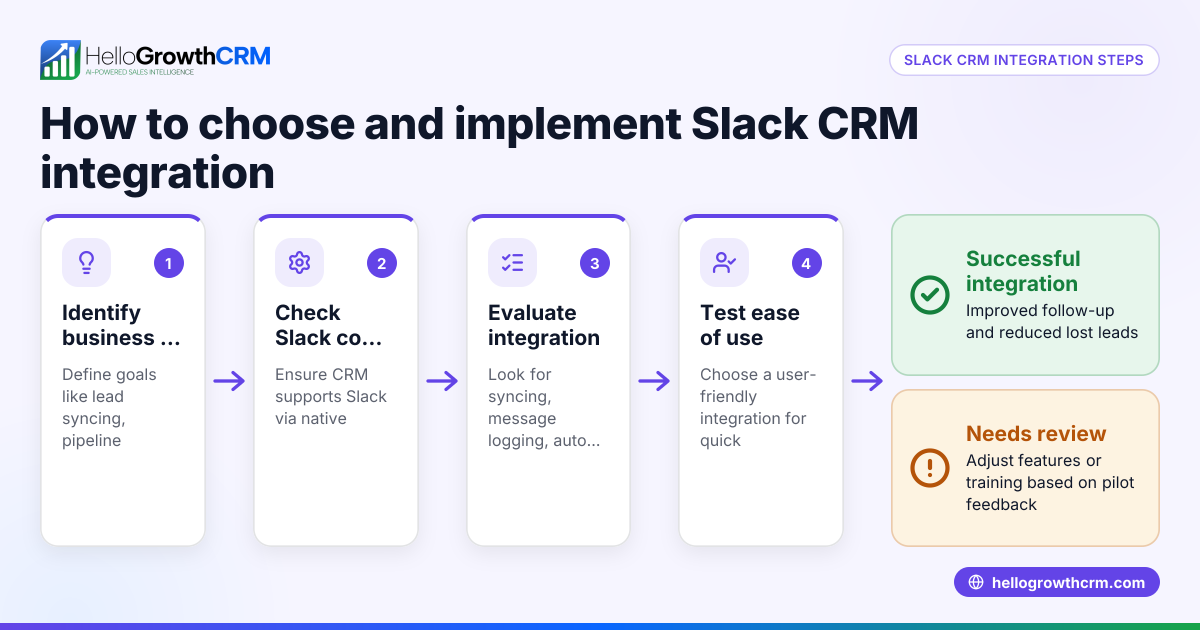
- Identify Your Business Needs
- Define what you want Slack CRM integration to achieve, such as receiving lead notifications in Slack or updating CRM records directly from Slack.
- Determine which CRM features are essential for your business, like lead capture, messaging, and task management.
- List Compatible CRM Options
- Research CRM systems that offer Slack integration or have APIs to connect with Slack.
- Confirm if the CRM supports WhatsApp and SMS follow-ups, as these channels are common in UAE business communication.
- Evaluate Integration Features
- Check if the integration supports:
- Automatic lead capture from Slack messages or commands.
- Logging Slack conversations on customer records.
- Triggering follow-up tasks or messages from Slack.
- Review Technical Requirements and Support
- Verify if your chosen CRM plan includes API and integration capabilities.
- Assess the ease of setup and whether custom development might be needed.
- Test the Integration
- Run a pilot program with your sales or telesales team.
- Confirm that lead data syncing, message logging, and task creation work smoothly.
- Train Your Team
- Provide clear instructions on how to use the Slack CRM integration.
- Emphasise the importance of updating records and responding promptly to leads.
- Monitor and Optimise
- Track lead response times and sales conversion rates.
- Adjust workflows and automation as needed for better efficiency.
Example (fictional figures)
Abu Dhabi Car Rentals wants to integrate Slack with their CRM to speed up lead follow-up.
- They receive 100 leads monthly, each lead worth AED 5,000 in potential revenue.
- Before integration, they estimate losing leads due to slow follow-up.
Calculations:
Leads lost monthly = 100 × 20% = 20 leads NEEDS EXPERT REVIEW Lost revenue monthly = 20 × AED 5,000 = AED 100,000
After integration, lost leads reduce significantly.
Leads lost monthly post-integration = 100 × 5% = 5 leads NEEDS EXPERT REVIEW Lost revenue monthly post-integration = 5 × AED 5,000 = AED 25,000
Monthly revenue saved = AED 100,000 - AED 25,000 = AED 75,000
This example shows how Slack CRM integration can help reduce lost leads and increase revenue by improving follow-up speed.
Common mistakes
- Choosing a CRM without Slack or API support
- Prevent this by confirming the CRM offers Slack integration or a flexible API for custom connections.
- Ignoring WhatsApp and SMS channels
- Prevent this by selecting a CRM that logs WhatsApp conversations and supports messaging follow-ups, as many UAE businesses rely on these channels.
- Not training the team on new workflows
- Prevent this by providing thorough training and clear guidelines on using the integration.
- Skipping pilot testing before full rollout
- Prevent this by running a small test to identify and fix issues early.
- Overcomplicating automation
- Prevent this by starting with simple workflows and expanding gradually as the team adapts.
- Failing to monitor integration effectiveness
- Prevent this by tracking lead response times and adjusting workflows based on results.
Doing this in HelloGrowthCRM
HelloGrowthCRM supports API and integrations, including enquiries from IndiaMART and JustDial arriving directly as leads. It logs WhatsApp conversations on lead records and allows follow-ups via WhatsApp and SMS messages. Additionally, AI agents (in Beta) can draft follow-up messages after calls for reps to review and send. These features help UAE businesses unify communication and sales workflows efficiently. Learn more about HelloGrowthCRM's integrations and WhatsApp and SMS CRM.
Frequently asked questions
Can Slack replace a CRM for small businesses? Slack is designed for team communication but does not provide structured lead and customer management. Integrating Slack with a CRM ensures customer data is organised and follow-ups are tracked effectively.
How does Slack CRM integration improve sales follow-up? It enables instant lead alerts in Slack, automatic logging of conversations, and task creation, reducing delays and missed leads.
Is it difficult to set up Slack CRM integration? Setup complexity varies by CRM. Some offer ready-made Slack apps; others require API configuration. Testing and training help ensure smooth adoption.
Can HelloGrowthCRM integrate with Slack? HelloGrowthCRM offers API and integration capabilities that can connect Slack workflows with lead capture and messaging. See HelloGrowthCRM for the United Arab Emirates for details.
Why should I consider WhatsApp and SMS along with Slack? In the UAE, many customers prefer WhatsApp and SMS for communication. A CRM supporting these channels alongside Slack helps ensure no lead is missed.
Key takeaways
- Slack CRM integration centralises communication and customer data.
- Evaluate CRM options based on Slack compatibility, API access, and messaging support.
- Test integrations with your team before full deployment.
- Do not neglect WhatsApp and SMS channels common in UAE businesses.
- HelloGrowthCRM supports integrations, WhatsApp logging, and AI-assisted follow-ups.
Start streamlining your sales and communication by trying HelloGrowthCRM. Start on the Free Forever plan (200 leads, no credit card).
Ready to put this into practice?
Set up your pipeline, WhatsApp follow-ups, and AI lead scoring in minutes — free, no credit card.
Try HelloGrowthCRM freeGet CRM tips in your inbox
Join thousands of sales professionals who get weekly insights on CRM strategy, AI automation, and pipeline optimization.

The HelloGrowthCRM team publishes guides on CRM strategy, AI sales tools, and revenue operations for small business sales teams.