HelloGrowthCRM software
Built for real small-business sales teams
HelloGrowthCRM helps reps qualify faster, follow up on time, and close more deals—with practical automation in one place.
- AI lead scoring and pipeline visibility
- Built-in dialer, WhatsApp, and email automation
- Sales forecasting and RevOps-ready reporting
A small call center typically involves a modest team of agents who manage customer interactions by phone, often combined with other communication channels like email or SMS. Small businesses use call centers to improve customer service, increase sales outreach, or manage support efficiently without the overhead of a large operation.
Why this comes up / what goes wrong
Small business owners often consider starting a small call center when they notice challenges such as slow lead follow-up, scattered contact information across spreadsheets and messaging apps, or missed sales opportunities. Without a clear process or proper tools, calls can be disorganized, agents may duplicate efforts, and customer satisfaction can drop. Many small teams run sales or support calls on text messages, email, and spreadsheets, which makes tracking call outcomes and managing leads difficult.
Step-by-step
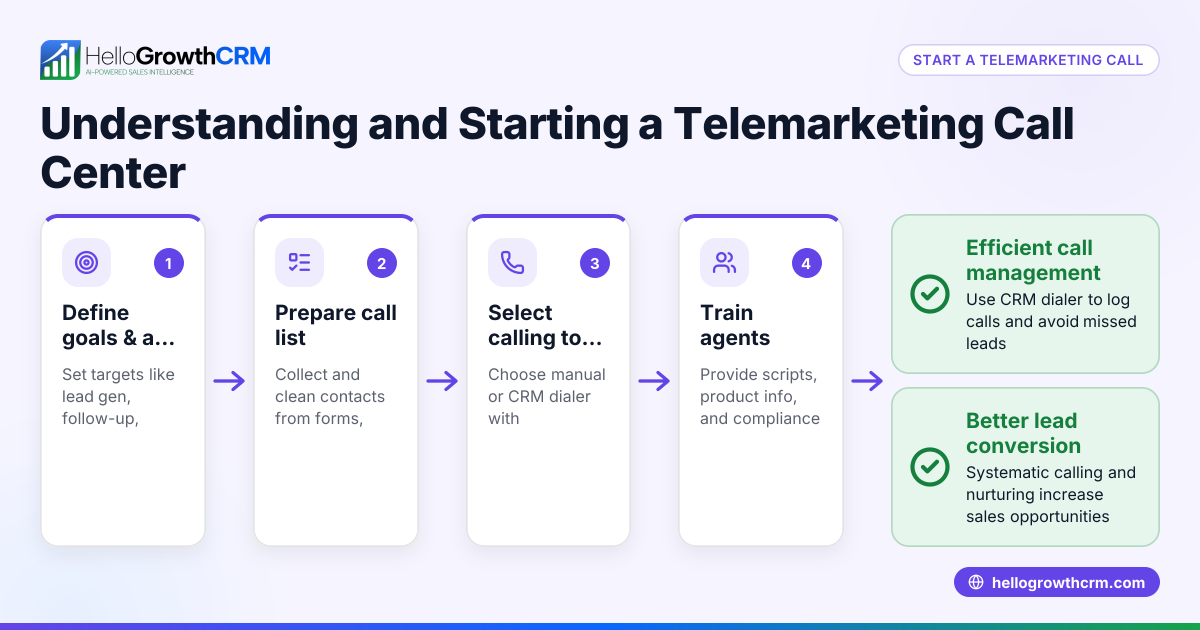
- Define your call center’s purpose and scope. Decide if your small call center will focus on outbound sales, inbound support, or both. Clarify your goals, such as increasing sales conversions or improving customer satisfaction.
- Choose your team size and roles. Determine how many agents you need based on call volume estimates. Assign roles like reps, supervisors, and quality reviewers.
- Select communication channels and tools. Decide which channels you will use (phone, WhatsApp, SMS, email). Choose software that supports these channels and integrates lead management.
- Set up call lists and lead management. Prepare call lists from your existing leads or new prospects. Organize leads in a CRM to track call outcomes and follow-ups.
- Train your agents. Provide scripts, product knowledge, and training on using your chosen tools and CRM.
- Implement call tracking and logging. Ensure every call’s result is logged to monitor performance and follow-up needs.
- Monitor and optimize. Use reporting tools to track call volume, success rates, and agent productivity. Adjust scripts, call lists, and workflows as needed.
- Ensure compliance and data security. Follow legal requirements for telemarketing and customer data protection.
For managing calls and logging outcomes efficiently, consider a CRM with a built-in CRM dialer that lets agents call directly from the system and automatically logs each call.
Example (fictional figures)
A B2B software reseller in Denver, Colorado, wants to start a small call center with 5 reps focused on outbound sales starting 07/01/2026.
- Estimated daily call volume per agent: 40 calls
- Working days per month: 22
- Total monthly calls = 5 agents × 40 calls/day × 22 days = 4,400 calls
Assuming a 5% conversion rate to sales:
- Monthly sales = 4,400 calls × 5% = 220 sales
Average sale value: $1,200
- Monthly revenue from calls = 220 sales × $1,200 = $264,000
This example shows how a small call center can generate significant revenue by organizing calling efforts and tracking outcomes.
Common mistakes
- Not defining clear goals. Prevent by setting specific, measurable objectives before starting.
- Using multiple disconnected tools. Prevent by choosing a CRM that integrates calling, lead management, and follow-up.
- Poor call list management. Prevent by regularly updating and cleaning lead lists.
- Inadequate training. Prevent by providing detailed agent training and scripts.
- Failing to log call outcomes. Prevent by using a CRM with a built-in dialer that automatically records call results.
- Ignoring compliance rules. Prevent by understanding telemarketing laws and respecting do-not-call lists.
Using a CRM that supports WhatsApp and SMS alongside phone calls can help unify your communications. See how a WhatsApp and SMS CRM fits into your small call center strategy.
Doing this in HelloGrowthCRM
HelloGrowthCRM includes a built-in dialer that allows reps to work through call lists directly inside the CRM. Each call’s outcome is logged on the lead record automatically, keeping all call history organized and accessible. This helps small call centers avoid manual tracking errors and speeds up follow-up actions. Learn more about the built-in CRM dialer.
Frequently asked questions
What is the difference between a small call center and a large one? A small call center typically has fewer agents and simpler infrastructure, focusing on personalized service or targeted sales, while large call centers often have more agents and complex systems with multiple departments.
Can I run a small call center without special software? While possible, managing calls, leads, and follow-ups manually with spreadsheets and messaging apps is inefficient and prone to errors. Using CRM software with integrated calling features improves organization and results.
How do I measure the success of a small call center? Track metrics like call volume, conversion rates, average call duration, and customer satisfaction. Logging call outcomes in a CRM helps generate these reports.
What communication channels should a small call center use? Phone calls remain essential, but adding WhatsApp, SMS, and email can improve reach and customer convenience. Integrating these channels in one CRM simplifies management.
Is compliance with telemarketing laws necessary for small call centers? Yes, small call centers must comply with laws such as the Telephone Consumer Protection Act (TCPA). This includes respecting do-not-call lists and obtaining proper consent. (fcc.gov)
Key takeaways
- A small call center is a compact team handling calls for sales or support.
- Clear goals, organized lead management, and proper tools are essential.
- Logging call outcomes improves follow-up and performance tracking.
- Training agents and complying with laws prevent common pitfalls.
- Using a CRM with a built-in dialer streamlines calling and logging.
- Integrating phone, WhatsApp, and SMS channels enhances communication.
Starting a small call center can boost your sales and customer service efficiency. To get started with a tool that supports calling and lead management, start on the Free Forever plan (200 leads, no credit card).
Ready to put this into practice?
Set up your pipeline, WhatsApp follow-ups, and AI lead scoring in minutes — free, no credit card.
Try HelloGrowthCRM freeGet CRM tips in your inbox
Join thousands of sales professionals who get weekly insights on CRM strategy, AI automation, and pipeline optimization.

The HelloGrowthCRM team publishes guides on CRM strategy, AI sales tools, and revenue operations for small business sales teams.