HelloGrowthCRM software
Built for real small-business sales teams
HelloGrowthCRM helps reps qualify faster, follow up on time, and close more deals—with practical automation in one place.
- AI lead scoring and pipeline visibility
- Built-in dialer, WhatsApp, and email automation
- Sales forecasting and RevOps-ready reporting
Training a chatbot with your own data means using your business-specific information to teach the chatbot how to understand and respond accurately to customer questions. This customization improves chatbot usefulness and relevance for your products, services, and customer interactions.
Why this comes up / what goes wrong
Small and mid-sized business owners often try generic chatbots that don’t understand their unique business language or customer needs. This causes poor customer experiences and lost sales. For example, a landscaping contractor in Charlotte, North Carolina, may find a chatbot unable to answer questions about local permits or seasonal services because it was trained only on broad data. Training a chatbot with your own data fixes this by tailoring responses to your business context.
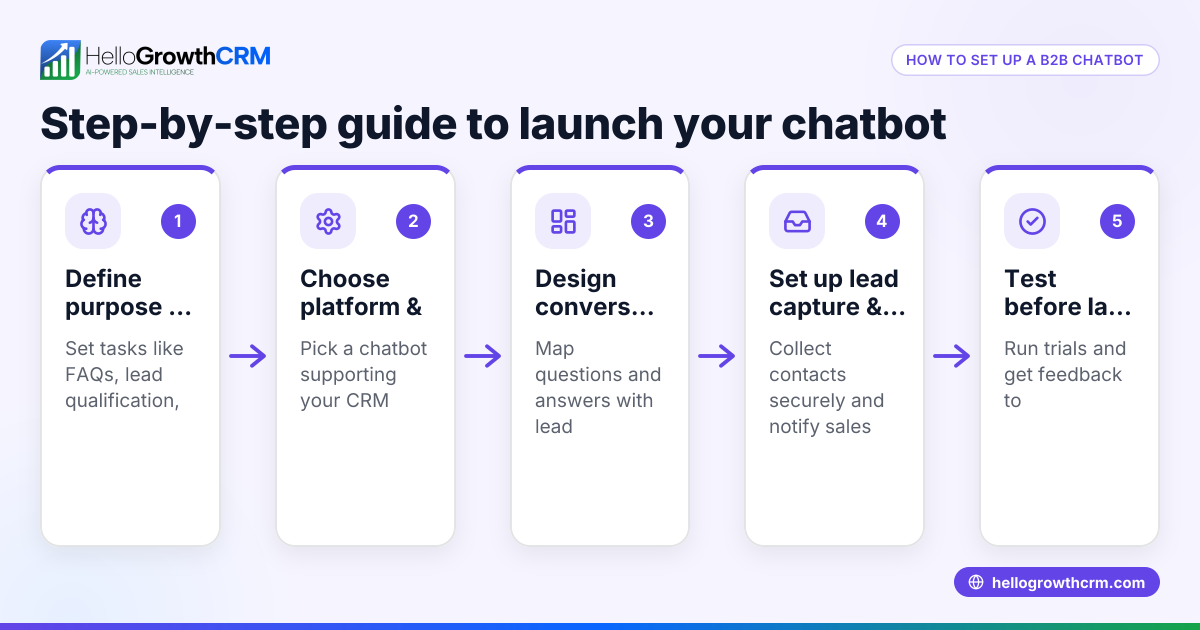
Step-by-step
- Collect your data: Gather customer questions, emails, chat transcripts, product details, FAQs, and other relevant information your customers typically ask about. Ensure the data is accurate and current.
- Clean and organize the data: Remove duplicates, fix errors, and format the data consistently. Group similar questions and answers together to create clear training pairs.
- Choose a chatbot platform that supports custom training: Confirm the platform allows uploading your own data or integrating with your databases.
- Upload or input your data: Follow the platform’s instructions to feed your cleaned data into the chatbot’s training system.
- Train the chatbot: Start the training process so the chatbot learns from your data. Training time depends on data volume.
- Test the chatbot: Interact with it using real customer questions to check its responses. Identify any gaps or errors.
- Refine and retrain: Update your data based on testing results and retrain the chatbot regularly to improve accuracy.
- Deploy and monitor: Launch the chatbot on your website, WhatsApp, or SMS channels and track its performance to ensure it meets customer needs.
Check if the chatbot handles your most common queries and understands your business terms correctly. For better communication management, consider platforms that support WhatsApp and SMS CRM and have built-in CRM dialers, such as WhatsApp and SMS CRM and the built-in CRM dialer.
Example (fictional figures)
Imagine a landscaping contractor in Charlotte, North Carolina, who wants to train a chatbot to answer common questions about their services and pricing.
- They collect 500 customer emails and chat transcripts.
- Cleaning the data takes 20 hours at $25/hour = $500
- Organizing and formatting takes 10 hours at $25/hour = $250
- Uploading and training on the chatbot platform costs $100 monthly for 1 month = $100
Total initial training cost = $500 + $250 + $100 = $850
After training, the chatbot reduces the need for human support by saving about 15 hours weekly at $20/hour.
Weekly savings = 15 hours × $20 = $300 Annual savings = $300 × 52 weeks = $15,600
This example shows an upfront investment of $850 leading to significant yearly savings in support costs.
Common mistakes
- Using unclean or inconsistent data: Prevent this by thoroughly cleaning and organizing data before training.
- Training on too little data: Collect enough examples to cover common customer questions.
- Ignoring testing and feedback: Regularly test the chatbot and update training data.
- Not updating data over time: Keep training data current to reflect new products or policies.
- Choosing a platform without custom training support: Verify platform features before starting.
Using a CRM that supports WhatsApp and SMS communication with features like a built-in dialer can improve your chatbot’s integration with customer management. Check out WhatsApp and SMS CRM and the built-in CRM dialer for options.
Doing this in HelloGrowthCRM
HelloGrowthCRM has completed a SOC 2 Type II examination and supports CCPA data-subject rights. This helps businesses maintain trust and meet regulatory requirements while managing customer interactions across WhatsApp and SMS channels. Learn more about HelloGrowthCRM’s security and compliance at HelloGrowthCRM for the United States.
Frequently asked questions
Can I train a chatbot without technical skills? Yes, many chatbot platforms offer user-friendly interfaces for uploading data and training chatbots without coding. However, having some understanding of your data and chatbot logic helps improve results.
How often should I retrain my chatbot? Retrain your chatbot whenever you add new products, services, or notice incorrect answers. Regular updates every few months keep it accurate and relevant.
What types of data work best for training? Customer questions, chat logs, emails, FAQs, product descriptions, and support documentation are ideal. Data should be relevant and well-organized.
Is my customer data safe when training a chatbot? Data safety depends on the platform’s security measures. HelloGrowthCRM complies with SOC 2 Type II and offers data residency options to protect customer information.
Can I integrate chatbot training with my CRM? Yes, integrating chatbot training with your CRM helps keep customer data unified and improves personalized responses. Platforms like HelloGrowthCRM support WhatsApp and SMS CRM integration.
Key takeaways
- Training a chatbot with your own data improves response accuracy and customer experience.
- Collect, clean, and organize your business-specific data before training.
- Test and retrain your chatbot regularly to maintain quality.
- Avoid common mistakes like using insufficient or outdated data.
- Using a CRM with WhatsApp and SMS features and a built-in dialer helps manage customer communication effectively.
- HelloGrowthCRM provides security and compliance features including data residency.
Start training your chatbot today to improve customer engagement and save time. Start on the Free Forever plan (200 leads, no credit card).
Ready to put this into practice?
Set up your pipeline, WhatsApp follow-ups, and AI lead scoring in minutes — free, no credit card.
Try HelloGrowthCRM freeGet CRM tips in your inbox
Join thousands of sales professionals who get weekly insights on CRM strategy, AI automation, and pipeline optimization.

The HelloGrowthCRM team publishes guides on CRM strategy, AI sales tools, and revenue operations for small business sales teams.