HelloGrowthCRM software
Built for real small-business sales teams
HelloGrowthCRM helps reps qualify faster, follow up on time, and close more deals—with practical automation in one place.
- AI lead scoring and pipeline visibility
- Built-in dialer, WhatsApp, and email automation
- Sales forecasting and RevOps-ready reporting
A Xero CRM plugin integrates your customer relationship management system with Xero accounting software, enabling smoother data flow between sales and finance. UK small businesses often seek this to reduce manual data entry and improve lead follow-up efficiency. This article covers why you need such a plugin, how to evaluate options, common pitfalls, and how HelloGrowthCRM complements Xero with WhatsApp-native messaging and AI features.
Why this comes up / what goes wrong
Small business owners in the UK often use Xero for bookkeeping but struggle to keep sales and customer data organised. Many run sales processes on WhatsApp, email, or spreadsheets, causing slow lead follow-up and lost opportunities. They search for a Xero CRM plugin to connect their sales pipeline with accounting, aiming to save time and ensure data consistency. However, not all plugins offer the same features, and some may not fit the team’s workflow or technical skills.
Step-by-step
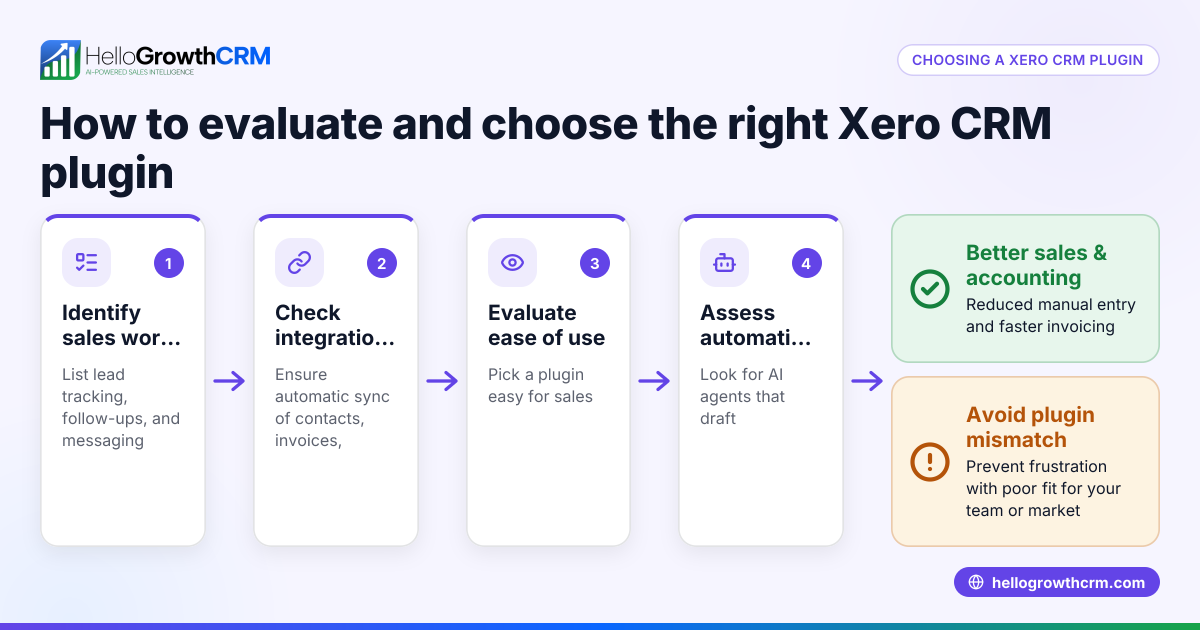
- Identify your sales and accounting needs: List what you want from the integration, such as automatic customer creation in Xero, invoice syncing, or lead management.
- Check plugin compatibility with your CRM and Xero version: Confirm the plugin supports your existing software versions and UK-specific settings.
- Evaluate ease of use for your team: Look for plugins that streamline workflows without adding complexity, especially if your team uses WhatsApp or SMS for sales.
- Assess data syncing frequency and accuracy: Ensure the plugin syncs data in real time or near real time to avoid discrepancies.
- Review security and compliance: Verify the plugin handles data securely and complies with UK data protection laws.
- Consider support and documentation: Choose a plugin with good customer support and clear guides.
- Test with a free trial or demo: Run a trial to see how it fits your processes before committing.
- Compare pricing and scalability: Check costs and whether the plugin can grow with your business.
Example (fictional figures)
A recruitment consultancy in Bristol uses Xero and wants a CRM plugin to link sales leads to invoicing. They expect 500 leads a month and £60,000 in monthly revenue.
- Monthly CRM plugin cost: £50
- Expected time saved on manual data entry: 10 hours/month
- Hourly wage of staff doing data entry: £15/hour
Calculation: 10 hours × £15/hour = £150 saved per month
Net benefit: £150 saved - £50 plugin cost = £100 net benefit per month
This shows the plugin pays for itself if it reliably saves data entry time and improves lead follow-up.
Common mistakes
- Choosing plugins without UK localisation: Avoid plugins that don’t support UK VAT or currency settings by checking compatibility.
- Ignoring user adoption: Prevent this by involving your sales and finance teams early and choosing easy-to-use plugins.
- Not testing data syncing thoroughly: Prevent data errors by conducting thorough tests during the trial phase.
- Overlooking customer support: Choose vendors with accessible UK-based support to resolve issues quickly.
- Neglecting security checks: Ensure the plugin encrypts data and complies with GDPR.
- Assuming all CRM features are included: Confirm if features like WhatsApp integration or AI agents are supported or require separate tools.
Doing this in HelloGrowthCRM
HelloGrowthCRM supports small UK businesses with WhatsApp and SMS workflows that log conversations on lead records and send follow-ups as messages, helping your sales team stay responsive. Its AI agents draft follow-up messages after calls, so reps only review and send, speeding up communication. The Free Forever plan lets two-person teams run their pipeline at no cost until they need calling or WhatsApp automation. This complements Xero by improving sales engagement while your accounts stay in sync. Learn more about WhatsApp and SMS CRM and the built-in CRM dialer.
Frequently asked questions
Can I use any CRM plugin with Xero? Not all CRM plugins are compatible with Xero or support UK business needs. Check the plugin’s documentation for compatibility and UK-specific features like VAT handling.
Does Xero have a built-in CRM? Xero itself focuses on accounting and does not include a full CRM. Many businesses use third-party CRM software connected via plugins.
How does a Xero CRM plugin improve sales follow-up? By syncing customer and lead data automatically, plugins reduce manual work and help sales teams access the latest info, enabling faster and more accurate follow-up.
Is WhatsApp integration important for UK sales teams? Many UK small businesses find WhatsApp useful for quick customer communication. A CRM with WhatsApp workflows, like HelloGrowthCRM, can log messages and automate follow-ups.
What should I ask before choosing a Xero CRM plugin? Ask about data syncing frequency, ease of use, UK compliance, support availability, and whether it supports your sales channels like WhatsApp or SMS.
Key takeaways
- A Xero CRM plugin connects sales and accounting data to save time and reduce errors.
- Evaluate plugins for UK-specific features, ease of use, and security.
- Test syncing accuracy and user adoption before committing.
- Avoid plugins without good UK support and compliance.
- HelloGrowthCRM offers WhatsApp-native messaging and AI agents to speed sales alongside Xero.
- Start small with free or trial plans to find the best fit.
Choosing the right Xero CRM plugin helps your UK business close leads faster and keep accounts accurate. For a CRM that supports WhatsApp conversations logged on lead records and AI-assisted follow-ups, try HelloGrowthCRM’s Free Forever plan for two users with up to 200 leads at no cost. Start on the Free Forever plan (200 leads, no credit card).
Ready to put this into practice?
Set up your pipeline, WhatsApp follow-ups, and AI lead scoring in minutes — free, no credit card.
Try HelloGrowthCRM freeGet CRM tips in your inbox
Join thousands of sales professionals who get weekly insights on CRM strategy, AI automation, and pipeline optimization.

The HelloGrowthCRM team publishes guides on CRM strategy, AI sales tools, and revenue operations for small business sales teams.