HelloGrowthCRM software
Built for real small-business sales teams
HelloGrowthCRM helps reps qualify faster, follow up on time, and close more deals—with practical automation in one place.
- AI lead scoring and pipeline visibility
- Built-in dialer, WhatsApp, and email automation
- Sales forecasting and RevOps-ready reporting
An alias email is an additional email address that directs incoming emails to your primary email account. It does not have its own inbox but acts as a forwarding address. This lets you receive emails sent to different addresses all in one place, simplifying communication management. Small businesses often use alias emails for roles, departments, or campaigns without needing extra mailboxes.
Why this comes up / what goes wrong
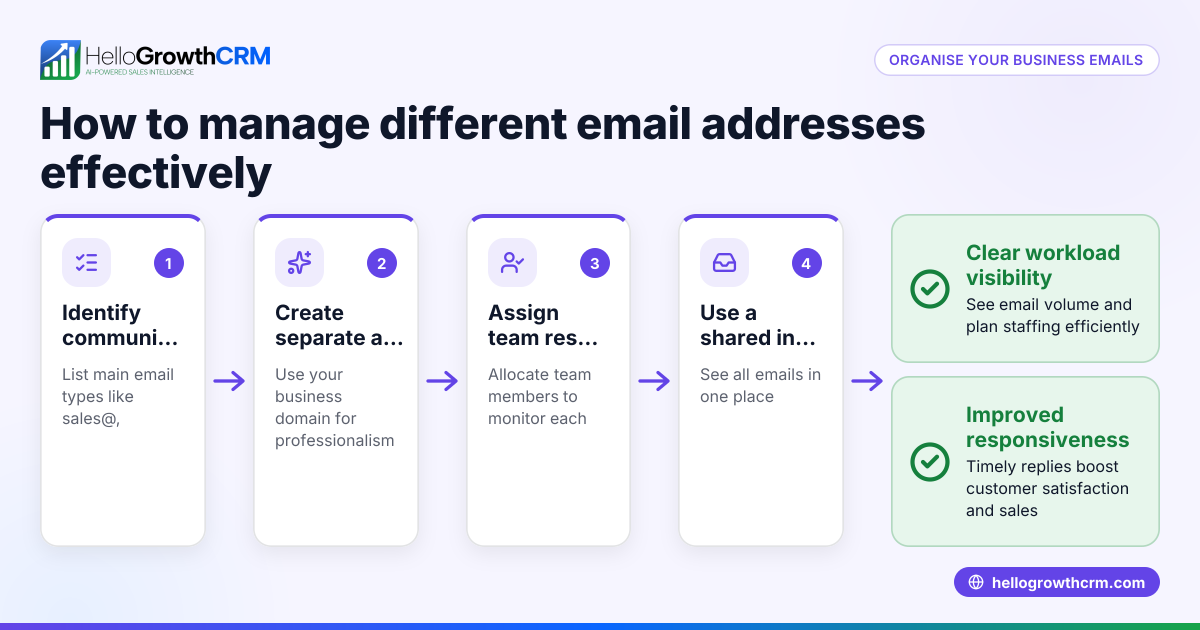
For small UK businesses, managing customer and lead communication can become chaotic if emails are scattered across multiple accounts or personal inboxes. Using alias emails helps keep messages organised by purpose without the cost or complexity of multiple email accounts. However, confusion arises when owners or teams are unsure how to create or use aliases properly, leading to missed messages or poor follow-up. For example, a solar-panel installer might want separate emails for sales@, support@, and info@ but still want all replies visible to the team.
Step-by-step
- Decide the purpose of your alias email: Choose a clear role or function for the alias, such as sales@yourbusiness.co.uk or support@yourbusiness.co.uk.
- Create the alias in your email provider settings: Most providers like Microsoft 365 or Google Workspace allow you to add aliases in the admin panel. Check your provider’s instructions.
- Verify forwarding is working: Send a test email to the alias and confirm it arrives in your main inbox.
- Set up filters or labels: To keep alias emails organised, create rules in your inbox to tag or move messages automatically.
- Inform your team and update your contacts: Use the alias in marketing materials or websites so customers know which address to use.
- Monitor replies and access: Make sure replies to alias emails are visible to relevant team members, avoiding lost or duplicated responses.
Check your email provider’s help pages if any step is unclear, and consider integrating your emails with tools that support shared access and automation.
Example (fictional figures)
Solar Solutions Ltd, a Glasgow-based solar-panel installer, uses alias emails to manage customer contact. They set up sales@solarsolutions.co.uk as an alias forwarding to their main email.
- They receive a quote request on 15/05/2026 with a project value of £12,500.
- The sales team replies from the main inbox, which collects all alias emails.
- Using HelloGrowthCRM, the reply to sales@solarsolutions.co.uk is visible to the whole team in the shared inbox.
This setup helps Solar Solutions Ltd ensure no leads are missed and all team members can track communication without switching accounts.
Common mistakes
- Creating a separate mailbox instead of an alias: This adds complexity and costs. Prevent by confirming you only need forwarding, not a new inbox.
- Not informing the team about alias use: Leads to missed or duplicated replies. Prevent by training and sharing access protocols.
- Failing to test alias forwarding: Messages might not arrive as expected. Always send test emails after setup.
- Using unclear or multiple aliases for the same purpose: Confuses customers and staff. Prevent by standardising alias names.
- Ignoring automation tools: Manually managing aliases wastes time. Use CRM features like sequences and shared inboxes to streamline follow-up.
For more on automating your email follow-up, see email automation and sequences.
Doing this in HelloGrowthCRM
HelloGrowthCRM supports alias email management with its HelloMail shared inbox, where replies to quotation emails sent via an alias are visible to the whole team on the deal. This prevents missed responses and duplicated effort. Additionally, sequences and campaigns automate multi-step follow-up over two weeks, stopping automatically when a prospect replies. These features help small and mid-sized UK businesses manage alias emails efficiently without switching between tools. Learn more about these features at email automation and sequences.
Frequently asked questions
What is the difference between an alias email and a separate email account? An alias email forwards messages to your main inbox and does not have its own login or storage. A separate email account is a full mailbox with its own credentials. Aliases simplify management by consolidating emails.
Can I send emails from an alias address? Most email providers allow you to send emails appearing from the alias, but you need to configure this in your email client settings. This helps maintain consistent communication.
How many alias emails can I create? Check your email provider's policies and plan details to understand any limits on aliases and potential costs.
Will using alias emails improve my team's response time? Yes, because aliases centralise incoming emails and, when combined with tools like HelloGrowthCRM’s shared inbox and sequences, they help teams respond quickly and coordinate better. See WhatsApp and SMS CRM for managing other channels.
Are alias emails secure? Aliases themselves are forwarding addresses and rely on the security of the main mailbox. Ensure your primary account has strong passwords and two-factor authentication.
Key takeaways
- Alias emails forward messages to a main inbox without needing separate mailboxes.
- They help small businesses organise communication by role or purpose.
- Proper setup includes creating aliases, testing forwarding, and informing your team.
- Common mistakes include confusing aliases with separate accounts and poor team communication.
- HelloGrowthCRM’s shared inbox and automated sequences improve alias email management and follow-up.
Start managing your sales and customer emails better with HelloGrowthCRM. Start on the Free Forever plan (200 leads, no credit card).
Ready to put this into practice?
Set up your pipeline, WhatsApp follow-ups, and AI lead scoring in minutes — free, no credit card.
Try HelloGrowthCRM freeGet CRM tips in your inbox
Join thousands of sales professionals who get weekly insights on CRM strategy, AI automation, and pipeline optimization.

The HelloGrowthCRM team publishes guides on CRM strategy, AI sales tools, and revenue operations for small business sales teams.