HelloGrowthCRM software
Built for real small-business sales teams
HelloGrowthCRM helps reps qualify faster, follow up on time, and close more deals—with practical automation in one place.
- AI lead scoring and pipeline visibility
- Built-in dialer, WhatsApp, and email automation
- Sales forecasting and RevOps-ready reporting
Auto reply text messages are automatic responses sent instantly when a customer or lead sends a text to your business. These messages acknowledge receipt of the inquiry, provide essential information, or inform the sender when they can expect a detailed reply. Auto replies help save time, improve customer experience, and prevent leads from being lost due to slow or missed responses.
Why this comes up / what goes wrong
Small-business owners often manage sales and customer communication manually through text messages. When a lead sends a message, the owner or team member may be busy, away from their phone, or handling multiple tasks. This can cause delays in replying, frustrating customers and causing lost sales opportunities. Without an immediate acknowledgment, leads may feel ignored and move on to competitors. Auto reply text messages solve this problem by instantly confirming receipt and setting expectations for a follow-up.
Step-by-step
- Choose a texting platform or CRM that supports auto replies: Look for a system that can automatically send replies based on incoming messages or specific triggers. This could be a CRM with messaging features or a dedicated texting app. Verify it supports auto reply functionality.
- Write your auto reply message: Create a clear, polite message that fits your business tone. Include acknowledgment of the message, an estimated response time, and any immediate instructions such as business hours or a link to FAQs.
- Set triggers for sending auto replies: Decide when the auto reply should be sent. Typical triggers include any incoming text or messages received outside of business hours.
- Test the auto reply: Send test messages from different numbers to make sure the auto reply sends correctly, looks professional, and contains accurate information.
- Train your team: Inform your staff about the auto reply system so they avoid duplicating responses and know how to follow up after the auto reply has been sent.
- Monitor and adjust the message: Review customer feedback and message logs regularly to improve the auto reply text or timing as needed.
Example (fictional figures)
A residential real-estate team in Phoenix, Arizona, uses auto reply text messages to acknowledge leads immediately after they inquire about listings.
- The team receives 50 new text messages daily.
- Each message triggers an instant auto reply confirming receipt and providing business hours.
If the team closes 8 sales monthly at an average commission of $12,500 each, keeping leads engaged through immediate acknowledgment helps maintain steady sales.
Calculation: $12,500 × 8 = $100,000 monthly commission
By using auto replies, the team ensures no lead feels ignored, supporting consistent revenue without losing potential clients due to slow responses.
Common mistakes
- Using generic or unclear messages: Prevent this by customizing your auto replies to reflect your business and include clear next steps.
- Sending auto replies too frequently: Avoid annoying customers by limiting auto replies to the first message or specific triggers only.
- Failing to update auto replies: Regularly review and update your messages to keep information accurate and relevant.
- Ignoring personal follow-up after the auto reply: Train your team to respond personally and promptly after the initial auto reply to maintain engagement.
- Not integrating auto replies with lead management: Use tools that log auto replies and customer responses so you can track conversations and follow up effectively.
Doing this in HelloGrowthCRM
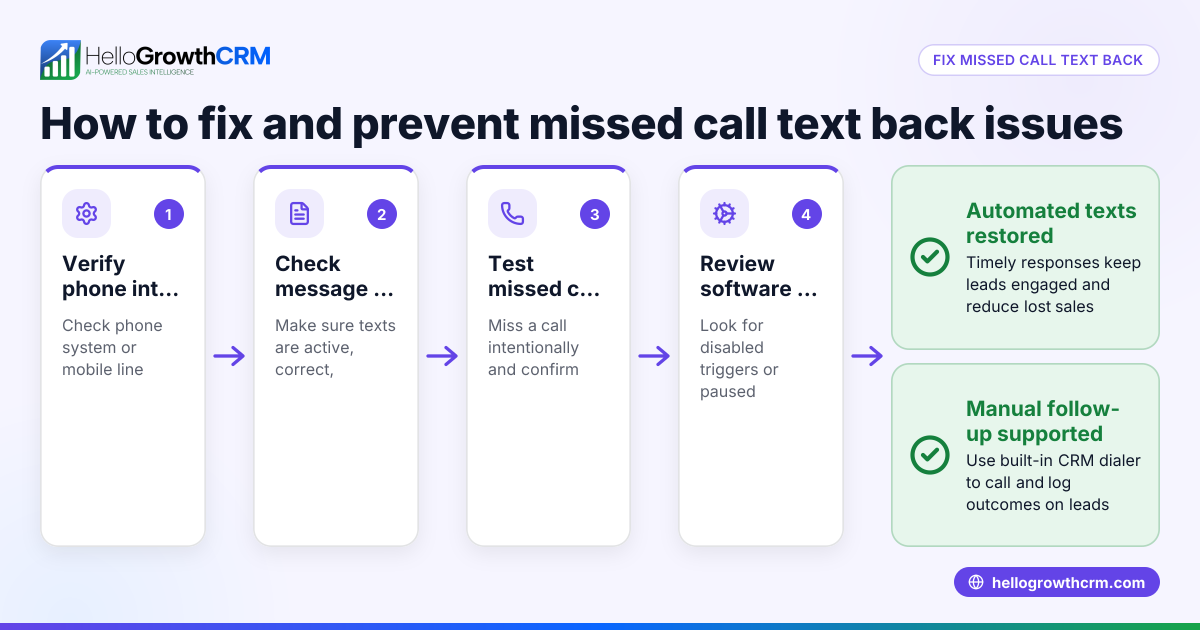
HelloGrowthCRM offers a built-in dialer that lets your telecaller work a list of leads directly inside the CRM. Each call outcome is logged on the lead record, keeping your follow-up organized and efficient. Although HelloGrowthCRM does not automate text replies, using its built-in dialer alongside your auto reply system helps you manage leads and sales conversations effectively. Learn more about the built-in CRM dialer and how it supports your sales process.
Frequently asked questions
Can auto reply text messages work outside business hours? Yes, auto replies are especially useful outside business hours to inform customers when you will respond. You can set specific messages to trigger only during those times.
Will auto replies annoy my customers? If overused or sent too frequently, auto replies can annoy customers. Limit them to the first message or key triggers, and keep the messages concise and helpful to avoid frustration.
How do I personalize auto reply messages? Many texting platforms allow you to insert customer names or other details automatically. Tailor the message tone and content to match your brand and make it feel personal.
Can HelloGrowthCRM send auto reply text messages? HelloGrowthCRM includes a built-in dialer for making calls and logging outcomes but does not currently automate text replies. You can combine it with your texting tools for a smooth workflow. Learn more about WhatsApp and SMS CRM.
How does auto reply help with lead management? Auto replies confirm that leads' messages were received, improving engagement. When combined with tools like HelloGrowthCRM’s dialer, you can track conversations and ensure timely follow-up.
Key takeaways
- Auto reply text messages instantly acknowledge customer messages and set clear expectations.
- They help prevent lost leads caused by slow or missed responses.
- Write polite, clear messages triggered by incoming texts or outside business hours.
- Avoid overusing auto replies and always follow up personally afterward.
- Use CRM tools like HelloGrowthCRM’s built-in dialer to manage leads and log interactions.
Start improving your customer response with auto reply text messages today. You can Start on the Free Forever plan (200 leads, no credit card) and see how HelloGrowthCRM helps manage your sales conversations.
Ready to put this into practice?
Set up your pipeline, WhatsApp follow-ups, and AI lead scoring in minutes — free, no credit card.
Try HelloGrowthCRM freeGet CRM tips in your inbox
Join thousands of sales professionals who get weekly insights on CRM strategy, AI automation, and pipeline optimization.

The HelloGrowthCRM team publishes guides on CRM strategy, AI sales tools, and revenue operations for small business sales teams.