HelloGrowthCRM software
Built for real small-business sales teams
HelloGrowthCRM helps reps qualify faster, follow up on time, and close more deals—with practical automation in one place.
- AI lead scoring and pipeline visibility
- Built-in dialer, WhatsApp, and email automation
- Sales forecasting and RevOps-ready reporting
Client tracker software is designed to help small and mid-sized businesses keep track of client details, communication history, appointments, and sales progress efficiently. It replaces scattered notes, spreadsheets, and text messages with a centralized system that improves follow-up speed and team collaboration.
Why this comes up / what goes wrong
Small business owners often face challenges keeping client information organized as their customer base grows. Many rely on spreadsheets, text messages, or email threads to track leads and client interactions. This scattered approach can cause slow follow-up, missed opportunities, and inconsistent customer service. Without dedicated client tracker software, sales teams risk losing leads, duplicating efforts, or failing to respond promptly. Choosing the right software is essential to streamline client management and improve sales outcomes.
Step-by-step
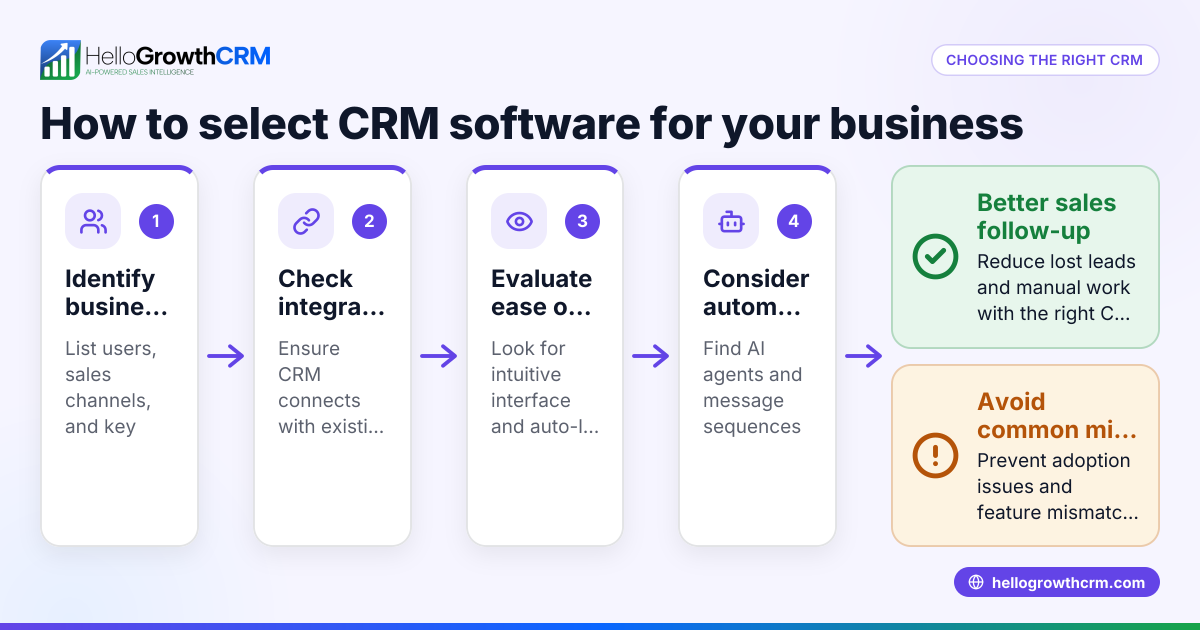
- Identify Your Business Needs: List what you want to track—contact info, communication history, appointments, sales pipeline, or billing. Check if you need features like task reminders, lead scoring, or multi-channel messaging.
- Evaluate Ease of Use: Choose software with an intuitive interface that your team will adopt easily. Avoid overly complex systems that require extensive training.
- Check Integration Options: Ensure the software can connect with your existing tools like email, web forms, or messaging apps. Integration reduces manual data entry and keeps information synchronized.
- Assess Communication Features: Look for built-in messaging or calling tools to track client conversations within the software. Some client trackers offer WhatsApp and SMS CRM capabilities, which can be crucial if your team uses these channels. See more on WhatsApp and SMS CRM.
- Consider Mobile Access: If your team works remotely or on the go, mobile-friendly software or apps are important.
- Review Reporting and Analytics: Good client tracker software provides insights on sales performance, client activity, and follow-up effectiveness.
- Compare Pricing and Plans: Understand the cost structure and what features come with each plan. Some offer free tiers suitable for small teams.
- Test with a Trial or Demo: Use free trials or demos to see how the software fits your workflows before committing.
- Check Customer Support: Reliable and accessible support can save time during onboarding and troubleshooting.
- Encourage Adoption: Consider software with features like a built-in CRM dialer to simplify calling tasks and improve team usage. Learn more about the built-in CRM dialer.
Example (fictional figures)
A two-location dental practice in Columbus, Ohio, wants to improve client follow-up and appointment reminders.
- They currently estimate losing some new patient leads due to slow follow-up.
- The average new patient value is $500.
- They receive 200 new patient inquiries per month.
If they improve follow-up and reduce lost leads, the potential increase in monthly revenue can be calculated as follows:
Assuming they reduce lost leads by 10 leads monthly:
10 leads × $500 = $5,000 increase in monthly revenue
Annually, this is:
$5,000 × 12 = $60,000 increase by improving follow-up
This example shows how client tracker software can directly impact revenue by improving lead management.
Common mistakes
- Choosing software without team input: Prevent by involving sales and customer service teams early to ensure the software meets their needs.
- Ignoring integration capabilities: Prevent by verifying if the software connects with your current tools like email or web forms to avoid duplicate data entry.
- Overlooking mobile access: Prevent by testing mobile apps or mobile-friendly versions if your team works outside the office.
- Focusing only on price: Prevent by weighing features and usability alongside cost to get real value.
- Skipping training and onboarding: Prevent by planning dedicated time for team training to ensure adoption.
- Neglecting follow-up automation features: Prevent by selecting software with task reminders or messaging sequences, such as WhatsApp and SMS CRM capabilities, to speed up follow-up.
Frequently asked questions
What is client tracker software used for? Client tracker software organizes client contact details, communication history, appointments, and sales pipelines. It helps businesses manage leads and customers efficiently to improve follow-up and sales.
Can client tracker software integrate with messaging apps? Yes, many client tracker tools offer integration with messaging apps like WhatsApp and SMS, allowing teams to communicate and track conversations within the software. For example, some solutions provide WhatsApp and SMS CRM features to centralize communication. See WhatsApp and SMS CRM for more.
Is client tracker software suitable for small businesses? Absolutely. Many client tracker solutions are designed specifically for small and mid-sized businesses, offering easy setup, affordable pricing, and scalable features.
How do I ensure my team uses the client tracker software? Choose software that is user-friendly, involves your team in the selection process, and provide adequate training. Features like a built-in CRM dialer can also encourage usage by simplifying calling tasks. Learn about the built-in CRM dialer.
What should I look for in reporting features? Look for sales forecasting, lead activity reports, and follow-up tracking. These help you measure performance and adjust your sales strategies.
Key takeaways
- Client tracker software centralizes client data and communication to improve follow-up and sales.
- Identify your business needs and prioritize ease of use and integration options.
- Test software with free trials and involve your team before deciding.
- Avoid common mistakes like ignoring mobile access or skipping training.
- Features like WhatsApp and SMS CRM and a built-in CRM dialer can enhance communication and adoption.
Start simplifying your client management today. Start on the Free Forever plan (200 leads, no credit card) to see how client tracking can improve your business.
Ready to put this into practice?
Set up your pipeline, WhatsApp follow-ups, and AI lead scoring in minutes — free, no credit card.
Try HelloGrowthCRM freeGet CRM tips in your inbox
Join thousands of sales professionals who get weekly insights on CRM strategy, AI automation, and pipeline optimization.

The HelloGrowthCRM team publishes guides on CRM strategy, AI sales tools, and revenue operations for small business sales teams.