HelloGrowthCRM software
Built for real small-business sales teams
HelloGrowthCRM helps reps qualify faster, follow up on time, and close more deals—with practical automation in one place.
- AI lead scoring and pipeline visibility
- Built-in dialer, WhatsApp, and email automation
- Sales forecasting and RevOps-ready reporting
A CRM for payment reminders helps Canadian finance and sales teams automate follow-ups on invoices, track payments, and manage customer communication efficiently. This article explains why small businesses need such a CRM, the step-by-step process to select one, a practical example with figures, common pitfalls to avoid, and how HelloGrowthCRM supports payment reminders.
Why this comes up / what goes wrong
Small and mid-sized businesses in Canada often struggle with timely payment reminders because finance and sales teams use separate tools like spreadsheets, email, or text messages. This causes missed follow-ups, delayed payments, and strained customer relationships. Finance teams want accurate tracking of invoices and payments, while sales teams need quick access to customer communication history and payment status to manage deals effectively. Without a unified system, communication gaps lead to lost revenue and inefficient workflows.
Step-by-step
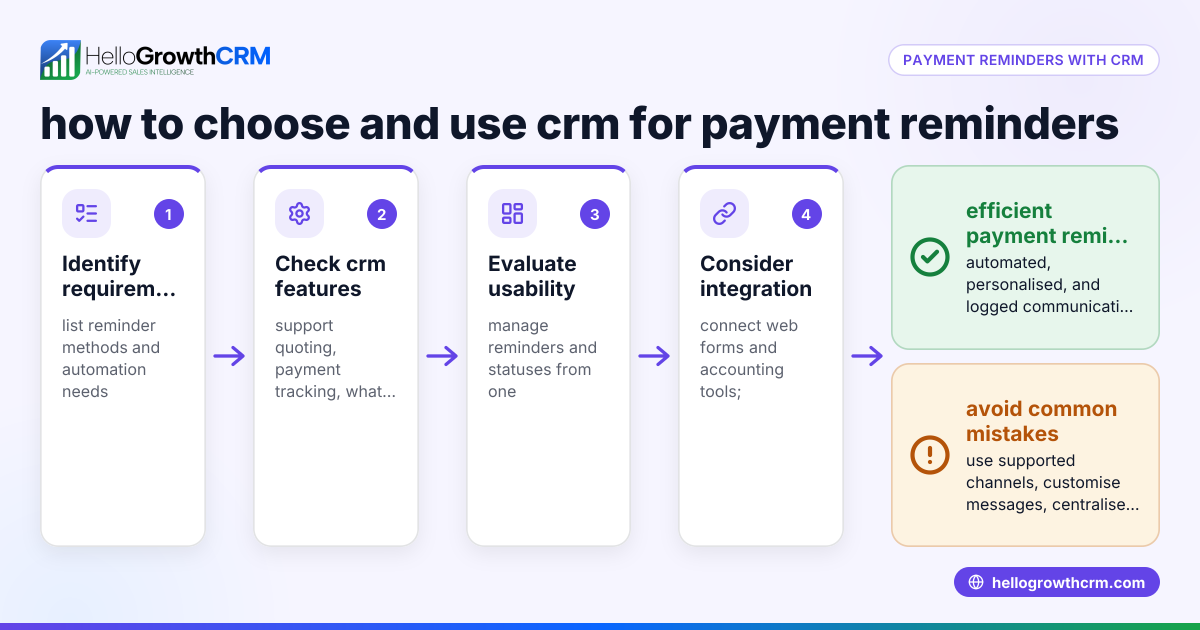
- Identify your payment reminder needs: Determine if you require automation for invoice follow-ups, multi-channel messaging (WhatsApp, SMS, email), or integration with sales pipelines.
- Check quoting and invoicing features: Look for a CRM that lets you create, send, and track quotes, proposals, and invoices directly from the deal record, with payment status visible alongside follow-up tasks.
- Evaluate communication channels: Confirm the CRM supports WhatsApp and SMS messaging logged on customer records to keep all payment reminders and conversations in one place.
- Consider team collaboration tools: Ensure the CRM offers sales task boards or pipeline management so finance and sales teams can coordinate follow-ups without losing track.
- Assess mobile and field capabilities: If you have field sales or finance reps, check for visit logging and mobile messaging to manage payment reminders on the go.
- Review reporting and forecasting: Choose a CRM with sales forecasting and payment tracking reports to monitor outstanding invoices and predict cash flow.
- Test ease of use: The CRM should be intuitive so your teams actually use it daily for payment reminders and deal management.
- Verify Canadian compliance and support: Confirm the CRM supports Canadian business practices and offers local support.
Example (fictional figures)
A mortgage brokerage in Mississauga, Ontario, uses a CRM to manage payment reminders for its sales and finance teams.
- The brokerage issues a quote of C$15,000 on 2024-05-01.
- The quote is sent and viewed by the client on 2024-05-02.
- The client accepts the quote on 2024-05-05, triggering invoice generation.
- Invoice amount: C$15,000.
- Payment terms: 30 days.
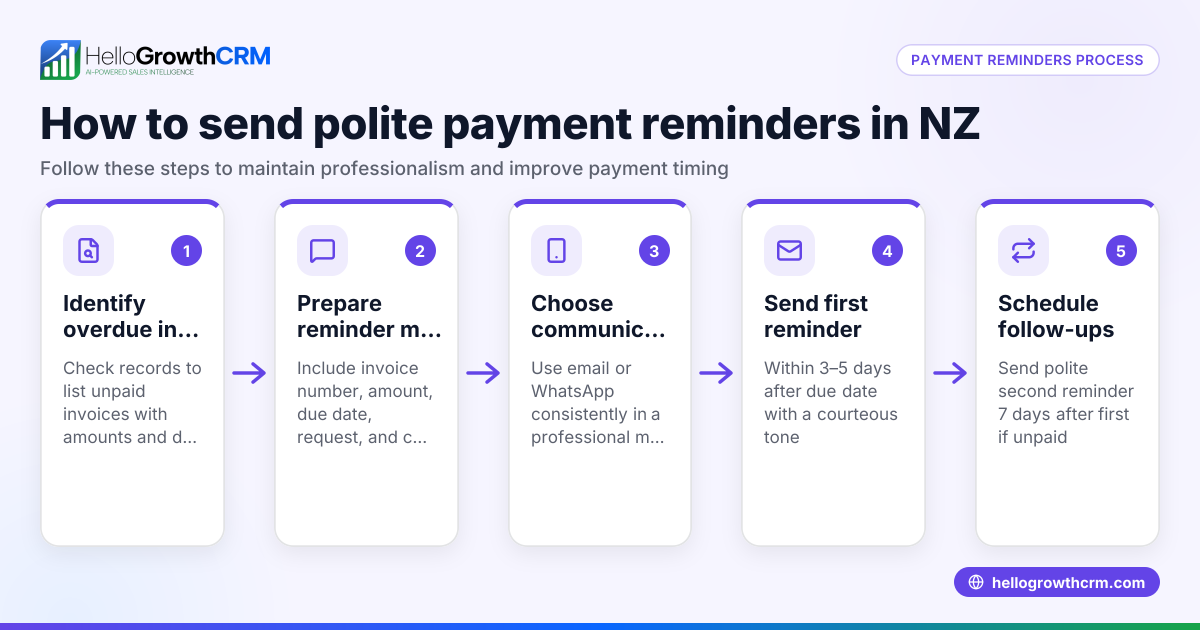
- Reminder 1 sent on 2024-06-04 (due date + 3 days).
- Reminder 2 sent on 2024-06-10 if unpaid.
Calculations:
Invoice amount = C$15,000
Due date = 2024-05-31 (2024-05-01 + 30 days)
Reminder 1 date = 2024-06-04 (due date + 3 days)
Reminder 2 date = 2024-06-10
The CRM logs WhatsApp reminders sent to the client on these dates and updates the payment status once the client pays. Sales and finance teams see the same information, avoiding duplicate calls or missed follow-ups.
Common mistakes
- Using multiple disconnected tools: Prevent by choosing a CRM that integrates quotes, invoices, and messaging to centralize payment reminders.
- Ignoring mobile communication: Avoid missing reminders by selecting a CRM that logs WhatsApp and SMS messages on lead records, as seen in WhatsApp and SMS CRM.
- Not tracking follow-up tasks: Prevent lost reminders by using sales task boards that show invoice follow-ups alongside deal progress, like sales task boards.
- Failing to coordinate teams: Avoid confusion by using a CRM that both finance and sales teams access, ensuring visibility of payment status and customer communication.
- Neglecting field operations: If you have field reps, prevent missed payments by using territory and visit logging features, such as those described in territories, field operations and commissions.
Doing this in HelloGrowthCRM
HelloGrowthCRM offers a built-in quoting and proposal tool that lets you create, send, and track quotes, proposals, invoices, and payments directly from the deal record. The status of these documents (sent, viewed, accepted) appears on the same screen as follow-up tasks, helping teams stay on top of payment reminders. WhatsApp conversations with leads are logged on the lead record, and follow-ups can be sent as WhatsApp or SMS messages, keeping all communication in one place. For businesses with field reps, territory management and visit logging help track on-site activity and commissions. Learn more about HelloGrowthCRM for Canada.
Frequently asked questions
What features should a CRM have for payment reminders? A CRM should integrate quoting, invoicing, payment tracking, and multi-channel messaging like WhatsApp and SMS. It should also support task management and reporting to coordinate finance and sales teams effectively.
Can a CRM send automatic payment reminders? Many CRMs allow scheduling and automating payment reminder messages via email, SMS, or WhatsApp. Check if the CRM logs these messages on customer records for full visibility.
How does using WhatsApp in CRM help with payment reminders? WhatsApp is widely used in Canada for business communication. A WhatsApp-native CRM logs conversations and lets teams send reminders directly, improving response rates and keeping payment follow-ups organised.
Is mobile access important for payment reminder CRMs? Yes, especially for field sales or finance teams. Mobile CRM features like visit logging and messaging ensure reminders are sent and tracked in real time.
How do sales task boards improve payment reminder workflows? Sales task boards visualise follow-up tasks alongside deals, helping teams prioritise payment reminders and avoid missed actions. See sales task boards for details.
Key takeaways
- Choose a CRM that integrates quotes, invoices, and payment tracking in one place.
- Use multi-channel messaging (WhatsApp, SMS) logged on lead records for effective payment reminders.
- Coordinate finance and sales teams with shared task boards and communication history.
- Include mobile and field tools if your team works outside the office.
- Avoid disconnected tools to reduce missed payments and improve cash flow.
To get started with a CRM that supports payment reminders and team collaboration, start on the Free Forever plan (200 leads, no credit card).
Ready to put this into practice?
Set up your pipeline, WhatsApp follow-ups, and AI lead scoring in minutes — free, no credit card.
Try HelloGrowthCRM freeGet CRM tips in your inbox
Join thousands of sales professionals who get weekly insights on CRM strategy, AI automation, and pipeline optimization.

The HelloGrowthCRM team publishes guides on CRM strategy, AI sales tools, and revenue operations for small business sales teams.