HelloGrowthCRM software
Built for real small-business sales teams
HelloGrowthCRM helps reps qualify faster, follow up on time, and close more deals—with practical automation in one place.
- AI lead scoring and pipeline visibility
- Built-in dialer, WhatsApp, and email automation
- Sales forecasting and RevOps-ready reporting
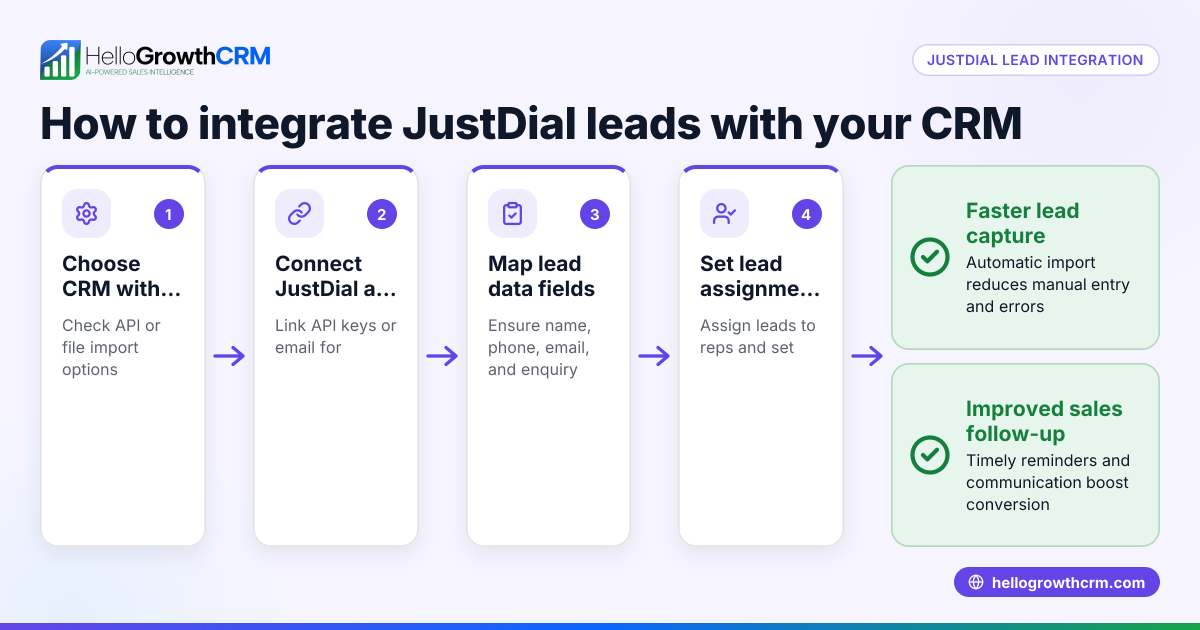
CRM integration connects your CRM with other software and communication channels your business uses, reducing manual data entry and speeding up lead follow-up. For Singapore small and mid-sized businesses, this often means linking lead sources like IndiaMART and JustDial, plus messaging channels such as WhatsApp and SMS.
Why this comes up / what goes wrong
Many Singapore small-business owners rely on WhatsApp, email, and spreadsheets to manage sales leads. Without integration, leads from platforms like IndiaMART must be entered manually into the CRM, causing delays and lost opportunities. Teams also struggle to track conversations spread across different channels. Selecting the right CRM integration helps automate lead capture, centralise communication, and improve sales follow-up speed.
Step-by-step
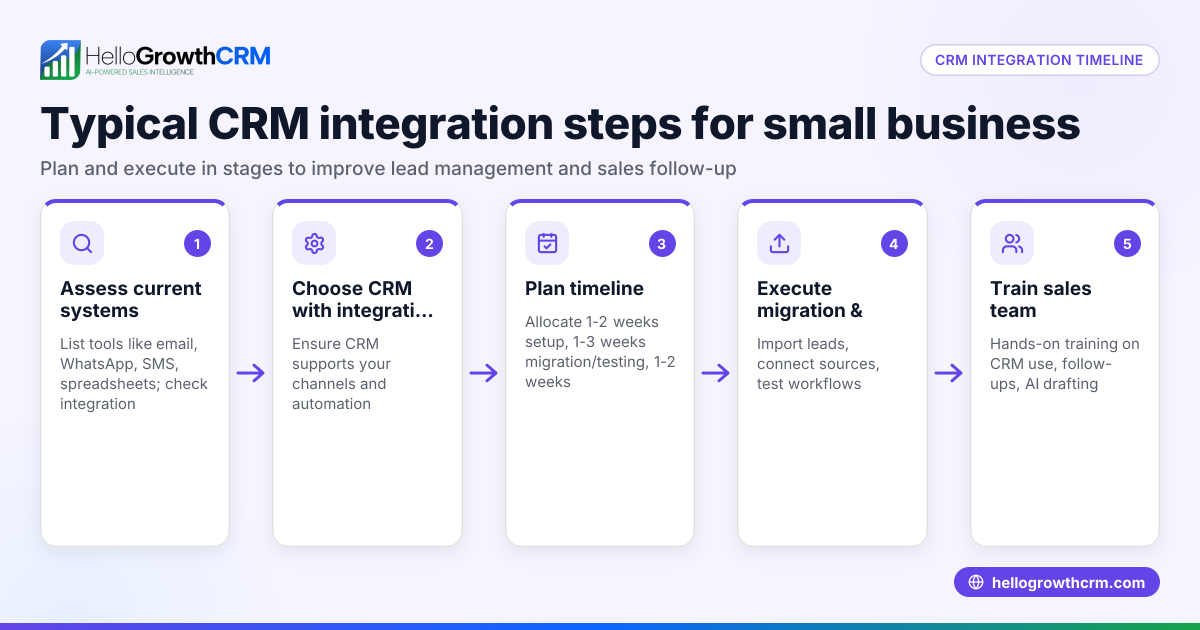
- Identify your key platforms to integrate. List where your leads come from (e.g., website forms, IndiaMART, JustDial) and how your team communicates (WhatsApp, SMS, email).
- Check CRM integration options. Confirm the CRM supports integrations with your lead sources and messaging channels. For example, HelloGrowthCRM integrates with IndiaMART and JustDial enquiries and logs WhatsApp conversations on lead records. See integrations and WhatsApp and SMS CRM.
- Evaluate data syncing and automation features. Does the CRM automatically import leads? Can it trigger follow-ups or update records without manual input? AI agents in HelloGrowthCRM can draft follow-up messages after calls for review and sending. Learn more at HelloGrowthCRM for Singapore.
- Assess ease of use and team adoption. Integration should simplify workflows, not add complexity. Choose a CRM with a user-friendly interface and mobile-friendly features if your team uses WhatsApp heavily.
- Consider scalability and support. Your integration needs may grow. Check if the CRM offers custom integrations or additional API support as your business expands.
- Request demos or trials focused on integration. Test how well the CRM connects with your existing tools and how it improves lead management.
Example (fictional figures)
An interior-design studio in Tanjong Pagar receives leads from its website and IndiaMART. They want to integrate these into their CRM and follow up via WhatsApp.
- Monthly website leads: 100
- Monthly IndiaMART leads: 50
- Average value per project: S$12,000
Without integration, some leads are lost due to slow manual entry.
Lost leads per month = 30 leads (assumed for example purposes) NEEDS EXPERT REVIEW
Potential lost revenue = 30 × S$12,000 = S$360,000
By integrating IndiaMART enquiries directly into the CRM and logging WhatsApp conversations, the studio reduces lead loss significantly.
Saved leads = 22.5 leads (assumed for example purposes) NEEDS EXPERT REVIEW
Additional revenue from integration = 22.5 × S$12,000 = S$270,000
This example shows how integration can preserve significant revenue by speeding up lead follow-up.
Common mistakes
- Not mapping all lead sources before choosing a CRM. Prevent by listing every place leads come from and verifying CRM support for each.
- Ignoring messaging channels used by the sales team. Prevent by choosing a CRM that logs WhatsApp and SMS conversations to keep communication centralised.
- Underestimating the importance of automation. Prevent by selecting a CRM with AI agents or workflow triggers to reduce manual tasks.
- Choosing complex integrations without team training. Prevent by prioritising ease of use and providing training for smooth adoption.
- Overlooking future integration needs. Prevent by checking if the CRM allows adding custom integrations or APIs as your business grows.
Learn more about integration options and WhatsApp features in HelloGrowthCRM at integrations and WhatsApp and SMS CRM.
Doing this in HelloGrowthCRM
HelloGrowthCRM supports API and integrations that bring IndiaMART and JustDial enquiries directly into the CRM as leads. WhatsApp conversations are logged on the lead record, and follow-ups can be sent as WhatsApp or SMS messages. Additionally, AI agents can draft follow-up messages after calls for the sales rep to review and send, reducing manual workload. Explore these features at HelloGrowthCRM for Singapore.
Frequently asked questions
What is CRM integration and why is it important for Singapore businesses? CRM integration connects your CRM with other platforms like lead sources and messaging apps. It automates lead capture and communication, reducing manual work and speeding up follow-up, which is critical for small businesses using WhatsApp and platforms like IndiaMART.
How do I know which integrations my CRM needs? Start by listing where your leads come from and how your team communicates. Then check if the CRM supports those platforms, such as IndiaMART, JustDial, WhatsApp, and SMS. Also consider automation features like AI agents to assist follow-ups.
Can I use WhatsApp within my CRM for follow-ups? WhatsApp conversations can be logged on lead records and follow-ups sent as messages if the CRM supports WhatsApp-native features, keeping communication in one place.
What are common pitfalls when integrating CRM systems? Common mistakes include not identifying all lead sources, ignoring messaging channels, underusing automation, and choosing complex integrations without training. Planning and testing help avoid these.
Will integration help my sales team close deals faster? Integration reduces manual data entry and ensures leads are followed up promptly on channels they prefer, which typically improves response rates and shortens sales cycles.
How can I test CRM integration before committing? Request demos or trials focusing on your key integrations and workflows. Check how leads flow in automatically and how communication is logged and managed.
Key takeaways
- Identify all lead sources and communication channels before choosing CRM integration.
- Integration with platforms like IndiaMART and messaging apps like WhatsApp speeds up lead management.
- Automation features, including AI agents, reduce manual tasks and improve follow-up.
- Avoid complexity by choosing user-friendly integrations and training your team.
- Plan for future scalability with APIs and custom integration options.
Start improving your lead follow-up and sales workflows with CRM integration tailored for Singapore businesses. Start on the Free Forever plan (200 leads, no credit card).
Ready to put this into practice?
Set up your pipeline, WhatsApp follow-ups, and AI lead scoring in minutes — free, no credit card.
Try HelloGrowthCRM freeGet CRM tips in your inbox
Join thousands of sales professionals who get weekly insights on CRM strategy, AI automation, and pipeline optimization.

The HelloGrowthCRM team publishes guides on CRM strategy, AI sales tools, and revenue operations for small business sales teams.