HelloGrowthCRM software
Built for real small-business sales teams
HelloGrowthCRM helps reps qualify faster, follow up on time, and close more deals—with practical automation in one place.
- AI lead scoring and pipeline visibility
- Built-in dialer, WhatsApp, and email automation
- Sales forecasting and RevOps-ready reporting
A customer success dashboard is a centralized visual display of important customer information and metrics that help your business monitor customer health, satisfaction, and retention. It enables you to spot issues early, improve customer relationships, and increase revenue by focusing on what matters most after the sale. This article covers why small businesses need such a dashboard, the steps to create one, a practical example, common mistakes, and how HelloGrowthCRM supports customer success tracking.
Why this comes up / what goes wrong
Small business owners often struggle to keep track of customer satisfaction and service effectiveness because customer data is scattered across emails, spreadsheets, and messaging apps. Without a clear view of customer health, businesses risk losing clients due to slow issue resolution or missed opportunities for upselling. A customer success dashboard solves this by consolidating key data points into one screen, making it easier to act quickly and keep customers happy.
Step-by-step
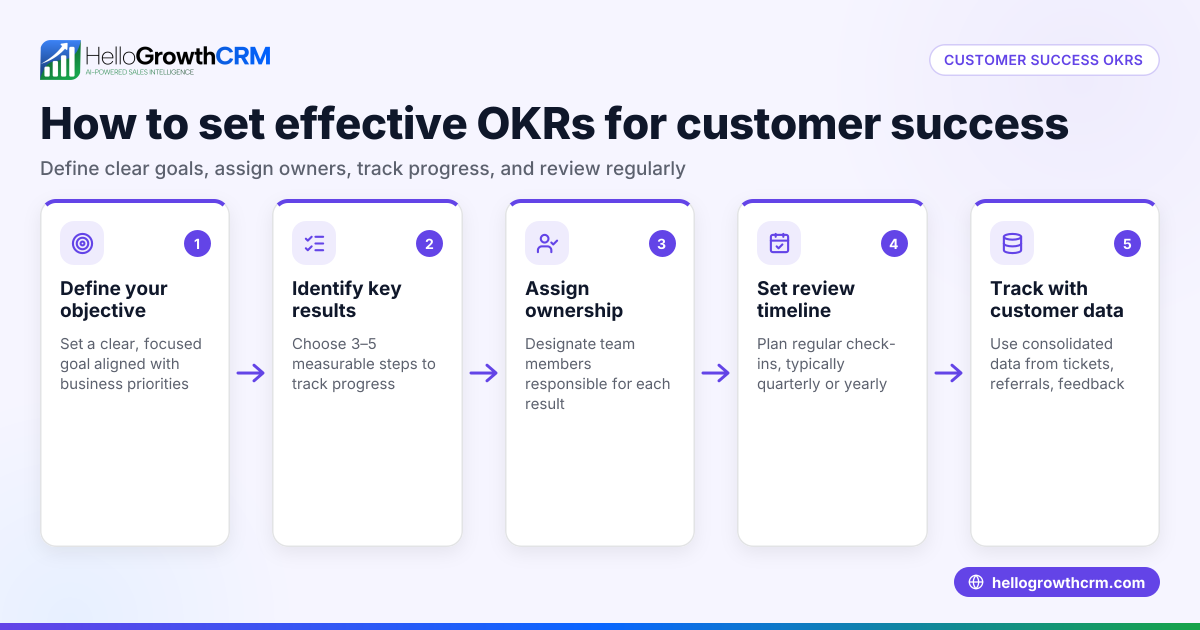
- Define your key customer success metrics: Decide what matters most for your business, such as customer satisfaction score, support tickets open, renewal rates, or product usage. Check that these metrics align with your business goals.
- Gather customer data sources: Identify where customer information currently resides—emails, CRM, help desk, billing software—and plan how to bring this data together.
- Choose or build a dashboard tool: Use software that can integrate these data sources or allows manual entry. Ensure it updates regularly and is easy for your team to access.
- Set up visual indicators: Use charts, gauges, or color codes to highlight customer health status, pending issues, and trends. Check that these visuals are clear and actionable.
- Assign ownership and review cadence: Decide who on your team monitors the dashboard and how often (daily, weekly). Check that the team uses the dashboard to follow up on alerts and improve customer outcomes.
- Continuously refine metrics and data quality: Regularly assess if the dashboard reflects meaningful insights and update it as your business evolves.
Example (fictional figures)
A residential real-estate team in Phoenix, Arizona, wants to track customer success after closing deals to increase referrals and repeat business.
- They track three metrics: open support tickets, customer satisfaction score (CSAT), and referral count.
- On 06/01/2026, they have 15 open tickets, an average CSAT of 85%, and 5 referrals.
- They set a goal to reduce open tickets to 5 and increase referrals to 10 by 09/01/2026.
- Monthly review shows tickets reduced by 3 each month:
15 - 3 = 12 (July)
12 - 3 = 9 (August)
9 - 3 = 6 (September)
- Referrals increased by 2 per month:
5 + 2 = 7 (July)
7 + 2 = 9 (August)
9 + 2 = 11 (September)
This dashboard helps the team focus on closing tickets faster and encouraging referrals, leading to better customer success outcomes.
Common mistakes
- Tracking too many metrics: Focus on a few actionable metrics to avoid overwhelming your team. Prevent by defining clear goals first.
- Using outdated or inaccurate data: Ensure data sources update automatically or are reviewed regularly. Prevent by setting data quality checks.
- Ignoring the dashboard after setup: Without regular review, the dashboard loses value. Prevent by assigning team members to monitor and act on insights.
- Not integrating customer service data with sales data: Separate systems cause blind spots. Prevent by using tools that unify customer records, like a CRM with customer support features.
- Failing to customize visuals for your team: Complex or unclear visuals reduce usability. Prevent by tailoring dashboard views to your team’s needs.
Doing this in HelloGrowthCRM
HelloGrowthCRM offers pipeline forecast and AI insights that show where deals stall without needing spreadsheets, helping you track sales progress clearly. After the sale, its customer portal, referrals, tickets, and knowledge base keep service requests linked to the same customer record as the deal, so you can monitor customer success in one place. Learn more about HelloGrowthCRM's customer health score and how it supports WhatsApp and SMS CRM communications for your US business at HelloGrowthCRM for the United States.
Frequently asked questions
What is the main purpose of a customer success dashboard? A customer success dashboard helps you track and visualize key metrics that indicate how satisfied and engaged your customers are. It enables you to identify issues early, improve service, and increase retention.
How often should a small business review their customer success dashboard? Review frequency depends on your business size and customer volume but typically ranges from daily for active service teams to weekly or monthly for smaller operations.
Can I create a customer success dashboard without technical skills? Yes, many CRM and customer service tools offer built-in dashboards or templates that require minimal setup. Alternatively, simple spreadsheets with charts can work if updated regularly.
How does integrating customer support and sales data improve a customer success dashboard? Integration provides a complete view of the customer journey, allowing you to see how sales outcomes relate to ongoing support and satisfaction, leading to better decision-making.
What metrics should I prioritize for my customer success dashboard? Prioritize metrics tied directly to customer retention and satisfaction, such as support ticket volume, resolution times, customer satisfaction scores, and referral rates.
Key takeaways
- A customer success dashboard consolidates key data to track customer satisfaction and retention.
- Define relevant metrics and gather data from all customer touchpoints.
- Use clear visuals and assign team ownership for regular dashboard review.
- Avoid common mistakes like tracking too many metrics or ignoring data quality.
- HelloGrowthCRM integrates sales forecasting and customer support data to simplify monitoring customer success.
Start tracking your customer success effectively today. Start on the Free Forever plan (200 leads, no credit card).
Ready to put this into practice?
Set up your pipeline, WhatsApp follow-ups, and AI lead scoring in minutes — free, no credit card.
Try HelloGrowthCRM freeGet CRM tips in your inbox
Join thousands of sales professionals who get weekly insights on CRM strategy, AI automation, and pipeline optimization.

The HelloGrowthCRM team publishes guides on CRM strategy, AI sales tools, and revenue operations for small business sales teams.