HelloGrowthCRM software
Built for real small-business sales teams
HelloGrowthCRM helps reps qualify faster, follow up on time, and close more deals—with practical automation in one place.
- AI lead scoring and pipeline visibility
- Built-in dialer, WhatsApp, and email automation
- Sales forecasting and RevOps-ready reporting
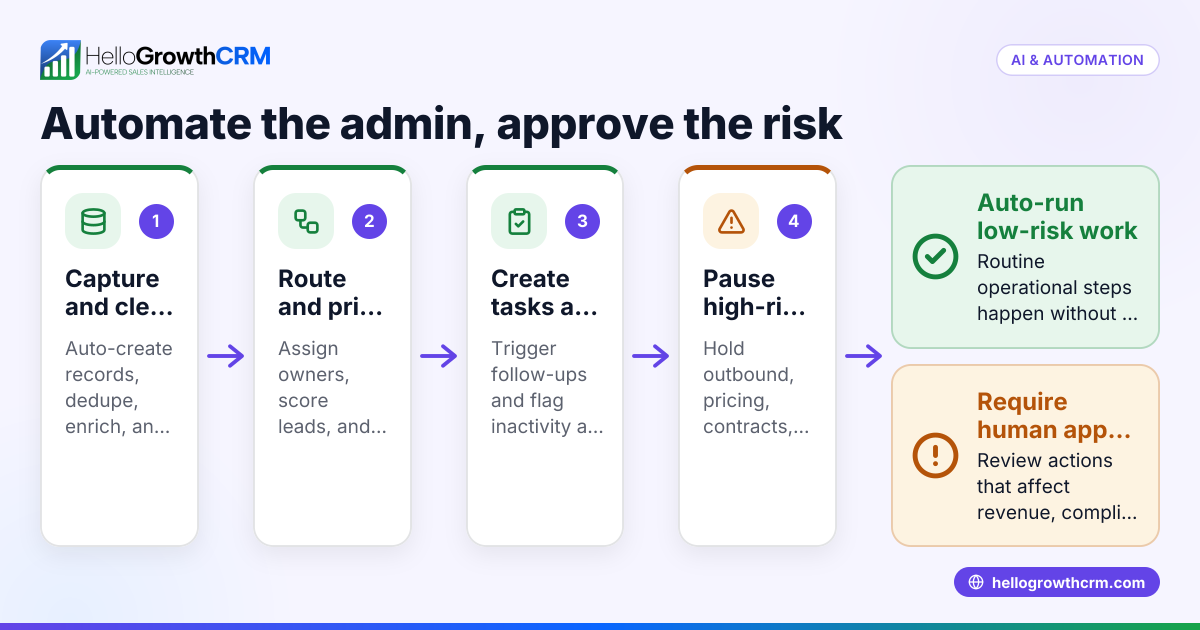
Automating customer approvals in your CRM streamlines your sales and service processes, reduces delays, and ensures consistent follow-up. You do this by setting clear approval criteria, configuring automated triggers for approval requests, and ensuring approvers receive timely notifications. The CRM then records approvals automatically, keeping your pipeline up to date without manual tracking.
Why this comes up / what goes wrong
Small-business owners in the UAE often face delays and lost leads because customer approvals—such as credit checks, contract sign-offs, or service confirmations—are done manually. This slows sales cycles and causes errors when approvals are tracked on spreadsheets, WhatsApp chats, or emails. Without automation, approvals can be forgotten or delayed, leading to lost deals or unhappy customers.
Owners want to automate these approvals inside their CRM to keep all communication and tracking in one place. This helps sales teams follow up faster and management to see real-time approval statuses without extra work.
Step-by-step
- Define your approval criteria clearly
- Decide exactly when an approval is needed (e.g., after quoting a price above AED 50,000).
- Specify who must approve (e.g., sales manager or finance team).
- Set up approval stages in your CRM pipeline
- Create a dedicated approval stage or status in your sales pipeline.
- Ensure this stage triggers an automated workflow.
- Create automated approval requests
- Configure the CRM to send an approval request automatically when a deal reaches the approval stage.
- Include all necessary details in the request (customer info, deal value, documents).
- Automate notifications to approvers
- Set up email, WhatsApp, or SMS notifications to alert approvers immediately.
- Include a clear call-to-action (e.g., click a link to approve or reject).
- Enable approvers to respond within the CRM or linked channels
- Use integrated messaging (like WhatsApp) or a web form linked to the CRM for approvals.
- Log approval or rejection automatically on the deal record.
- Set reminders and escalation rules
- If no response is received within a set time (e.g., 48 hours), send reminders.
- Escalate to a higher manager if still pending after another set time.
- Track and report approval statuses
- Use CRM dashboards or reports to monitor pending, approved, and rejected requests.
- Analyse delays and bottlenecks to improve the process.
- Test the entire workflow before going live
- Run through test deals to ensure approvals trigger, notifications send, and responses log correctly.
For more on tracking customer engagement, see customer health score.
Example (fictional figures)
A car rental company in Abu Dhabi needs manager approval for rentals over AED 20,000.
- A customer requests a rental costing AED 25,000 on 10/06/2024.
- The deal moves to the "Approval Required" stage automatically.
- The CRM sends a WhatsApp message to the sales manager: "Approval needed for rental AED 25,000 for customer XYZ. Approve or reject by replying here."
- The manager replies "Approve" within 24 hours.
- The CRM logs the approval, moves the deal to "Approved" stage, and notifies the sales rep.
This saves time by:
- Automatically sending approval requests
- Logging responses without manual entry
- Keeping all communication in WhatsApp linked to the deal
Common mistakes
- Not defining clear approval criteria: Leads to confusion and inconsistent approvals. Prevent by documenting exact thresholds and approvers.
- Relying on manual notifications: Causes delays or missed approvals. Use automated messaging via WhatsApp or SMS to ensure timely alerts.
- No reminders or escalation: Approval requests can be forgotten. Set automatic reminders and escalation paths.
- Using separate tools for approvals: Splits communication and tracking. Keep approvals inside your CRM or integrated channels like WhatsApp to maintain a single source of truth.
- Skipping testing: Workflow errors can block deals. Test thoroughly before full rollout.
For messaging workflows, see WhatsApp and SMS CRM.
Doing this in HelloGrowthCRM
HelloGrowthCRM supports automating customer approvals by logging WhatsApp conversations on lead records and sending follow-up messages automatically. Its built-in dialer lets telecallers work approval calls from inside the CRM, logging each call outcome directly on the lead. AI agents (Beta) can draft follow-up messages after calls for reps to review and send, speeding up approvals. For UAE businesses, HelloGrowthCRM centralises approvals, calls, and messages in one place for faster sales cycles. Learn more about HelloGrowthCRM for the United Arab Emirates.
Frequently asked questions
Can I automate approvals for all customer types? Yes, you can set different approval criteria for customer segments or deal types, automating approvals only when needed.
How do I ensure approvers respond quickly? Use automated WhatsApp or SMS notifications with clear instructions and set reminders. Escalation workflows help if approvals are delayed.
Can approvals be logged automatically from WhatsApp replies? Yes, with WhatsApp-integrated CRM systems like HelloGrowthCRM, replies can be logged automatically on the deal record.
Is it possible to track approval status in reports? Most CRMs allow you to create dashboards showing pending and completed approvals, helping you monitor delays.
Can AI help with customer approvals? AI agents can draft follow-up messages after calls or approvals, reducing rep workload and speeding up the process.
Key takeaways
- Define clear approval criteria and responsible approvers.
- Automate approval requests and notifications via CRM workflows.
- Use integrated channels like WhatsApp for instant communication and logging.
- Set reminders and escalation rules to avoid delays.
- Test workflows thoroughly before launch.
- Leverage AI agents and built-in dialers for faster approvals.
Automate your customer approvals today to speed up sales and improve customer experience. Start on the Free Forever plan (200 leads, no credit card) with HelloGrowthCRM.
Ready to put this into practice?
Set up your pipeline, WhatsApp follow-ups, and AI lead scoring in minutes — free, no credit card.
Try HelloGrowthCRM freeGet CRM tips in your inbox
Join thousands of sales professionals who get weekly insights on CRM strategy, AI automation, and pipeline optimization.

The HelloGrowthCRM team publishes guides on CRM strategy, AI sales tools, and revenue operations for small business sales teams.