HelloGrowthCRM software
Built for real small-business sales teams
HelloGrowthCRM helps reps qualify faster, follow up on time, and close more deals—with practical automation in one place.
- AI lead scoring and pipeline visibility
- Built-in dialer, WhatsApp, and email automation
- Sales forecasting and RevOps-ready reporting
Creating a customer payment link allows Singapore small businesses to receive payments conveniently and securely online, reducing cash handling and manual follow-ups.
Why this comes up / what goes wrong
Small business owners often want to send payment requests digitally but struggle to create clear, secure payment links. Many rely on manual bank transfers or informal messages on WhatsApp without official payment links, which can cause delays, lost payments, or accounting errors. A payment link provides a direct, trackable way for customers to pay online, improving cash flow and record-keeping.
Step-by-step
- Choose a payment platform: Select a trusted payment gateway or your bank’s online service that supports payment links in Singapore dollars (SGD). Examples include PayNow QR via your bank or other local payment providers.
- Log in to your business account: Access your online banking or payment gateway dashboard.
- Find the payment link creation feature: Look for labels like “Create payment link,” “Request payment,” or “Generate QR code.”
- Enter payment details: Input the exact amount to be paid in SGD and add a clear description or invoice number. Double-check the amount to avoid mistakes.
- Set expiry or usage limits if available: Some platforms let you limit how long the link is valid or how many times it can be used. Choose settings that suit your business needs.
- Generate the payment link or QR code: Click the appropriate button to create the link.
- Test the payment link: Open the link in a private browser to verify it directs to the correct payment page with the right amount and description.
- Send the payment link to your customer: Share it via WhatsApp, email, or SMS with a polite message requesting payment.
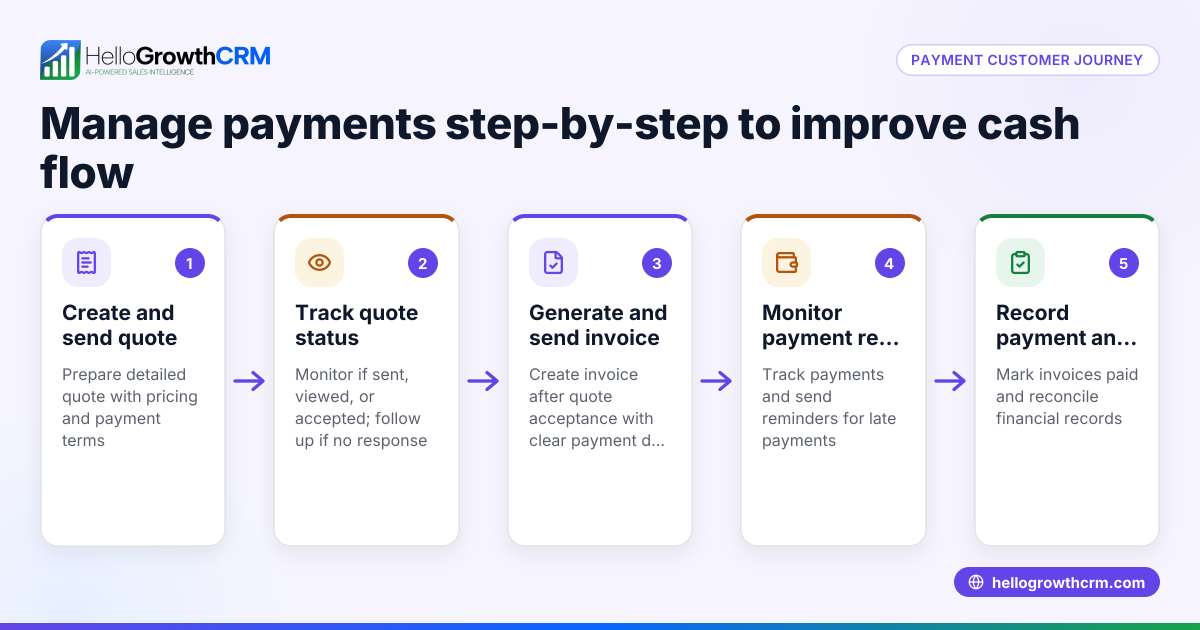
- Monitor payment status: Use your payment platform’s dashboard to check if the payment has been completed.
- Record the payment: Update your sales records or CRM to reflect the received payment and send a receipt if needed.
Using HelloGrowthCRM, you can manage quotes, proposals, invoices and payments received efficiently after generating payment requests. See HelloGrowthCRM for Singapore for details.
Example (fictional figures)
An F&B supplier based in Woodlands delivered an order on 15/05/2024 and needs to collect payment immediately.
- Order amount: S$4,750
- Payment due: Immediate
Steps:
- Log in to the bank’s payment portal.
- Select “Create payment link.”
- Enter amount: S$4,750
- Enter description: Invoice #20240515
- Set expiry: 7 days
- Generate link: https://pay.example.com/abc123 NEEDS EXPERT REVIEW
- Test link to confirm payment page shows S$4,750 and invoice #20240515
- Send link via WhatsApp to customer.
- Customer pays S$4,750 online.
- Confirm payment received and update records.
Worked arithmetic for payment amount: S$4,000 + S$750 = S$4,750
This example shows a clear, traceable payment request.
Common mistakes
- Entering incorrect amounts: Always double-check payment amounts before creating the link to prevent underpayment or disputes.
- Using expired or reused links: Set expiry dates and avoid reusing old links for new payments.
- Not testing the payment link before sending: Verify the link works and shows correct details to avoid customer confusion.
- Failing to track payment status: Use your payment provider’s dashboard or a CRM system to monitor payments and send reminders.
- Poor communication with customers: Include clear payment instructions and follow up politely if payment is delayed.
- Mixing payment methods without clarity: Stick to one payment method per invoice to reduce confusion.
Using a CRM with quoting and payment tracking features helps avoid these errors. See customer health score for insights.
Doing this in HelloGrowthCRM
HelloGrowthCRM includes a built-in quoting and proposal tool for building, sending and tracking commercial documents from a deal record. You can generate invoices tied to closed deals and reconcile payments received against those invoices and deals (Starter plan and above). The quotation goes out from the deal and its status (sent, viewed, accepted) is visible alongside your follow-up tasks. After the sale, service requests stay on the same customer record as the deal, making post-sale support easier. Learn more at WhatsApp and SMS CRM.
Frequently asked questions
Can I create a payment link without a business bank account? Most payment link services require an account with the payment provider or bank. Some third-party platforms allow you to create links without a traditional business bank account, but check their terms and fees carefully.
Is it safe to send payment links via WhatsApp? Yes, if the link comes from a trusted payment provider and you verify it before sending. Avoid including sensitive details in the message.
Can customers pay in instalments using payment links? Payment links generally request a fixed amount. For instalments, create separate links for each payment or use a platform that supports payment plans.
What if a customer says the payment link doesn’t work? Test the link yourself first. If it works, ask the customer for screenshots or error details. Sometimes device or network issues cause problems.
How do I track payments after sending links? Use your payment provider’s dashboard or integrate with a CRM like HelloGrowthCRM to monitor payment status and send reminders.
Can I customise the payment link message? Yes, include clear instructions and invoice details in your message to reduce confusion and speed up payment.
See also customer health score for insights on payment behaviour.
Key takeaways
- Use a trusted payment platform to create secure payment links in Singapore dollars.
- Enter correct payment amounts and clear descriptions to avoid disputes.
- Always test payment links before sending to customers.
- Track payment status and update your records promptly.
- Avoid common mistakes like expired links and unclear communication.
- HelloGrowthCRM helps manage quotes, proposals, invoices and payments efficiently.
Creating and sending payment links can speed up cash flow and reduce manual work. To start managing your sales and payments efficiently, start on the Free Forever plan (200 leads, no credit card).
Ready to put this into practice?
Set up your pipeline, WhatsApp follow-ups, and AI lead scoring in minutes — free, no credit card.
Try HelloGrowthCRM freeGet CRM tips in your inbox
Join thousands of sales professionals who get weekly insights on CRM strategy, AI automation, and pipeline optimization.

The HelloGrowthCRM team publishes guides on CRM strategy, AI sales tools, and revenue operations for small business sales teams.