HelloGrowthCRM software
Built for real small-business sales teams
HelloGrowthCRM helps reps qualify faster, follow up on time, and close more deals—with practical automation in one place.
- AI lead scoring and pipeline visibility
- Built-in dialer, WhatsApp, and email automation
- Sales forecasting and RevOps-ready reporting
To create a quotation for a customer in the UAE, you need to prepare a clear document that outlines what you offer, at what price, and under what terms. The quotation should include your business and customer details, a description of goods or services, quantities, unit prices, any applicable taxes, total amounts, and payment terms. This article explains why quotations matter, gives you a step-by-step process, a detailed example, common mistakes to avoid, and how HelloGrowthCRM can help streamline this task.
Why this comes up / what goes wrong
Many small business owners in the UAE need to provide quotations to potential customers to formalise their offers before a sale. Without a clear quotation, customers may be confused about pricing or terms, leading to lost sales or disputes. Often, quotations are created informally on WhatsApp, calls, or spreadsheets, which can cause delays or errors. A well-structured quotation helps speed up customer decisions and keeps your sales process professional.
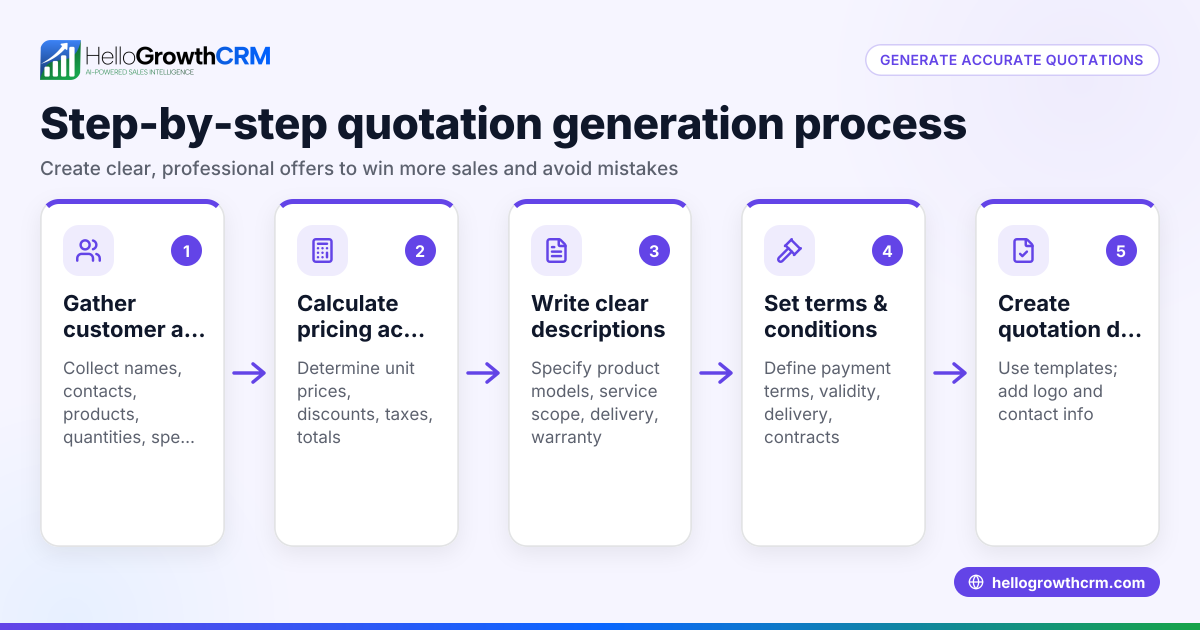
Step-by-step
- Gather customer details: Get the customer's full name, company (if any), contact information, and address. Double-check for accuracy.
- Include your business details: Your company name, trade licence number if applicable, contact details, and address should be clearly shown.
- Assign a quotation number: Use a unique reference number for tracking. This could be sequential or date-based.
- Add the quotation date: The date you issue the quotation.
- State the validity period: Specify how long the quotation is valid (e.g., 30 days).
- List products or services: For each item, provide a clear description, quantity, unit price, and line total.
- Calculate totals: Sum all line totals to get the subtotal.
- Add taxes if applicable: Include VAT or other taxes if your business is registered and required to charge them. State the tax rate and amount separately.
- Show the grand total: Add subtotal and taxes for the final amount.
- Specify payment terms: State how and when payment should be made (e.g., 50% upfront, balance on delivery).
- Include any additional terms or notes: Delivery times, warranty, or special conditions.
- Review and approve: Check all figures and details for accuracy before sending.
Using this clear format ensures your customer understands the offer and helps avoid disputes.
Example (fictional figures)
A real-estate brokerage in Dubai Marina wants to provide a quotation for property marketing services.
- Quotation number: Q-2024-045
- Date: 15/06/2024
- Validity: 30 days
| Description | Quantity | Unit Price (AED) | Line Total (AED) |
|---|---|---|---|
| Property listing on portal | 1 | 5,000 | 5,000 |
| Professional photography | 1 | 3,500 | 3,500 |
| Social media campaign (1 mo) | 1 | 7,000 | 7,000 |
Subtotal = AED 5,000 + AED 3,500 + AED 7,000 = AED 15,500
Assumed VAT rate = 5%
VAT = AED 15,500 × 5% = AED 775
Grand Total = AED 15,500 + AED 775 = AED 16,275
Payment terms: 50% upfront, balance on completion.
This quotation clearly communicates the offer and pricing.
Common mistakes
- Not including a quotation number: This makes tracking difficult. Always assign a unique number.
- Omitting validity period: Without it, customers may accept the quotation after prices change. Always state how long the offer lasts.
- Forgetting taxes: If your business is VAT registered, exclude or include VAT correctly to avoid confusion.
- Unclear descriptions or quantities: This causes misunderstandings. Be precise and detailed.
- No payment terms: This delays payment. Specify when and how payment is expected.
- Not reviewing before sending: Errors reduce professionalism. Double-check all details.
Avoid these to keep your sales smooth.
Doing this in HelloGrowthCRM
HelloGrowthCRM helps you create and send quotations directly from the deal record using its built-in quoting and proposal tool. You can track the quotation’s status—whether it’s sent, viewed, or accepted—on the same screen as your follow-up tasks. After the sale, service requests and customer interactions stay linked on the same customer record. For founders without a sales manager, Managed RevOps ensures someone works your follow-up queue weekly to keep deals progressing. Learn more about HelloGrowthCRM’s quoting features and customer management on the WhatsApp and SMS CRM page and explore how it supports businesses in the UAE on the HelloGrowthCRM for the United Arab Emirates page.
Frequently asked questions
How do I create a customer database in the UAE? Start by collecting customer contact details, company names, and communication preferences. Organise this data in a spreadsheet or CRM. Ensure you keep records up to date and comply with data protection rules. HelloGrowthCRM offers customer record management integrated with sales and support activities.
Should I include VAT in my quotations? If your business is VAT registered in the UAE, you must include VAT at the applicable rate. Show the VAT amount separately on the quotation. If you are not registered, do not charge VAT. Confirm your VAT status before quoting.
What payment terms are common in UAE quotations? Typical terms include 50% upfront and 50% on delivery or full payment within 30 days. Specify the method (bank transfer, cheque, etc.) and any penalties for late payment.
Can I send quotations via WhatsApp? Yes, many UAE businesses use WhatsApp for communication. HelloGrowthCRM integrates WhatsApp messaging with quotations, helping you send and track documents easily.
How do I follow up after sending a quotation? Set reminders to contact the customer before the quotation expires. HelloGrowthCRM shows quotation status and follow-up tasks together, helping you stay organised.
Key takeaways
- Always include customer and business details, quotation number, date, and validity period.
- List products/services with quantities and unit prices clearly.
- Calculate subtotal, add VAT if applicable, and show the grand total.
- Specify payment terms and any additional conditions.
- Review the quotation thoroughly before sending.
- Use tools like HelloGrowthCRM to create, send, and track quotations efficiently.
Start creating professional quotations today to improve your sales process and customer trust.
Start on the Free Forever plan (200 leads, no credit card) at HelloGrowthCRM.
Ready to put this into practice?
Set up your pipeline, WhatsApp follow-ups, and AI lead scoring in minutes — free, no credit card.
Try HelloGrowthCRM freeGet CRM tips in your inbox
Join thousands of sales professionals who get weekly insights on CRM strategy, AI automation, and pipeline optimization.

The HelloGrowthCRM team publishes guides on CRM strategy, AI sales tools, and revenue operations for small business sales teams.