HelloGrowthCRM software
Built for real small-business sales teams
HelloGrowthCRM helps reps qualify faster, follow up on time, and close more deals—with practical automation in one place.
- AI lead scoring and pipeline visibility
- Built-in dialer, WhatsApp, and email automation
- Sales forecasting and RevOps-ready reporting
Handling business enquiries on WhatsApp is essential for Singapore small businesses that want to convert leads quickly and avoid losing potential customers. The key is to respond quickly, keep enquiries organised, and follow up in a timely manner. This article explains why this issue arises, provides step-by-step instructions, a realistic example with calculations, common pitfalls, and how HelloGrowthCRM can help.
Why this comes up / what goes wrong
Many small-business owners in Singapore use WhatsApp informally to communicate with customers but lack a system to track enquiries effectively. Leads often come mixed with personal chats, making it easy to overlook or delay responses. Without a clear process, enquiries get lost or forgotten, leading to lost sales opportunities. Businesses also struggle to prioritise leads or follow up consistently. This wastes time and frustrates customers expecting quick replies.
Step-by-step
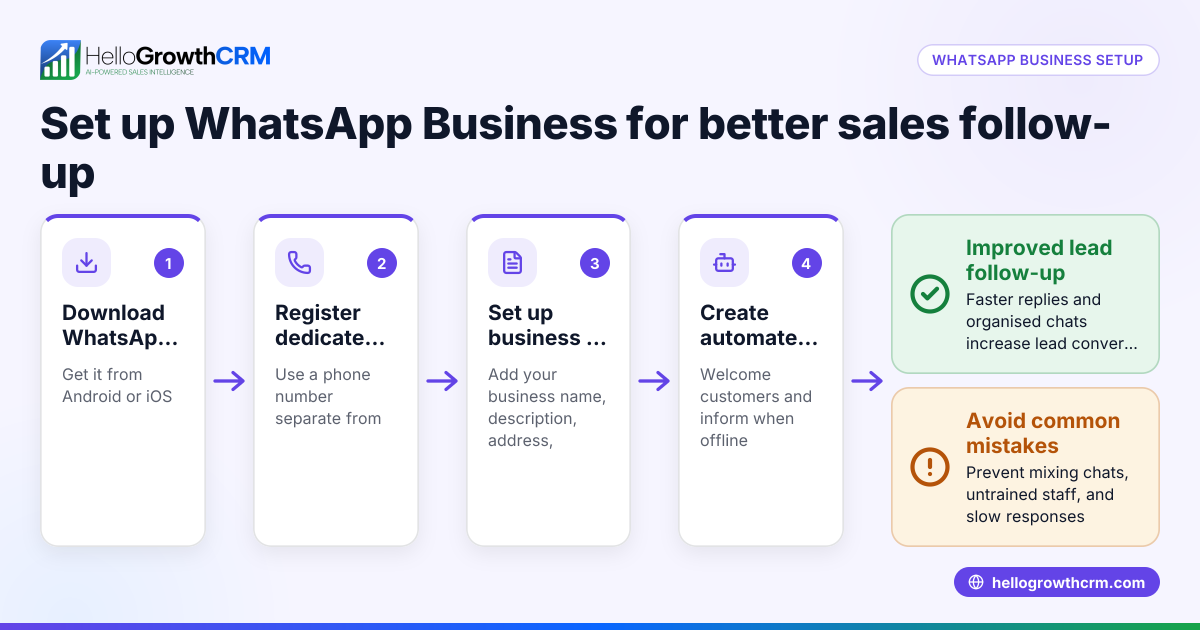
- Set up a dedicated WhatsApp Business number or account.
- Ensure this number is used only for business enquiries.
- Display this number clearly on your website, social media, and marketing materials.
- Respond promptly to every new enquiry.
- Aim to reply within 1 hour during business hours.
- Prepare quick replies or message templates for common questions to save time.
- Log each enquiry immediately.
- Record customer details such as name, contact number, enquiry date, and enquiry specifics in a spreadsheet or CRM.
- Make notes on the enquiry topic and any important details.
- Categorise and prioritise leads.
- Mark urgent enquiries or those close to purchase.
- Assign follow-up dates and responsible team members.
- Follow up systematically.
- Set reminders to send follow-up messages if there is no response after 2 days.
- Keep records of follow-up messages and their outcomes.
- Use WhatsApp features effectively.
- Label chats by enquiry status (new, in progress, closed).
- Use starred messages to mark important information.
- Review and improve your process regularly.
- Weekly review your enquiry log to identify missed or delayed responses.
- Adjust your process or staffing as needed.
- Integrate WhatsApp with a CRM if possible.
- Consider a CRM that logs WhatsApp conversations automatically to avoid manual entry and improve follow-up.
Learn more about managing WhatsApp communications with a built-in CRM dialer and WhatsApp and SMS CRM.
Example (fictional figures)
A property agency in Novena receives a WhatsApp enquiry about a rental unit on 15/05/2024. They follow these steps:
- Enquiry received at 10:00 AM.
- Agent replies at 10:30 AM with availability details.
- Agent logs enquiry in a spreadsheet with these details:
- Name: Mr Lim
- Contact: +65 9123 4567
- Enquiry: Rental unit at Novena
- Date: 15/05/2024
- Status: New
- Agent sets a follow-up reminder for 17/05/2024.
- On 17/05/2024, agent sends a follow-up message.
- Mr Lim confirms interest and schedules a viewing.
Financially, the agency expects a rental commission of 1 month's rent at S$3,500.
Calculation:
Rental commission = Monthly rent × Commission rate
Assuming a 7% commission rate (illustrative):
S$3,500 × 7% = S$245
If the agency closes 4 similar deals in a month:
S$245 × 4 = S$980 total commission
This example shows how prompt, organised WhatsApp management leads to clear revenue opportunities.
Common mistakes
- Mixing personal and business WhatsApp chats. Prevent by using a dedicated business number or WhatsApp Business account.
- Delaying responses to enquiries. Prevent by setting response time goals and using quick replies or templates.
- Not logging enquiries immediately. Prevent by recording all enquiries in a spreadsheet or CRM as soon as they arrive.
- Failing to follow up consistently. Prevent by setting reminders and tracking follow-up status.
- Ignoring WhatsApp organisational features like labels and starred messages. Prevent by using these features to prioritise and organise chats.
- Manual tracking without integration. Prevent by considering a WhatsApp CRM such as HelloGrowthCRM to log conversations automatically and send follow-ups.
Doing this in HelloGrowthCRM
HelloGrowthCRM offers WhatsApp and SMS features that log WhatsApp conversations with leads directly on the lead record. Follow-ups can be sent as messages from the CRM, helping your team stay organised and respond faster. Learn more about WhatsApp and SMS CRM and how it supports Singapore businesses on HelloGrowthCRM for Singapore.
Frequently asked questions
How quickly should I respond to WhatsApp enquiries? Respond within 1 hour during business hours to keep leads engaged and demonstrate professionalism.
Can I use my personal WhatsApp for business enquiries? It's best to use a dedicated business number or WhatsApp Business account to separate personal and business chats and stay organised.
How do I keep track of multiple WhatsApp enquiries? Use a spreadsheet or CRM to log enquiries, assign follow-ups, and track status. Tools like HelloGrowthCRM can automate this process.
What if I miss a WhatsApp enquiry? Set up notifications and check your WhatsApp Business inbox regularly. Logging enquiries immediately helps prevent misses.
Can I send follow-up messages automatically on WhatsApp? Some CRM tools support messaging sequences. HelloGrowthCRM allows follow-ups to be sent as WhatsApp messages from the lead record.
Key takeaways
- Use a dedicated business WhatsApp number or account for enquiries.
- Respond quickly, ideally within 1 hour during business hours.
- Log and categorise each enquiry immediately.
- Follow up consistently with reminders.
- Use WhatsApp features like labels and starred messages to organise chats.
- Consider a CRM like HelloGrowthCRM to log conversations and send follow-ups.
Start handling your WhatsApp business enquiries more efficiently today. You can Start on the Free Forever plan (200 leads, no credit card) to organise and respond better.
Ready to put this into practice?
Set up your pipeline, WhatsApp follow-ups, and AI lead scoring in minutes — free, no credit card.
Try HelloGrowthCRM freeGet CRM tips in your inbox
Join thousands of sales professionals who get weekly insights on CRM strategy, AI automation, and pipeline optimization.

The HelloGrowthCRM team publishes guides on CRM strategy, AI sales tools, and revenue operations for small business sales teams.