HelloGrowthCRM software
Built for real small-business sales teams
HelloGrowthCRM helps reps qualify faster, follow up on time, and close more deals—with practical automation in one place.
- AI lead scoring and pipeline visibility
- Built-in dialer, WhatsApp, and email automation
- Sales forecasting and RevOps-ready reporting
Recording a voicemail is essential for small-business owners who want to maintain professional communication when they cannot answer calls. A clear, friendly voicemail greeting ensures that callers know you received their call and can expect a callback. This guide explains why you might need to record a voicemail, provides step-by-step instructions, a worked example, common mistakes to avoid, and frequently asked questions.
Why this comes up / what goes wrong
Small-business owners often need to record voicemails to handle calls professionally outside business hours or when they are busy. Without a clear voicemail greeting, callers may hang up or feel uncertain about leaving a message. Many owners struggle with when and how to record a voicemail, what to say, and how to check that it sounds right. Slow follow-up on missed calls can lead to lost leads, which is costly for growing businesses.
Step-by-step
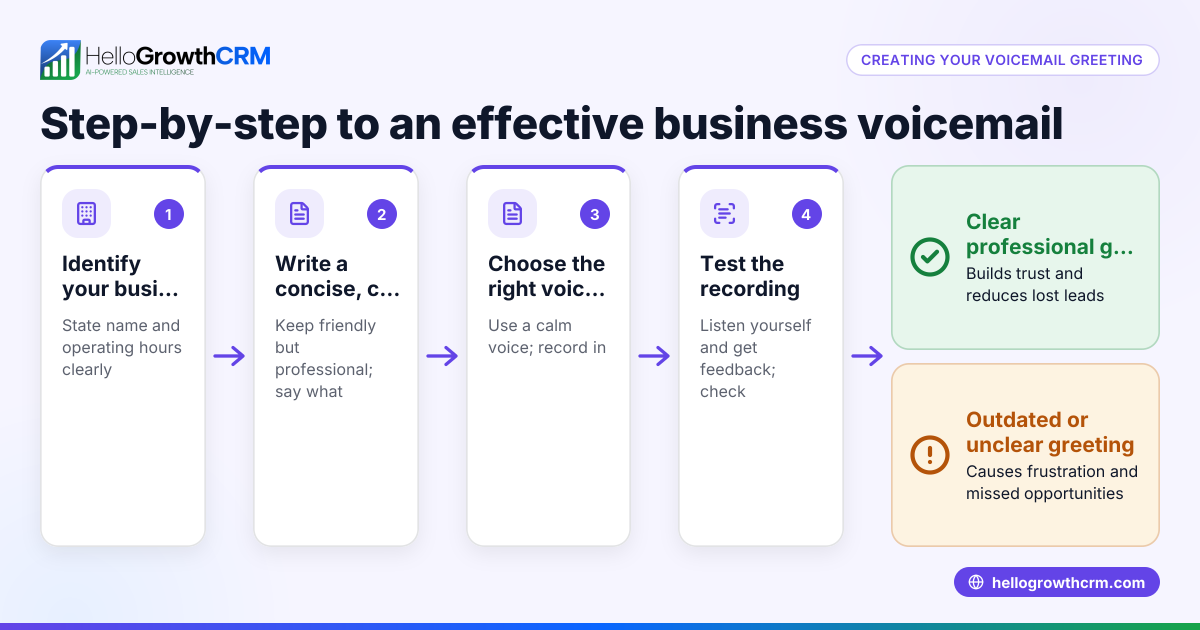
- Access your voicemail system: On your mobile phone, open the Phone app and tap the voicemail icon or dial your voicemail number. On a landline or office phone system, press the voicemail or message button.
- Enter your voicemail PIN or password: If this is your first time, you may need to set a PIN. Follow the prompts to do so.
- Navigate to the greeting setup: Listen to the menu options and select the one for recording or changing your voicemail greeting.
- Record your greeting: When prompted, speak your voicemail message clearly and at a moderate pace. Example: “Hi, you’ve reached [Your Business Name]. We can’t take your call right now, but please leave your name, number, and a brief message. We’ll get back to you as soon as possible.”
- Review your recording: Most systems allow you to listen to your greeting before saving. Confirm that the message is clear, professional, and free of background noise.
- Save your greeting: Follow the prompts to save the recording.
- Test your voicemail: Call your number from another phone to hear your voicemail greeting and ensure it works correctly.
- Update as needed: Change your greeting if your business hours or contact details change.
Remember to keep your message concise and friendly to encourage callers to leave messages.
Example (fictional figures)
A B2B software reseller in Denver, Colorado, named Tech Solutions, wants to record a voicemail to handle after-hours calls.
- On 06/15/2026, the owner accesses the voicemail by dialing *86 from their office phone.
- They enter their PIN: 1234.
- They select option 2 for "Record Personal Greeting."
- They record: “Hi, this is Tech Solutions. We’re unavailable right now. Please leave your name, number, and message, and we’ll return your call within 24 hours.”
- They listen to the recording, confirm it sounds clear and professional.
- They save the greeting.
- They test by calling from their mobile phone and hear the message exactly as recorded.
This process took about 5 minutes and ensures no lead is lost due to unanswered calls.
Common mistakes
- Speaking too fast or unclearly: Speak slowly and clearly to ensure callers understand your message.
- Leaving a greeting too long: Keep it under 30 seconds to avoid losing caller attention.
- Not testing the voicemail: Always call your number from another phone to check the greeting.
- Using a generic or unprofessional message: Personalize your greeting with your business name and a friendly tone.
- Failing to update the greeting: Change your message if your hours or contact details change to avoid confusion.
Using email automation and sequences alongside voicemail can improve your lead follow-up efficiency. See more about email automation and sequences and managing communications through WhatsApp and SMS CRM.
Frequently asked questions
Can I record a voicemail greeting on any phone? Most mobile phones and office phone systems allow voicemail greetings. Check your device’s user manual or carrier instructions. Smartphones usually have a voicemail icon for easy access.
How long should my voicemail greeting be? Aim for 20 to 30 seconds. This is enough time to identify your business and ask callers to leave a message without losing their attention.
What should I say in my voicemail? Include your business name, a polite note that you can’t answer, and a request for the caller’s name, phone number, and message. Mention when you’ll return the call if possible.
Can I change my voicemail greeting anytime? Yes. Most voicemail systems let you record and save new greetings whenever you want. Update it if your hours or contact details change.
How do I check if the voicemail is working? Call your number from another phone and listen to your greeting. Leave a test message to confirm it records correctly.
For US businesses looking to streamline lead management, consider exploring HelloGrowthCRM’s HelloGrowthCRM for the United States features.
Key takeaways
- Access your voicemail system, enter your PIN, and select the greeting setup.
- Record a clear, concise, and friendly voicemail message.
- Always listen to and test your recording before saving.
- Keep your greeting under 30 seconds and update it as needed.
- Avoid common mistakes like speaking too fast or not testing the greeting.
Start recording your voicemail today to ensure you never miss a lead. For managing leads and communications efficiently, Start on the Free Forever plan (200 leads, no credit card).
Ready to put this into practice?
Set up your pipeline, WhatsApp follow-ups, and AI lead scoring in minutes — free, no credit card.
Try HelloGrowthCRM freeGet CRM tips in your inbox
Join thousands of sales professionals who get weekly insights on CRM strategy, AI automation, and pipeline optimization.

The HelloGrowthCRM team publishes guides on CRM strategy, AI sales tools, and revenue operations for small business sales teams.