HelloGrowthCRM software
Built for real small-business sales teams
HelloGrowthCRM helps reps qualify faster, follow up on time, and close more deals—with practical automation in one place.
- AI lead scoring and pipeline visibility
- Built-in dialer, WhatsApp, and email automation
- Sales forecasting and RevOps-ready reporting
To send multiple emails at once, you typically use features like bulk send, mail merge, or an email marketing platform that allows batch messaging. These methods let you compose one email and send it individually to multiple recipients efficiently, saving time and reducing errors.
Why this comes up / what goes wrong
Small business owners often need to communicate with many customers, leads, or employees at the same time. For example, a two-location dental practice in Columbus, Ohio, might want to remind patients about upcoming appointments, or a local retailer might announce a sale to their mailing list. Sending emails one by one is slow and increases the risk of mistakes such as missing recipients, inconsistent messages, or exposing email addresses publicly. Using bulk email features helps maintain professionalism, saves time, and ensures timely communication.
Step-by-step
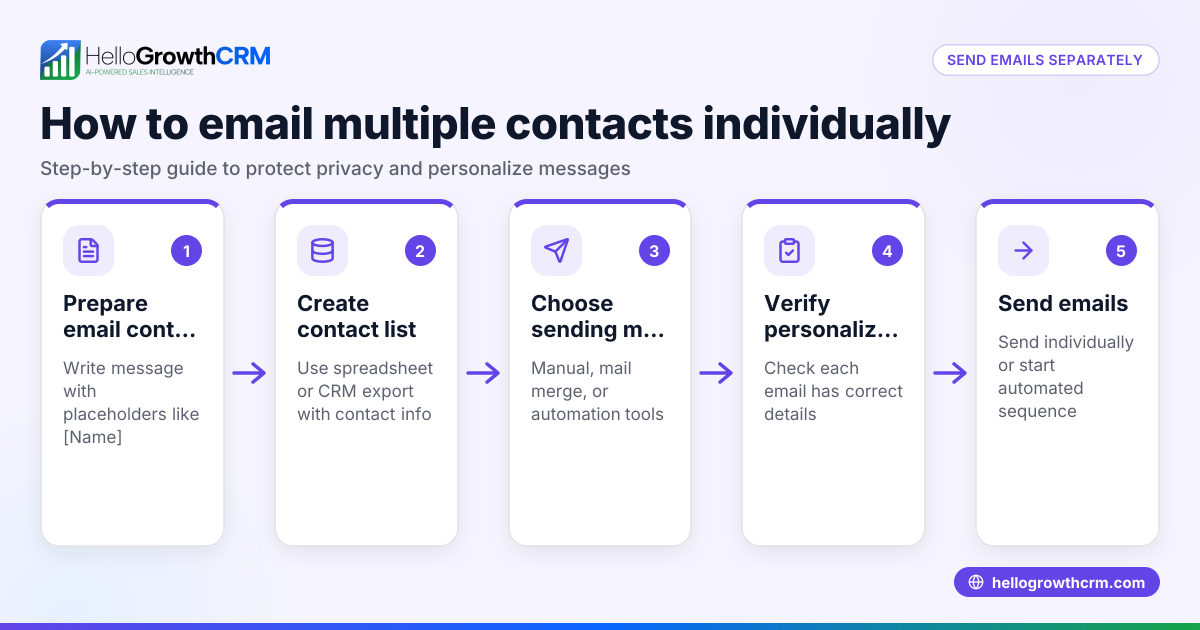
- Choose your sending method: Decide whether to use your email client’s bulk send or mail merge feature, or an email marketing tool designed for batch sending. Popular email clients like Microsoft Outlook and Gmail support mail merge with add-ons or built-in features.
- Prepare your recipient list: Collect all recipient email addresses in a spreadsheet or contact list. Verify that all emails are accurate and properly formatted to avoid bounce-backs.
- Compose your email message: Write the email you want to send. If you want to personalize emails (for example, include the recipient's name), prepare placeholders or merge fields in your message.
- Set up the mail merge or bulk send: In your email client or marketing tool, upload or connect your recipient list. Map the fields (such as name and email) to the placeholders in your email template.
- Send a test email: Send a test email to yourself or a colleague to check formatting, links, and personalization. This step helps catch errors before sending to your full list.
- Send the emails: Execute the bulk send or mail merge. The tool will send individual emails to each recipient, ensuring privacy and personalization.
- Monitor delivery and responses: After sending, check for bounce notifications or delivery failures and remove invalid addresses from your list. Track replies or engagement as needed.
For more on automating your outreach, see email automation and sequences.
Example (fictional figures)
A two-location dental practice in Columbus, Ohio, plans to remind 150 patients about their upcoming appointments scheduled for 07/15/2026. They use mail merge in Microsoft Outlook to send personalized reminder emails.
- Total patients: 150
- Compose reminder email with placeholders for patient name and appointment date
- Send a test email to the office manager
- Mail merge sends 150 individual emails
During sending, 5 emails bounce due to invalid addresses.
To update the list:
150 (total emails sent) - 5 (bounced emails) = 145 (valid emails)
The dental practice updates their patient list to 145 valid email addresses for future communications.
Common mistakes
- Sending emails without personalization: Generic emails can reduce engagement. Use mail merge fields to add recipient names or other details.
- Not testing emails before sending: Formatting errors or broken links can harm your brand. Always send a test email to check.
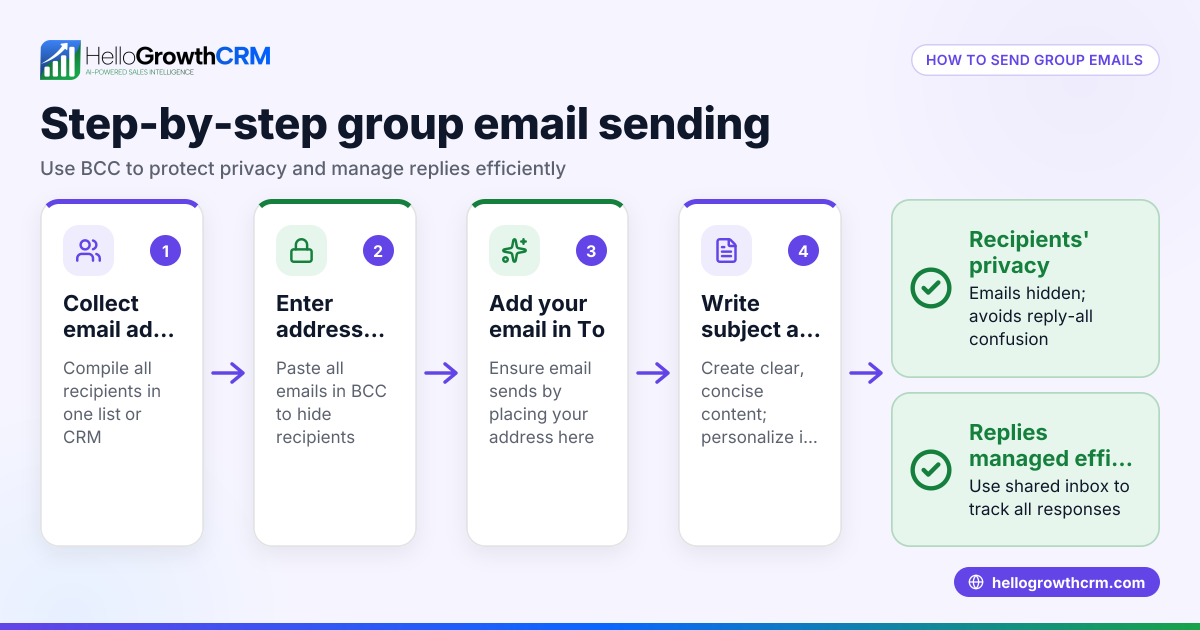
- Ignoring privacy by using To or Cc fields for multiple recipients: This exposes all email addresses. Use Bcc or mail merge to keep addresses private.
- Not cleaning the recipient list: Sending to invalid emails causes bounce-backs and may harm sender reputation. Regularly update your list.
- Overloading recipients with too many emails: Space out bulk sends to avoid being marked as spam.
See more on multi-channel outreach with WhatsApp and SMS CRM.
Checklist to Know If Your Bulk Emailing Is Working
To make sure your bulk emails are effective, here are some simple checks you can do:
- Check delivery rates: Are most of your emails reaching recipients without bouncing?
- Look for engagement: Are people opening your emails and clicking any links?
- Monitor responses: Are you getting replies or inquiries from your recipients?
- Review unsubscribe rates: Are many people opting out after your emails?
- Assess timing: Are your emails sent at times when recipients are likely to read them?
If you notice low engagement or high bounce rates, revisit your email list quality, personalization, and message content. Regularly reviewing these points helps you improve your approach and get better results from sending multiple emails at once.
Frequently asked questions
Can I send multiple emails at once from Gmail? Yes, Gmail supports sending emails to multiple recipients using the Bcc field or mail merge add-ons like Yet Another Mail Merge. These tools allow you to personalize and send bulk emails efficiently.
How do I keep recipients’ emails private when sending bulk emails? Use the Bcc (blind carbon copy) field or mail merge features. These hide each recipient’s email from others, protecting privacy and reducing spam complaints.
Is it better to use an email marketing tool than my regular email client? Email marketing tools often provide more features like tracking, templates, and compliance management. For frequent or large campaigns, these tools save time and improve results. Learn more about WhatsApp and SMS CRM for multi-channel outreach.
What if some emails bounce or fail? Review bounce notifications and remove invalid addresses from your list. Keeping your list clean improves deliverability and sender reputation.
Can I schedule bulk emails to send later? Many email clients and marketing platforms let you schedule emails for a future date and time, helping you target the best send moments.
Key takeaways
- Use mail merge or bulk send features to email multiple recipients efficiently.
- Prepare and clean your recipient list before sending.
- Personalize emails to improve engagement.
- Test emails before sending to avoid errors.
- Respect privacy by using Bcc or mail merge instead of To/Cc.
- Monitor delivery and remove bounced emails.
Start sending multiple emails at once today and save time managing your communications. To get started, Start on the Free Forever plan (200 leads, no credit card).
Ready to put this into practice?
Set up your pipeline, WhatsApp follow-ups, and AI lead scoring in minutes — free, no credit card.
Try HelloGrowthCRM freeGet CRM tips in your inbox
Join thousands of sales professionals who get weekly insights on CRM strategy, AI automation, and pipeline optimization.

The HelloGrowthCRM team publishes guides on CRM strategy, AI sales tools, and revenue operations for small business sales teams.