HelloGrowthCRM software
Built for real small-business sales teams
HelloGrowthCRM helps reps qualify faster, follow up on time, and close more deals—with practical automation in one place.
- AI lead scoring and pipeline visibility
- Built-in dialer, WhatsApp, and email automation
- Sales forecasting and RevOps-ready reporting
Sending video files by email can be tricky because of file size limits and compatibility issues. Small-business owners often need to share promotional videos, product demos, or client testimonials quickly and clearly. This guide explains why sending videos by email can be challenging, how to do it step-by-step, common mistakes to avoid, and a worked example for a US dental practice.
Why this comes up / what goes wrong
Many small-business owners want to send videos through email to prospects or clients but run into problems like emails bouncing back, slow uploads, or confusing recipients with large attachments. Email providers typically have limits on attachment sizes, so large video files can’t be sent directly. Also, video formats may not play easily on all devices. Without clear steps, you might waste time or lose leads due to delayed follow-up.
Step-by-step
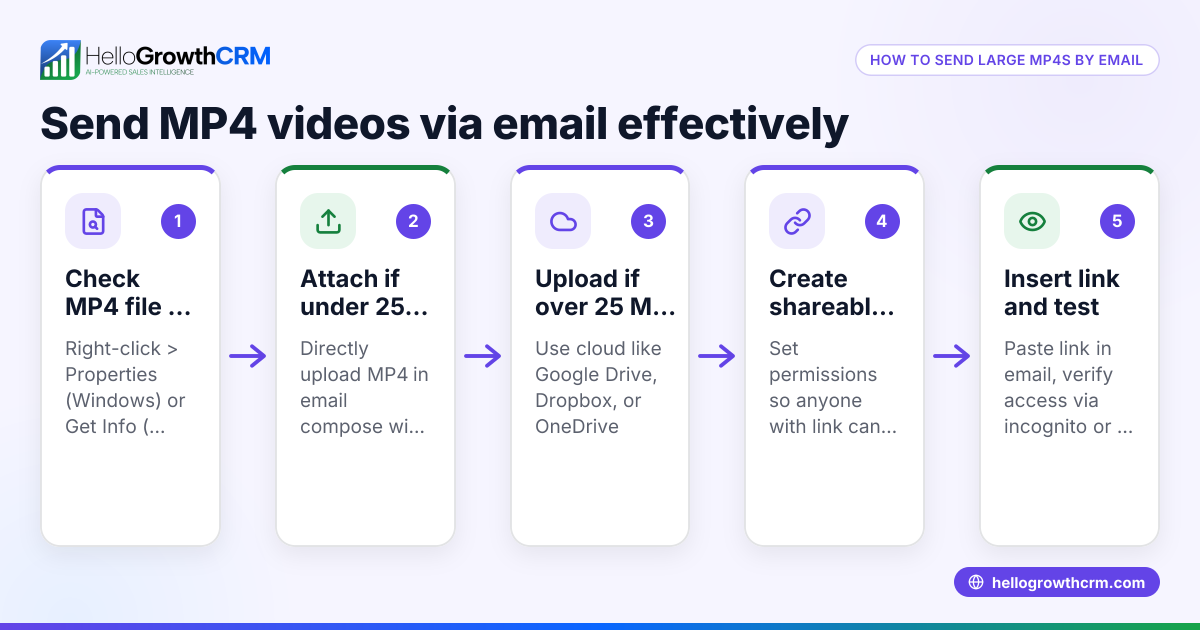
- Check the video file size: Locate your video file on your computer and check its size. If the file size is small enough, you can usually attach it directly to your email.
- Open your email client or service: Use your preferred email platform where you compose messages.
- Create a new email: Click to compose a new email and enter the recipient’s email address, subject, and message body.
- Attach the video file: Click the attachment icon (usually a paperclip), browse to your video file, and select it.
- If the video is too large (over 25 MB), upload it to a cloud storage service: Use services like Google Drive, Dropbox, or OneDrive.
- Get a shareable link from the cloud storage: Right-click the uploaded video and select “Get shareable link” or “Copy link.”
- Paste the link into your email: Instead of attaching the file, paste the link in your email body with a short explanation.
- Check the email for clarity and test the link: Ensure the recipient can open the video link without needing special permissions.
- Send the email: Click Send.
- Follow up as needed: If you use HelloGrowthCRM, you can automate follow-ups with sequences and campaigns to check if the recipient viewed your video. See more on email automation and sequences.
Example (fictional figures)
A two-location dental practice in Columbus, Ohio, wants to email a 30 MB video introducing their new teeth whitening service to 50 prospective patients on 06/15/2026.
Step 1: The video file is 30 MB, which is over the 25 MB email attachment limit.
Step 2: They upload the video to Google Drive.
Step 3: They copy the shareable link.
Step 4: Compose an email with the subject “Introducing Our New Teeth Whitening Service” and paste the link with a message.
Step 5: Send the email to all 50 prospects.
Step 6: Using HelloGrowthCRM sequences, they schedule a 5-step follow-up over two weeks to check engagement and respond promptly if anyone replies.
Common mistakes
- Trying to attach large videos directly: Prevent by checking file size first and using cloud storage for files over 25 MB.
- Not testing the video link before sending: Prevent by clicking the link yourself to ensure it works and has correct permissions.
- Sending videos in unsupported formats: Prevent by using common formats like MP4.
- Not explaining the link in the email: Prevent by writing a clear message about what the recipient will see.
- Ignoring follow-up: Prevent by automating follow-ups with tools like HelloGrowthCRM sequences to stay on top of replies.
Doing this in HelloGrowthCRM
HelloGrowthCRM offers a shared inbox called HelloMail, where replies to your video email or quotation emails are visible to your whole team, improving collaboration on deals. Additionally, you can use Sequences and campaigns to automate a five-step follow-up over two weeks that stops as soon as a prospect replies. This helps ensure timely engagement without manual tracking. Learn more about WhatsApp and SMS CRM and email automation and sequences.
Frequently asked questions
Can I send any video size through email? Most email services limit attachments to about 25 MB. For larger videos, upload them to cloud storage and share the link instead.
What video formats work best for email? MP4 is a widely supported video format for email recipients across many devices. Avoid less common formats that may not play easily.
How can I make sure my video email isn’t marked as spam? Keep your email text clear and avoid excessive links or attachments. Using a CRM like HelloGrowthCRM to manage email sequences can help maintain good sending practices.
Is it better to attach the video or send a link? If your video is small (under 25 MB), attaching it is simple. For larger files, sending a cloud storage link is more reliable and user-friendly.
How do I follow up after sending a video email? You can manually track replies or automate follow-ups using HelloGrowthCRM’s sequences and campaigns to save time and increase response rates.
Key takeaways
- Check your video file size before sending to avoid attachment limits.
- Use cloud storage links for videos over 25 MB.
- Test video links and use common formats like MP4.
- Explain the video link clearly in your email.
- Automate follow-ups with HelloGrowthCRM sequences to improve engagement.
Start sending videos through email confidently today. To manage your email communication and automate follow-ups, start on the Free Forever plan (200 leads, no credit card).
Ready to put this into practice?
Set up your pipeline, WhatsApp follow-ups, and AI lead scoring in minutes — free, no credit card.
Try HelloGrowthCRM freeGet CRM tips in your inbox
Join thousands of sales professionals who get weekly insights on CRM strategy, AI automation, and pipeline optimization.

The HelloGrowthCRM team publishes guides on CRM strategy, AI sales tools, and revenue operations for small business sales teams.