HelloGrowthCRM software
Built for real small-business sales teams
HelloGrowthCRM helps reps qualify faster, follow up on time, and close more deals—with practical automation in one place.
- AI lead scoring and pipeline visibility
- Built-in dialer, WhatsApp, and email automation
- Sales forecasting and RevOps-ready reporting
Meet with me scheduling is a way to let people pick a meeting time from your available calendar slots by sending them a link. This saves time and reduces confusion compared to negotiating meeting times by email, text, or WhatsApp. It is especially helpful for small business owners who want to speed up lead engagement and avoid losing prospects due to slow or complicated scheduling.
Why this comes up / what goes wrong
Small business owners often struggle with meeting scheduling because they rely on manual back-and-forth communication. For example, they might exchange multiple WhatsApp messages or emails trying to find a time that suits both parties. This wastes time, causes delays, and sometimes leads to lost leads or frustrated prospects. The problem worsens when the business grows and the volume of meeting requests increases. Without a clear scheduling system, it’s easy to double-book or miss opportunities.
Step-by-step
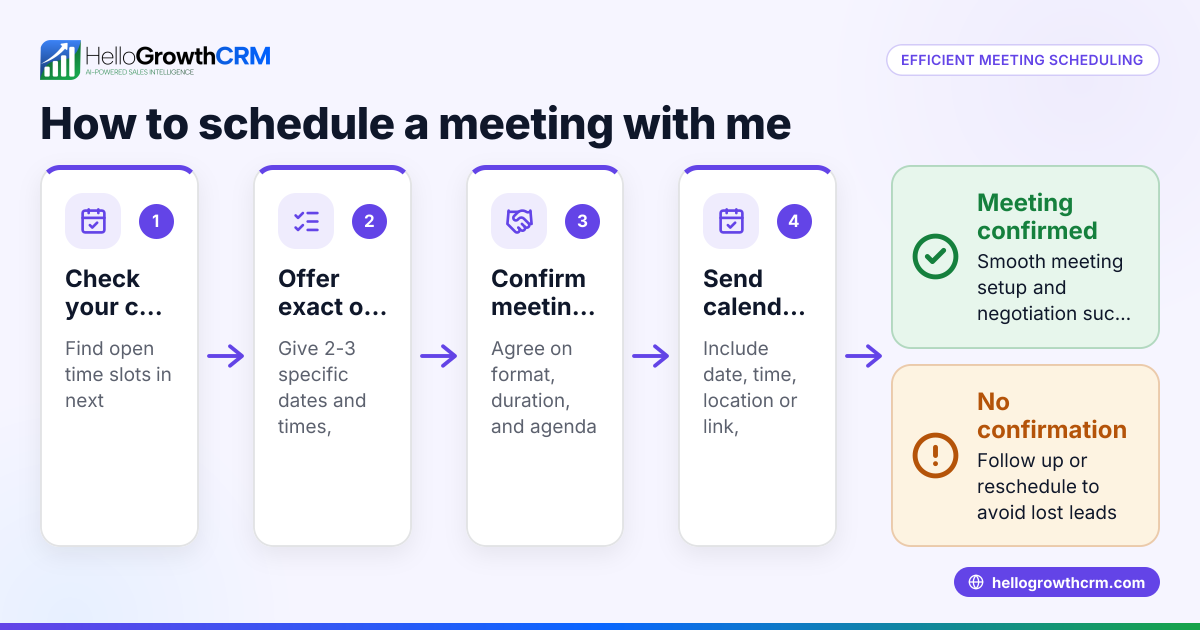
- Choose a scheduling tool or method. Decide how you will offer your available meeting times. This could be a calendar app or a CRM feature with scheduling capabilities.
- Set your available time slots. Define the days and hours when you are open for meetings. Be realistic about your availability to avoid overbooking.
- Create a booking link. Generate a link that prospects can click to see your available times and pick one.
- Share the link. Send this link in your emails, WhatsApp messages, or on your website where prospects can easily find it.
- Confirm the booking automatically. Use your tool’s features to send confirmation messages and reminders to both you and the prospect.
- Prepare for the meeting. Once booked, review the prospect’s information and plan your agenda.
- Follow up after the meeting. Use your CRM to track outcomes and schedule next steps.
Check that your scheduling tool integrates well with your communication channels and calendar to avoid double bookings or missed meetings. Also, make sure the booking link is easy to access and mobile-friendly.
Example (fictional figures)
A two-location dental practice in Columbus, Ohio, wants to reduce the time spent scheduling patient consultations. They offer 30-minute slots Monday to Friday from 9:00 AM to 5:00 PM. They create a booking link using their scheduling tool and share it via WhatsApp and email.
They have 20 consultation requests per week. Previously, each scheduling took about 10 minutes of back-and-forth messaging, totaling 200 minutes (20 × 10 minutes).
With meet with me scheduling, each booking takes 2 minutes for the patient to select a slot and 1 minute for confirmation, totaling 60 minutes (20 × 3 minutes).
Time saved weekly: 200 minutes − 60 minutes = 140 minutes
This 2 hours and 20 minutes saved can be used for patient care or administrative tasks.
Common mistakes
- Not setting clear available times. Prevent by defining specific slots and updating them regularly.
- Sharing the booking link inconsistently. Prevent by including it in all lead communications and website contact points.
- Ignoring confirmation and reminder messages. Prevent by automating these through your scheduling tool.
- Using a scheduling method that doesn’t sync with your calendar. Prevent by choosing tools that integrate with your calendar and communication channels like WhatsApp.
- Not preparing for booked meetings. Prevent by reviewing the prospect’s details in your CRM before the meeting.
Doing this in HelloGrowthCRM
HelloGrowthCRM offers scheduling and booking features that let a prospect pick a meeting slot from a link instead of exchanging messages back and forth on WhatsApp. This shortens the path from interest to conversation, helping small and mid-sized businesses save time and avoid lost leads. Scheduling is available on all plans, including the Free tier. Learn more about WhatsApp and SMS CRM and the built-in CRM dialer to combine communication and scheduling efficiently.
Frequently asked questions
What is meet with me scheduling? It is a scheduling approach where you send a link showing your available meeting times so prospects can pick a slot themselves. This avoids the usual back-and-forth to find a meeting time.
How does meet with me scheduling save time? By letting prospects choose their own meeting time from your calendar, you eliminate multiple messages trying to agree on a time. This speeds up lead engagement and reduces errors like double-booking.
Can I use meet with me scheduling on WhatsApp? Yes. Tools like HelloGrowthCRM integrate scheduling links directly into WhatsApp conversations, making it easy for prospects to book meetings without leaving the chat.
What should I look for in a scheduling tool? Choose one that syncs with your calendar, sends automatic confirmations and reminders, and integrates with your main communication channels like WhatsApp and email.
Is meet with me scheduling suitable for all business sizes? It works best for small and mid-sized businesses that handle multiple leads and want to reduce manual scheduling tasks. Larger businesses may need more advanced systems.
Key takeaways
- Meet with me scheduling lets prospects pick meeting times from your available slots via a link.
- It reduces time wasted in back-and-forth communication and prevents scheduling errors.
- Set clear availability, share your booking link consistently, and automate confirmations.
- Avoid common mistakes like poor calendar sync and lack of reminders.
- HelloGrowthCRM offers scheduling features integrated with WhatsApp to simplify this process.
Start saving time and improving your lead follow-up by using meet with me scheduling. Start on the Free Forever plan (200 leads, no credit card) with HelloGrowthCRM today.
Ready to put this into practice?
Set up your pipeline, WhatsApp follow-ups, and AI lead scoring in minutes — free, no credit card.
Try HelloGrowthCRM freeGet CRM tips in your inbox
Join thousands of sales professionals who get weekly insights on CRM strategy, AI automation, and pipeline optimization.

The HelloGrowthCRM team publishes guides on CRM strategy, AI sales tools, and revenue operations for small business sales teams.