HelloGrowthCRM software
Built for real small-business sales teams
HelloGrowthCRM helps reps qualify faster, follow up on time, and close more deals—with practical automation in one place.
- AI lead scoring and pipeline visibility
- Built-in dialer, WhatsApp, and email automation
- Sales forecasting and RevOps-ready reporting
A reminder message is a short, clear message sent to remind a customer, client, or lead about an upcoming event, deadline, appointment, or task. Small businesses use reminder messages to improve follow-up, reduce no-shows, and keep sales moving forward. This article covers why reminder messages matter, how to create and send them effectively, common pitfalls, and how to manage reminders using HelloGrowthCRM.
Why this comes up / what goes wrong
Small business owners often struggle with keeping track of follow-ups, appointments, and deadlines. Without timely reminders, leads can go cold, customers may miss appointments, or payments can be delayed. This leads to lost revenue and wasted time trying to reconnect. Many small teams rely on manual tracking with spreadsheets, texts, or emails, which is prone to error and forgetfulness. Reminder messages come up as a solution to ensure consistent communication that prompts action before it’s too late.
Step-by-step
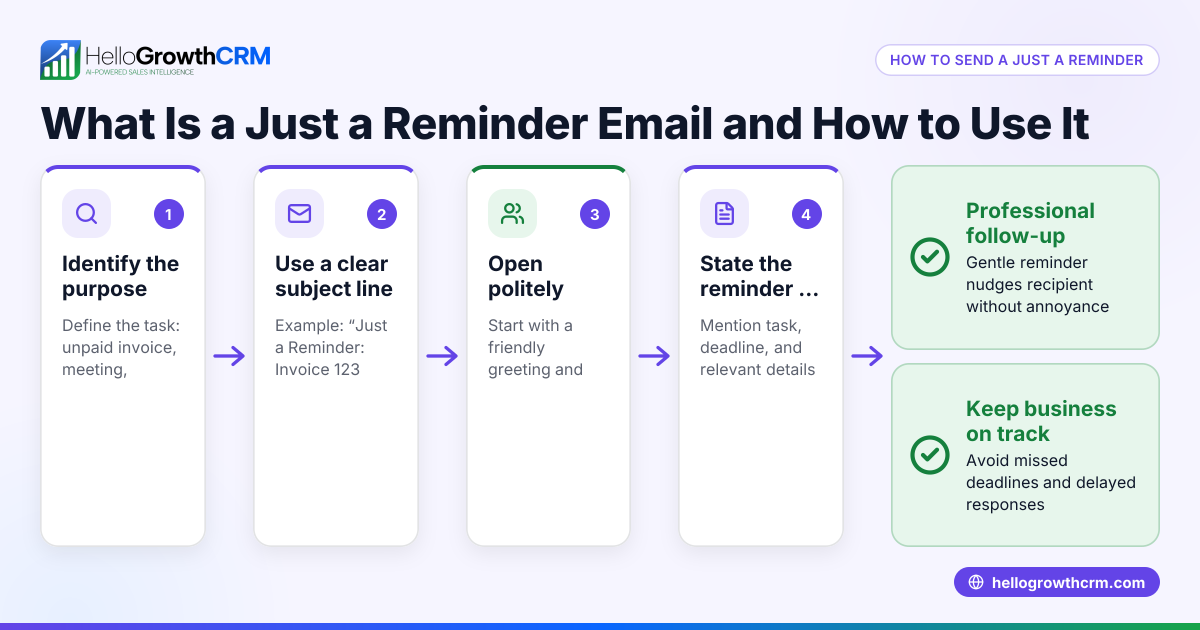
- Identify the purpose of your reminder message
- Decide what you want the recipient to do: confirm an appointment, pay an invoice, respond to a proposal, or attend an event.
- Check the timing: send reminders with enough lead time for the recipient to act.
- Keep the message clear and concise
- Use simple language.
- Include key details: date, time, amount due, or next steps.
- Choose the right communication channel
- Use the channel your customer prefers: email, SMS, or WhatsApp.
- Check message length limits for SMS or WhatsApp.
- Personalize the message
- Use the recipient’s name and specific details to increase engagement.
- Include a clear call to action
- Tell the recipient exactly what to do next (e.g., “Reply YES to confirm,” “Click here to pay,” or “Call us to reschedule”).
- Schedule and automate reminders when possible
- Use tools or CRM features to send reminders automatically at set times.
- Follow up if needed
- If there’s no response, send a polite second reminder or try a different channel.
Example (fictional figures)
A residential real-estate team in Phoenix, Arizona, wants to remind a client about a home viewing appointment on 07/15/2026 at 3:00 PM.
- The client’s name is Sarah.
- The message is sent 2 days before the appointment on 07/13/2026.
Message: "Hi Sarah, this is a reminder from Phoenix Home Team about your home viewing appointment on 07/15/2026 at 3:00 PM. Please reply YES to confirm or call us at (555) 123-4567 to reschedule."
They send this reminder via WhatsApp.
If Sarah confirms, the team marks the task complete. If no reply by 07/14/2026, they send a follow-up message.
Common mistakes
- Sending reminders too late or too early: Too early and the message is forgotten; too late and the recipient can’t act. Prevent by scheduling reminders with enough lead time.
- Using unclear language or missing details: Vague messages confuse recipients. Prevent by including date, time, and clear instructions.
- Not personalizing messages: Generic messages reduce response rates. Prevent by using names and specific details.
- Relying on one communication channel only: Some customers ignore certain channels. Prevent by offering reminders via email, SMS, or WhatsApp depending on preference.
- Forgetting to follow up: One reminder may not be enough. Prevent by scheduling a polite follow-up reminder.
- Manual tracking and memory reliance: Leads to missed reminders. Prevent by using task boards and CRM tools to automate and track reminders.
Doing this in HelloGrowthCRM
HelloGrowthCRM helps small businesses automate reminder messages and follow-ups efficiently. Each follow-up becomes a task with a due date on the sales task boards, so your team sees all calls and reminders for the day without relying on memory. WhatsApp conversations with leads are logged on the lead record, and follow-ups can be sent as WhatsApp or SMS messages directly from the CRM. This keeps all communication organized and timely. Learn more about sales task boards and WhatsApp and SMS CRM.
Frequently asked questions
What is the best time to send a reminder message? The best time depends on the purpose. For appointments, sending a reminder 24 to 48 hours before is common. For payments, a few days before the due date plus a follow-up after the due date if unpaid can work well.
How often should I send reminder messages? Generally, send one reminder before the event or deadline and a polite follow-up if there’s no response. Avoid excessive reminders that may annoy recipients.
Can reminder messages be automated? Yes, using CRM tools or scheduling software, you can automate reminders to send at set times without manual effort.
What channels are best for reminder messages? Email, SMS, and WhatsApp are popular. Choose based on your customer’s preference and the message urgency.
How do I keep track of sent reminders? Using a CRM with task boards or activity logs helps you track sent reminders, responses, and follow-ups in one place.
Key takeaways
- Reminder messages prompt customers to act on appointments, payments, or tasks.
- Clear, concise, and personalized messages improve response rates.
- Timing and channel choice matter for effective reminders.
- Follow-up reminders increase success but avoid overdoing it.
- Use task boards and CRM tools to automate and track reminders efficiently.
Start sending better reminder messages today to reduce missed opportunities and improve your sales follow-up. Get started with HelloGrowthCRM’s free plan that supports up to 200 leads and no credit card required at Start on the Free Forever plan (200 leads, no credit card).
Ready to put this into practice?
Set up your pipeline, WhatsApp follow-ups, and AI lead scoring in minutes — free, no credit card.
Try HelloGrowthCRM freeGet CRM tips in your inbox
Join thousands of sales professionals who get weekly insights on CRM strategy, AI automation, and pipeline optimization.

The HelloGrowthCRM team publishes guides on CRM strategy, AI sales tools, and revenue operations for small business sales teams.