HelloGrowthCRM software
Built for real small-business sales teams
HelloGrowthCRM helps reps qualify faster, follow up on time, and close more deals—with practical automation in one place.
- AI lead scoring and pipeline visibility
- Built-in dialer, WhatsApp, and email automation
- Sales forecasting and RevOps-ready reporting
Sales pages are a crucial tool for small businesses looking to convert website visitors into paying customers. Unlike general website pages, a sales page has one clear goal: to drive a sale or lead capture with persuasive content and a strong call to action. This article covers why sales pages are important, the practical steps to create one, a worked example using realistic UK figures, common mistakes to avoid, and how HelloGrowthCRM supports your sales process.
Why this comes up / what goes wrong
Small business owners often struggle to turn website visitors into customers because their sites lack focused sales pages. They may rely on generic homepages or contact pages that don't clearly explain the product benefits or prompt a buying decision. This leads to lost leads and slow follow-up. Without a dedicated sales page, visitors leave without understanding why they should choose your business or how to take the next step.
Step-by-step
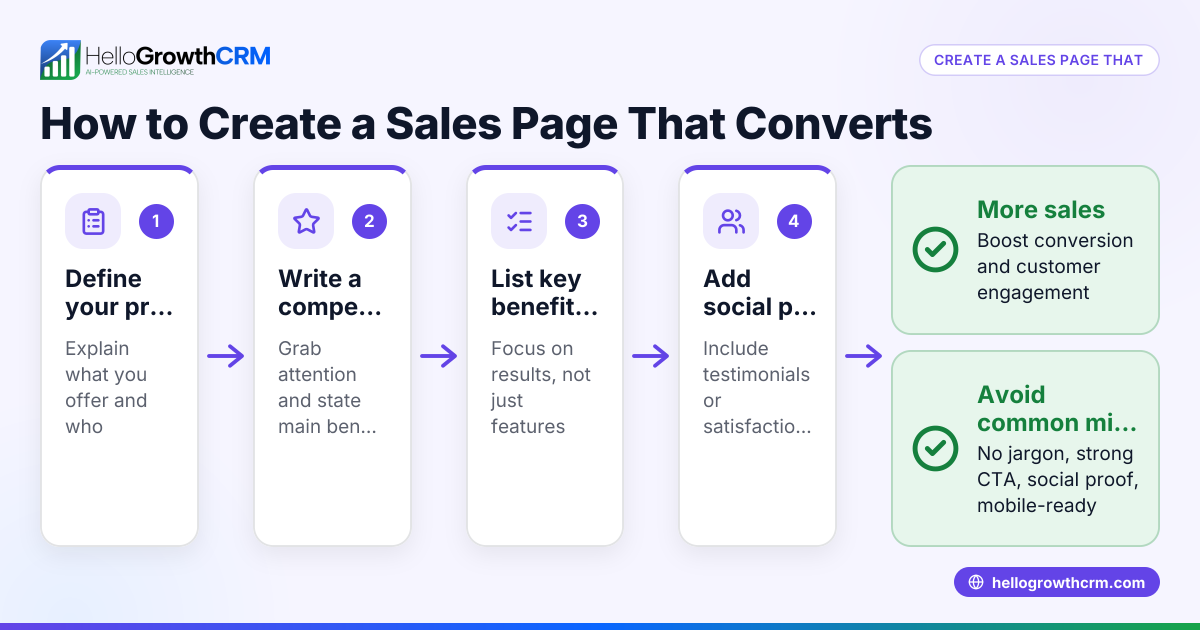
- Identify your target customer and product: Know who you are selling to and what problem your product or service solves. Check that your sales page speaks directly to this audience.
- Write a clear headline: The headline must grab attention and state the main benefit or offer. Check that it is simple and compelling.
- Describe the problem and solution: Explain the customer's pain points and how your product solves them. Use clear, relatable language.
- List key benefits and features: Highlight what the customer gains, focusing more on benefits than just features. Check that each benefit answers "What's in it for me?"
- Include social proof or testimonials: If available, add quotes or case studies to build trust. Verify that these are genuine and relevant.
- Add a strong call to action (CTA): Tell visitors exactly what to do next (e.g., "Buy now", "Book a free consultation"). Check that the CTA is prominent and repeated.
- Design for clarity and ease of use: Use short paragraphs, bullet points, and clear buttons. Check the page loads fast and works well on mobile.
- Set up tracking and follow-up: Use tools to capture leads and monitor conversions. Check that follow-up tasks are assigned promptly.
Example (fictional figures)
An accountancy practice in Birmingham wants to sell a new tax advisory service via a sales page launched on 01/04/2026.
- Headline: "Save £1,000s on your tax bill with expert advice"
- Offer price: £1,200
- Expected conversion rate: 5% of 1,000 visitors per month
Calculations:
1,000 visitors × 5% conversion = 50 sales
50 sales × £1,200 = £60,000 revenue per month
If the practice spends £5,000 monthly on ads driving traffic to the sales page, the net revenue is:
£60,000 - £5,000 = £55,000
This example shows how a focused sales page can generate significant income by converting visitors effectively.
Common mistakes
- Overloading with information: Too much text or technical jargon confuses visitors. Prevent by keeping language simple and benefits clear.
- Weak or missing call to action: Visitors don’t know what to do next. Prevent by using bold, repeated CTAs.
- Ignoring mobile users: Many visitors use phones; a poor mobile experience loses sales. Prevent by testing page responsiveness.
- Not following up on leads: Captured leads get forgotten. Prevent by using CRM tools to schedule follow-ups and reminders.
- No social proof or trust elements: Without testimonials, visitors may hesitate. Prevent by collecting and displaying genuine feedback.
- Slow page load times: Visitors leave if the page is slow. Prevent by optimising images and hosting.
Doing this in HelloGrowthCRM
HelloGrowthCRM helps you manage your sales pipeline efficiently. For example, a quotation sent last week appears as a deal at the 'quote sent' stage with a follow-up date, ensuring no opportunity is forgotten. This keeps your sales process organised and your follow-ups timely. Learn more about Deals (pipeline). If your business has field sales reps, their visit logs and routes are visible to managers via Territories, field operations and commissions. For founders without a sales manager, HelloGrowthCRM provides weekly follow-up execution and pipeline hygiene support through Managed RevOps services.
Frequently asked questions
What is the difference between a sales page and a landing page? A sales page specifically aims to persuade visitors to buy or take a sales action, with detailed product information and a strong call to action. A landing page may serve broader purposes like capturing emails or announcing events.
How long should a sales page be? The length depends on the product complexity and audience. It should be long enough to explain benefits and overcome objections but concise enough to keep attention. Use clear headings and bullet points to aid scanning.
Can I use WhatsApp to follow up on leads from my sales page? Yes, integrating WhatsApp follow-up sequences with your CRM helps maintain quick, personal contact with leads. HelloGrowthCRM supports WhatsApp and SMS sequences to automate this. See WhatsApp and SMS CRM for details.
How do I measure if my sales page is effective? Track visitor numbers, conversion rates, and sales revenue linked to the page. Use CRM tools to monitor follow-up tasks and deal progress.
Should I include prices on my sales page? Including prices can help filter serious buyers and set expectations, but in some cases, you might encourage enquiries first. Test what works best for your business.
How do I ensure my sales page works on mobile devices? Use responsive design templates and test the page on various devices and browsers. Fast loading and easy navigation are essential.
Key takeaways
- Sales pages focus on converting visitors into customers with clear benefits and calls to action.
- Identify your target audience and craft a headline that grabs attention.
- Use simple language, social proof, and strong CTAs to guide visitors.
- Avoid common mistakes like clutter, weak CTAs, and slow load times.
- HelloGrowthCRM helps track deals and follow-ups so no leads are lost.
- Regularly test and update your sales page based on visitor behaviour and results.
Start creating your sales page today and improve your conversion rates. For managing your sales pipeline and follow-ups effectively, start on the Free Forever plan (200 leads, no credit card).
Ready to put this into practice?
Set up your pipeline, WhatsApp follow-ups, and AI lead scoring in minutes — free, no credit card.
Try HelloGrowthCRM freeGet CRM tips in your inbox
Join thousands of sales professionals who get weekly insights on CRM strategy, AI automation, and pipeline optimization.

The HelloGrowthCRM team publishes guides on CRM strategy, AI sales tools, and revenue operations for small business sales teams.