HelloGrowthCRM software
Built for real small-business sales teams
HelloGrowthCRM helps reps qualify faster, follow up on time, and close more deals—with practical automation in one place.
- AI lead scoring and pipeline visibility
- Built-in dialer, WhatsApp, and email automation
- Sales forecasting and RevOps-ready reporting
Sales statuses are labels or stages assigned to sales opportunities that show where each prospect stands in your sales process, from first contact to closing. They help organize leads, prioritize follow-ups, and forecast revenue. This article covers why sales statuses matter, how to set them up step-by-step, a practical example with calculations, common mistakes to avoid, and how HelloGrowthCRM supports managing sales statuses efficiently.
Why this comes up / what goes wrong
Small-business owners often find it challenging to keep track of sales progress because leads and deals pass through multiple stages before closing. Without clear sales statuses, it’s easy to lose track of where each prospect is, leading to slow follow-up, missed opportunities, or confusion among sales team members. For instance, a quote sent to a client might be forgotten if it’s not marked as "Quote Sent" with a follow-up reminder. Sales statuses provide a clear, shared view of every deal's current stage, helping teams stay organized and responsive.
Step-by-step
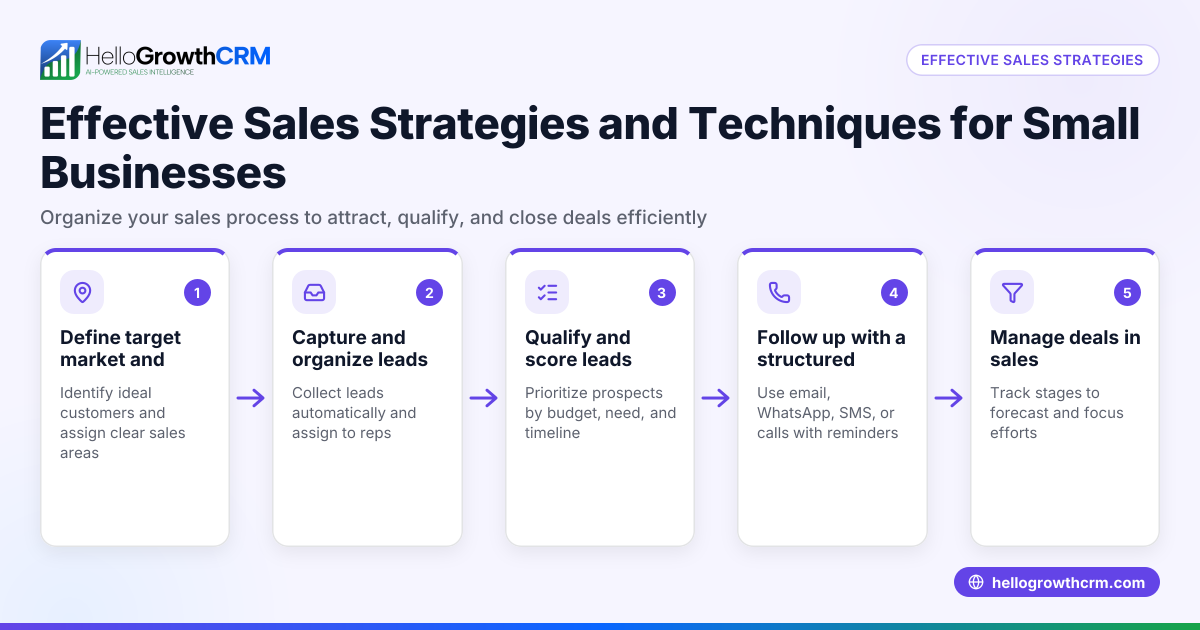
- Define your sales stages: Identify key points in your sales process such as "New Lead," "Contacted," "Qualified," "Quote Sent," "Negotiation," and "Closed Won/Lost." Each status should represent a meaningful step that your team understands.
- Assign each lead or deal a status: When a new lead enters your pipeline, assign it the correct status based on your last interaction or progress.
- Set follow-up dates and reminders: For critical statuses like "Quote Sent," add a follow-up date to ensure timely next steps and prevent deals from stalling.
- Regularly update statuses: As conversations advance, update the status to reflect the current position in the sales process.
- Review your pipeline frequently: Check all deals by their statuses to prioritize your efforts and accurately forecast sales.
- Analyze stage durations and conversion rates: Track how long deals stay in each status and the percentage that move forward to improve your sales process.
Example (fictional figures)
A two-location dental practice in Columbus, Ohio, tracks sales statuses for new patient appointments and service upsells.
- On 05/01/2026, they receive a new lead for teeth whitening.
- They assign the status "New Lead."
- On 05/03/2026, they contact the lead and update the status to "Contacted."
- On 05/05/2026, they send a quote for $500 and update the status to "Quote Sent" with a follow-up date of 05/10/2026.
- On 05/10/2026, they follow up, and the lead agrees to the service, updating the status to "Closed Won."
Calculations for expected revenue:
$500 × 100% probability (Closed Won) = $500 expected revenue
This clear tracking helps the practice prioritize follow-ups and avoid losing deals.
Common mistakes
- Not defining clear sales statuses: Without clear labels, team members may interpret stages differently. Prevent this by agreeing on standard statuses upfront.
- Failing to update statuses regularly: Leads can stagnate if statuses aren’t kept current. Schedule regular reviews to update all deals promptly.
- Ignoring follow-up reminders: Missing follow-up dates leads to lost opportunities. Use reminders or CRM features to stay on track.
- Overcomplicating sales stages: Too many statuses can confuse the team. Keep the number manageable and meaningful to simplify pipeline management.
- Not analyzing pipeline data: Without reviewing stage durations and conversion rates, you miss chances to improve. Regular analysis is essential.
Doing this in HelloGrowthCRM
HelloGrowthCRM offers a Deals (pipeline) feature that tracks open opportunities from first contact through close. For example, a quotation sent last week appears automatically as a deal at the "quote sent" stage with a follow-up date, so it is not forgotten. This helps small businesses keep every deal visible and actionable. Additionally, HelloGrowthCRM supports Territories, field operations, and commissions, allowing field reps to log visits from their phones and managers to monitor daily activities. For founders without a sales manager, Managed RevOps provides weekly follow-up execution and pipeline hygiene, ensuring no lead is left behind. Learn more about HelloGrowthCRM for the United States, WhatsApp and SMS CRM, and the built-in CRM dialer.
Frequently asked questions
What are common sales statuses used in small businesses? Common statuses include "New Lead," "Contacted," "Qualified," "Quote Sent," "Negotiation," "Closed Won," and "Closed Lost." These stages reflect typical steps from first contact to deal closure.
How often should I update sales statuses? Update sales statuses immediately after each meaningful interaction or at least daily during sales reviews. This keeps your pipeline accurate and actionable.
Can sales statuses help with sales forecasting? Yes, by assigning probabilities to each status, you can estimate expected revenue and forecast sales more accurately.
How do I avoid losing leads during follow-up? Use follow-up dates and reminders linked to sales statuses, so you never forget to reach out. Tools like HelloGrowthCRM automate this process.
Is it better to have many detailed sales statuses or fewer broad ones? Fewer, clear, and meaningful statuses reduce confusion and make pipeline management simpler.
Key takeaways
- Sales statuses track where each lead or deal stands in your sales process.
- Define clear, manageable sales stages aligned with your sales steps.
- Regularly update statuses and set follow-up reminders to avoid lost deals.
- Analyze pipeline data to improve your sales process over time.
- HelloGrowthCRM’s Deals pipeline and Managed RevOps features help keep sales statuses organized and actionable.
Start managing your sales statuses effectively today. Start on the Free Forever plan (200 leads, no credit card).
Ready to put this into practice?
Set up your pipeline, WhatsApp follow-ups, and AI lead scoring in minutes — free, no credit card.
Try HelloGrowthCRM freeGet CRM tips in your inbox
Join thousands of sales professionals who get weekly insights on CRM strategy, AI automation, and pipeline optimization.

The HelloGrowthCRM team publishes guides on CRM strategy, AI sales tools, and revenue operations for small business sales teams.