HelloGrowthCRM software
Built for real small-business sales teams
HelloGrowthCRM helps reps qualify faster, follow up on time, and close more deals—with practical automation in one place.
- AI lead scoring and pipeline visibility
- Built-in dialer, WhatsApp, and email automation
- Sales forecasting and RevOps-ready reporting
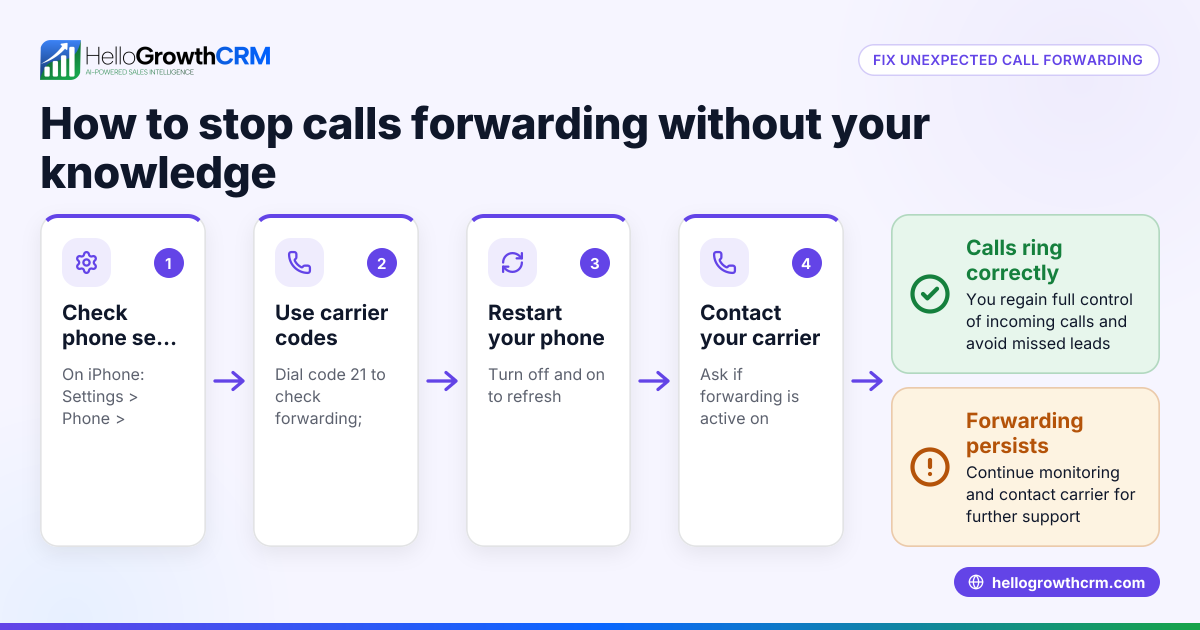
To take call forwarding off, you need to deactivate the forwarding feature on your phone or phone system. This often involves dialing a code like ##21# or adjusting settings in your phone app or business phone system. Doing this stops your calls from being redirected to another number, so they ring directly on your phone as usual.
Why this comes up / what goes wrong
Small-business owners often enable call forwarding to ensure they don’t miss calls when away from their desk or using a different device. However, situations arise where you want to take call forwarding off, such as:
- Receiving calls directly on your main phone rather than a forwarded number.
- Avoiding confusion caused by multiple forwarded calls.
- Troubleshooting call issues caused by incorrect forwarding settings.
- Ending temporary forwarding after a vacation or remote work period.
Without clear instructions, turning call forwarding off can be confusing, especially if you set it up on multiple devices or through your phone provider.
Step-by-step
- Check your phone type and provider
- Identify if you use a mobile phone, landline, or VoIP system.
- Note your phone provider as codes or steps vary.
- Use the universal GSM code (for most mobile phones)
- Open your phone dialer.
- Dial ##21# and press call to check or modify your call forwarding settings, depending on your mobile phone and carrier.
- This disables all call forwarding.
- Listen for confirmation or check your phone settings.
- Disable forwarding on your phone settings
- For smartphones, go to the Phone app settings.
- Find the Call Forwarding option.
- Turn off any enabled forwarding numbers.
- Check forwarding settings with your provider
- Log into your account on your phone provider’s website.
- Navigate to call forwarding or call settings.
- Disable forwarding if set there.
- Restart your phone
- After disabling forwarding, restart your device to ensure changes apply.
- Test by calling your number
- Use another phone to call your number.
- Confirm it rings directly without forwarding.
- Contact support if needed
- If forwarding remains active, contact your phone provider’s support for assistance.
Example (fictional figures)
A B2B software reseller in Denver, Colorado, had enabled call forwarding to their mobile during a conference from 09/15/2025 to 09/20/2025. After the event, they wanted to take call forwarding off to receive calls on their office landline.
- The reseller dialed ##21# on their mobile phone.
- The phone confirmed call forwarding was disabled.
- They called their office number from another phone to verify it rang directly.
Costs involved were minimal, only internal staff time:
- Staff time to disable forwarding: 15 minutes at $40/hour. Calculation: $40/hour × 0.25 hours = $10
- No additional phone charges.
Total cost to take call forwarding off: $10
Common mistakes
- Not confirming the forwarding is off
- Always test by calling your number after disabling.
- Prevent by making a test call immediately.
- Using the wrong disabling code
- Codes vary by provider and phone type.
- Prevent by checking your provider’s instructions or using universal GSM codes.
- Forgetting to disable forwarding on multiple devices
- Forwarding may be active on both mobile and VoIP.
- Prevent by checking all devices and accounts.
- Assuming call forwarding disables automatically
- Forwarding stays active until manually turned off.
- Prevent by scheduling reminders to disable after temporary use.
- Changing settings without provider knowledge
- Some forwarding is controlled by the provider’s system.
- Prevent by verifying settings on your provider’s portal.
- Ignoring call forwarding in business CRM systems
- Forwarding can interfere with call logging.
- Prevent by using tools with integrated dialing like HelloGrowthCRM.
Doing this in HelloGrowthCRM
HelloGrowthCRM offers a built-in dialer that lets your sales team call leads directly from the CRM. When you use this dialer, your calls are logged automatically with outcomes tied to each contact and deal record. This reduces the need for call forwarding because your team can manage calls efficiently within one system. Learn more about the built-in CRM dialer and how HelloGrowthCRM supports US businesses in managing calls and leads effectively at HelloGrowthCRM for the United States. You can also explore our WhatsApp and SMS CRM features to complement your calling strategy.
Frequently asked questions
How do I know if call forwarding is active on my phone? Most phones show a forwarding icon or message in the call settings or status bar. You can also dial a code like *#21# to check forwarding status. If calls ring on another number, forwarding is active.
Will disabling call forwarding affect voicemail? Disabling call forwarding does not usually affect voicemail. Your voicemail settings remain unless you change them separately.
Can I disable call forwarding remotely? If your phone provider offers an online portal or app, you can disable forwarding remotely by logging into your account and changing call settings.
Does disabling call forwarding stop all types of forwarding? Dialing ##21# disables all unconditional forwarding. However, conditional forwarding (like forwarding when busy or unanswered) may require separate codes or settings to disable.
What if I use a VoIP system for calls? VoIP systems have their own forwarding settings in their software or web portals. You must disable forwarding within those systems separately.
Key takeaways
- To take call forwarding off, disable it via phone codes, settings, or your provider’s portal.
- Always test by calling your number to confirm forwarding is off.
- Check all devices and accounts where forwarding might be set.
- Use universal GSM codes like ##21# for most mobile phones.
- Avoid confusion and missed calls by scheduling disabling after temporary forwarding.
- HelloGrowthCRM’s built-in dialer helps manage calls without relying on forwarding.
Start managing your calls and leads efficiently with HelloGrowthCRM’s built-in dialer. Start on the Free Forever plan (200 leads, no credit card).
Ready to put this into practice?
Set up your pipeline, WhatsApp follow-ups, and AI lead scoring in minutes — free, no credit card.
Try HelloGrowthCRM freeGet CRM tips in your inbox
Join thousands of sales professionals who get weekly insights on CRM strategy, AI automation, and pipeline optimization.

The HelloGrowthCRM team publishes guides on CRM strategy, AI sales tools, and revenue operations for small business sales teams.