HelloGrowthCRM software
Built for real small-business sales teams
HelloGrowthCRM helps reps qualify faster, follow up on time, and close more deals—with practical automation in one place.
- AI lead scoring and pipeline visibility
- Built-in dialer, WhatsApp, and email automation
- Sales forecasting and RevOps-ready reporting
A territory plan is a strategic approach to dividing sales regions or customer segments among your sales team to maximize coverage, efficiency, and revenue. It outlines who sells where, how leads are assigned, and how sales activities are tracked. This article explains why territory plans matter for small businesses, provides step-by-step guidance to create one, shares a practical example, and highlights common pitfalls to avoid.
Why this comes up / what goes wrong
Small and mid-sized businesses often struggle with sales organization when leads and customers are scattered across different locations or industries. Without a clear territory plan, sales reps may overlap efforts, ignore some areas, or respond slowly to leads. This leads to lost sales, uneven workloads, and poor customer experience. For example, a business owner managing a team of inside and field sales reps may find it difficult to know who should contact which lead or how to track each rep’s progress without a defined territory plan.
Step-by-step
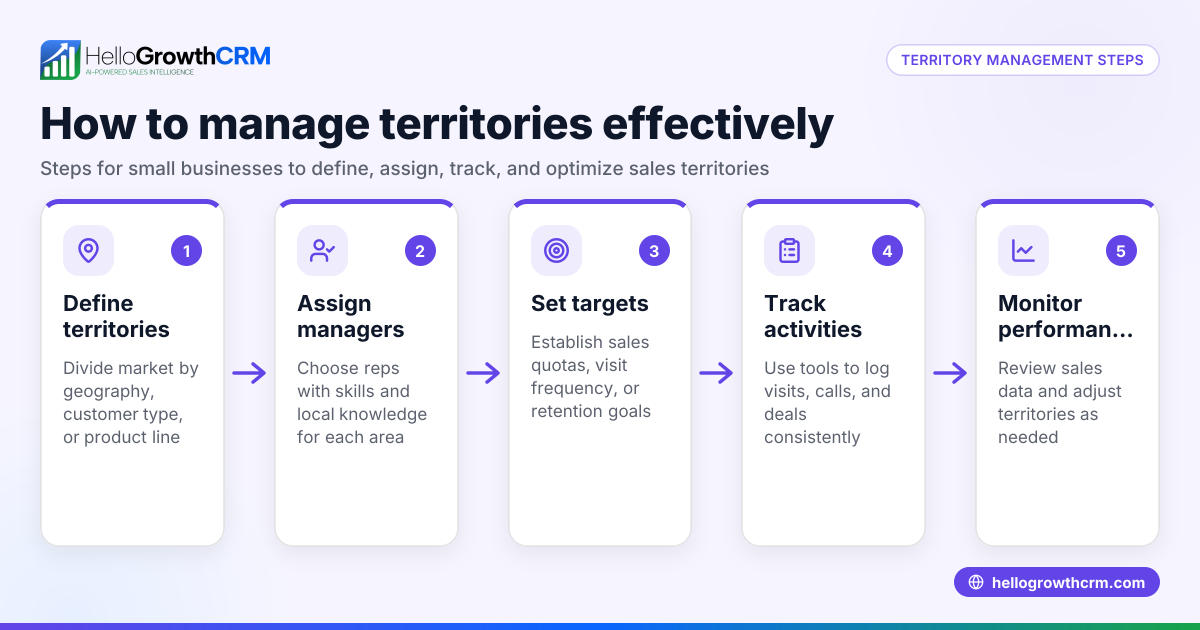
- Define your sales territories: Decide how to split your market—by geography (city, zip code), customer type, industry, or product line. Check your current customer data and lead sources to find natural divisions.
- Assign ownership: Allocate each territory to a specific sales rep or team. Make sure the workload is balanced by number of leads, potential sales value, or travel time.
- Set clear goals and KPIs: Establish sales targets, call or visit frequency, and other performance measures per territory.
- Create a lead routing process: Define how new leads are assigned to territories and reps automatically or manually. Confirm this process is transparent and quick.
- Equip your team with tools: Use CRM software that supports territory management, visit logging, and activity tracking to keep everyone accountable and informed.
- Monitor and adjust regularly: Review territory performance monthly or quarterly and reassign or redefine territories as needed to improve coverage and results.
You can learn more about territory management tools in HelloGrowthCRM’s territory management features.
Example (fictional figures)
A two-location dental practice in Columbus, Ohio, wants to organize its sales efforts for new patient leads. They decide to split the city into two territories:
- North Columbus: Assigned to Dr. Smith
- South Columbus: Assigned to Dr. Lee
They have 1,200 new patient inquiries expected this year.
Step 1: Divide leads equally by territory:
1,200 ÷ 2 = 600 leads per territory
Step 2: Set a target conversion rate of 20% per territory.
600 × 20% = 120 new patients per territory
Step 3: Calculate expected revenue per new patient, assumed $1,200 each.
120 × $1,200 = $144,000 expected revenue per territory
Step 4: Total expected revenue:
$144,000 × 2 = $288,000
This territory plan helps assign leads clearly and set realistic targets for each dentist.
Common mistakes
- Ignoring workload balance: Assigning territories without considering lead volume or travel time causes some reps to be overwhelmed while others are idle. Prevent this by analyzing data before assigning.
- No clear ownership: When territories overlap or are not clearly assigned, leads get lost or contacted multiple times. Use a CRM with territory ownership features to prevent confusion.
- Failing to track activities: Without logging visits or calls, managers can’t see what’s happening in each territory. Use tools that capture field operations and activity logs.
- Not adjusting territories: Markets change, and static territories can reduce effectiveness. Schedule regular reviews and be ready to reassign territories.
- Poor lead routing: Slow or manual lead assignment delays follow-up. Automate lead routing where possible.
Learn more about improving your sales process with WhatsApp and SMS CRM tools.
Doing this in HelloGrowthCRM
HelloGrowthCRM offers territory definition and ownership tools to help small and mid-sized businesses manage sales regions effectively. Field sales reps can log visits directly from their phones, and managers can see the day’s beat and activities. For teams starting out, the Free Forever plan lets up to two users run a full Kanban pipeline with 200 leads at no cost until calling or WhatsApp automation is needed. Explore these options at HelloGrowthCRM for the United States. For more details, visit the territory management page.
Frequently asked questions
What is a territory plan in sales? A territory plan divides your market into defined areas or segments and assigns them to specific sales reps. It helps organize sales efforts, ensures coverage, and improves efficiency.
How do I decide on sales territories for my business? Look at your customer locations, lead sources, and product lines. Common approaches include geographic boundaries, customer industry, or deal size. Balance workload and potential revenue when assigning territories.
How often should I update my territory plan? Review your territory plan at least quarterly or whenever you notice changes in market conditions or sales performance. Regular updates keep your sales coverage effective.
Can I manage territories without software? Yes, but manual management with spreadsheets or notes can lead to errors and slow follow-up. Using a CRM with territory features improves accuracy and tracking.
What tools help with territory planning? CRMs that offer territory ownership, visit logging, and activity tracking help you implement and monitor your plan. HelloGrowthCRM includes these features for growing sales teams.
Key takeaways
- A territory plan assigns specific sales regions or segments to reps to improve coverage and efficiency.
- Define territories based on geography, customer type, or product, and balance workloads.
- Use clear ownership, lead routing, and activity tracking to avoid lost leads and overlap.
- Regularly review and adjust territories to respond to market changes.
- HelloGrowthCRM supports territory management and field operations for small and mid-sized businesses.
Start organizing your sales territories today to improve lead follow-up and sales results. Start on the Free Forever plan (200 leads, no credit card).
Ready to put this into practice?
Set up your pipeline, WhatsApp follow-ups, and AI lead scoring in minutes — free, no credit card.
Try HelloGrowthCRM freeGet CRM tips in your inbox
Join thousands of sales professionals who get weekly insights on CRM strategy, AI automation, and pipeline optimization.

The HelloGrowthCRM team publishes guides on CRM strategy, AI sales tools, and revenue operations for small business sales teams.