HelloGrowthCRM software
Built for real small-business sales teams
HelloGrowthCRM helps reps qualify faster, follow up on time, and close more deals—with practical automation in one place.
- AI lead scoring and pipeline visibility
- Built-in dialer, WhatsApp, and email automation
- Sales forecasting and RevOps-ready reporting
A video call integration website means embedding video call functionality into your website so visitors can connect with you or your team through live video without switching apps. This feature helps small businesses offer quick consultations, support, or sales calls directly from their site.
Why this comes up / what goes wrong
Small business owners often want to improve customer experience by enabling direct video calls on their websites. This can increase engagement and speed up sales or support conversations. However, many struggle with how to add video calls effectively. Some rely on external apps and share links manually, causing friction and lost leads. Others try complicated setups that don’t work well on all devices or slow the website down.
These challenges arise because video call integration requires technical setup and testing to ensure smooth performance. Without proper integration, visitors might find it difficult to start calls, or calls may drop unexpectedly, hurting customer satisfaction.
Step-by-step
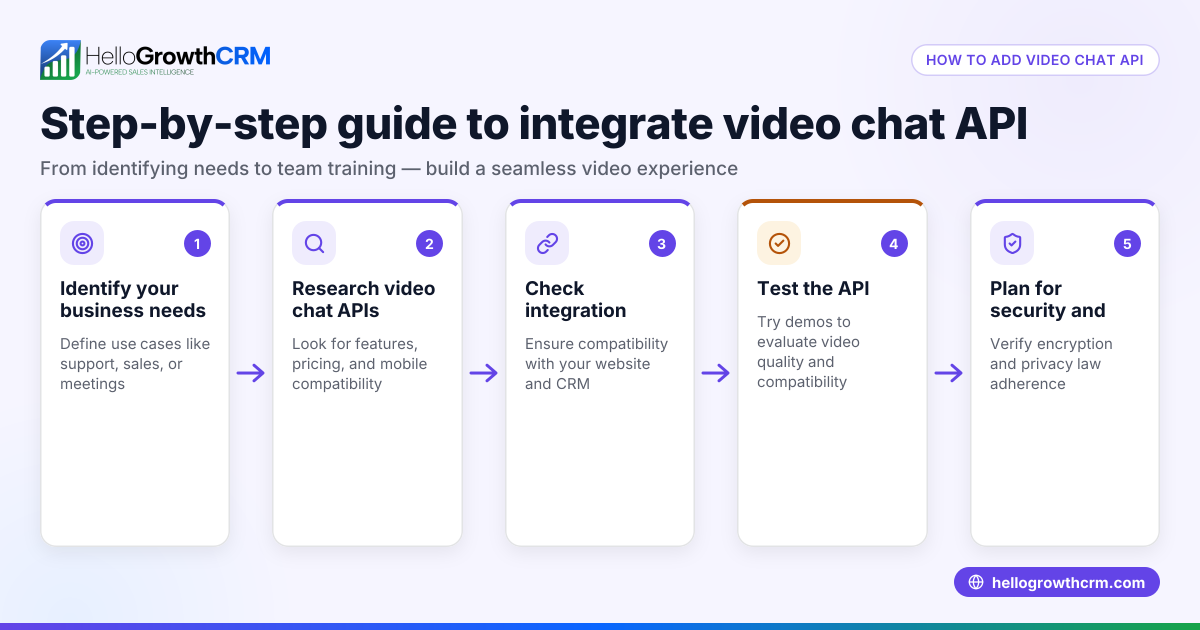
- Choose a video call provider or platform: Select a service offering embeddable video call widgets or APIs compatible with your website platform (WordPress, Shopify, custom HTML). Check features like video quality, user limits, and mobile compatibility.
- Create an account and configure video call rooms or links: Set up meeting rooms, waiting rooms, or direct call links tailored to your business needs.
- Obtain embed code or API keys: Get the HTML embed code or API credentials from your provider to integrate into your website.
- Add the embed code to your website: Insert the code on the page where you want the video call button or widget. Test on desktop and mobile devices to confirm functionality.
- Set up notifications and scheduling: Configure alerts to notify you or your team when a visitor starts a call. Integrate with calendars if needed to manage availability.
- Test the full user experience: Verify visitors can start calls easily, video and audio work well, and calls connect reliably.
- Train your team on managing calls: Ensure staff know how to answer calls promptly and log outcomes.
- Monitor and optimize: Use analytics or feedback to improve call availability, speed, and quality.
Example (fictional figures)
A two-location dental practice in Columbus, Ohio wants to add video call integration to its website for remote consultations.
- Video call provider charges $50/month for the embed feature.
- Setup requires 4 hours at $40/hour for a web developer.
- They schedule 10 video consultations monthly, each generating $150 revenue.
Calculations:
Setup cost = 4 hours × $40/hour = $160 Monthly subscription = $50 Monthly revenue from video calls = 10 × $150 = $1,500
Return on investment in first month:
Revenue - (Setup cost + subscription) = $1,500 - ($160 + $50) = $1,290
This shows the integration quickly pays off by increasing consultations.
Common mistakes
- Choosing a video call provider without embed or API support: Prevent by verifying embed or API availability before subscribing.
- Ignoring mobile device compatibility: Test on phones and tablets to ensure calls work smoothly.
- Not setting up notifications for incoming calls: Leads to missed calls; use email or SMS alerts.
- Overcomplicating the user interface: Keep call buttons clear and simple.
- Failing to train staff on call handling: Prevent by documenting call procedures and logging outcomes.
- Not integrating video calls with lead tracking or CRM: Leads to lost follow-up opportunities.
Doing this in HelloGrowthCRM
HelloGrowthCRM supports your sales calls with a built-in dialer that lets reps call leads directly from inside the CRM and log each call outcome. It also offers API and integrations to bring inquiries from web forms and other connected lead sources into the CRM as leads, helping you manage contacts efficiently. Learn more about the built-in CRM dialer and integrations features. For US businesses, see how HelloGrowthCRM for the United States fits your needs.
Frequently asked questions
Can I add video calls directly to any website? Most modern websites support adding video call widgets via embed code or API. Check your website platform’s documentation for adding custom HTML or plugins.
Do I need special software or hardware for video call integration? Basic video call integration requires only a webcam and microphone. No extra software is usually needed beyond a web browser.
How do I ensure video calls don’t slow down my website? Choose lightweight video call providers and embed codes optimized for performance. Test website speed before and after adding the feature.
Can video calls be recorded through website integration? Recording depends on the video call provider’s features. Ensure compliance with legal consent requirements.
How does video call integration help sales teams? It enables immediate live conversations with leads, speeding up engagement and improving conversion rates.
Can HelloGrowthCRM handle video calls? HelloGrowthCRM includes a built-in dialer for phone calls and logs outcomes, but video calls require separate integration. It helps centralize lead data from multiple sources to support your sales process.
Key takeaways
- Video call integration lets customers start live video calls directly from your website.
- Choose providers with embed or API support compatible with your website.
- Test on all devices and set up notifications to avoid missed calls.
- Train your team to handle calls and log outcomes for follow-up.
- Avoid mistakes like ignoring mobile compatibility and overcomplicating the interface.
- HelloGrowthCRM offers a built-in dialer and integrations to manage leads and calls efficiently.
Start adding video call integration to your website today to improve customer engagement and sales. Manage your leads and calls more efficiently by starting with the Free Forever plan (200 leads, no credit card) at Start on the Free Forever plan (200 leads, no credit card).
Ready to put this into practice?
Set up your pipeline, WhatsApp follow-ups, and AI lead scoring in minutes — free, no credit card.
Try HelloGrowthCRM freeGet CRM tips in your inbox
Join thousands of sales professionals who get weekly insights on CRM strategy, AI automation, and pipeline optimization.

The HelloGrowthCRM team publishes guides on CRM strategy, AI sales tools, and revenue operations for small business sales teams.