HelloGrowthCRM software
Built for real small-business sales teams
HelloGrowthCRM helps reps qualify faster, follow up on time, and close more deals—with practical automation in one place.
- AI lead scoring and pipeline visibility
- Built-in dialer, WhatsApp, and email automation
- Sales forecasting and RevOps-ready reporting
An automatic call logging CRM captures call information such as call time, duration, outcome, and notes automatically or with minimal manual input. This saves time, reduces errors, and ensures that sales teams have up-to-date records of all customer interactions. For Indian small businesses, this can prevent lost leads and improve follow-up efficiency.
Why this comes up / what goes wrong
Many small business owners and sales leaders rely on phone calls for sales and customer engagement but face challenges like:
- Manual call logging on spreadsheets or paper, which is time-consuming and error-prone.
- Lost or incomplete call records leading to missed follow-ups.
- Difficulty tracking call outcomes and integrating calls with lead and deal data.
- Using WhatsApp and phone calls separately from CRM, causing fragmented information.
These issues reduce sales efficiency and cause lost revenue opportunities. An automatic call logging CRM can solve these problems by integrating calling and logging into one system.
Step-by-step
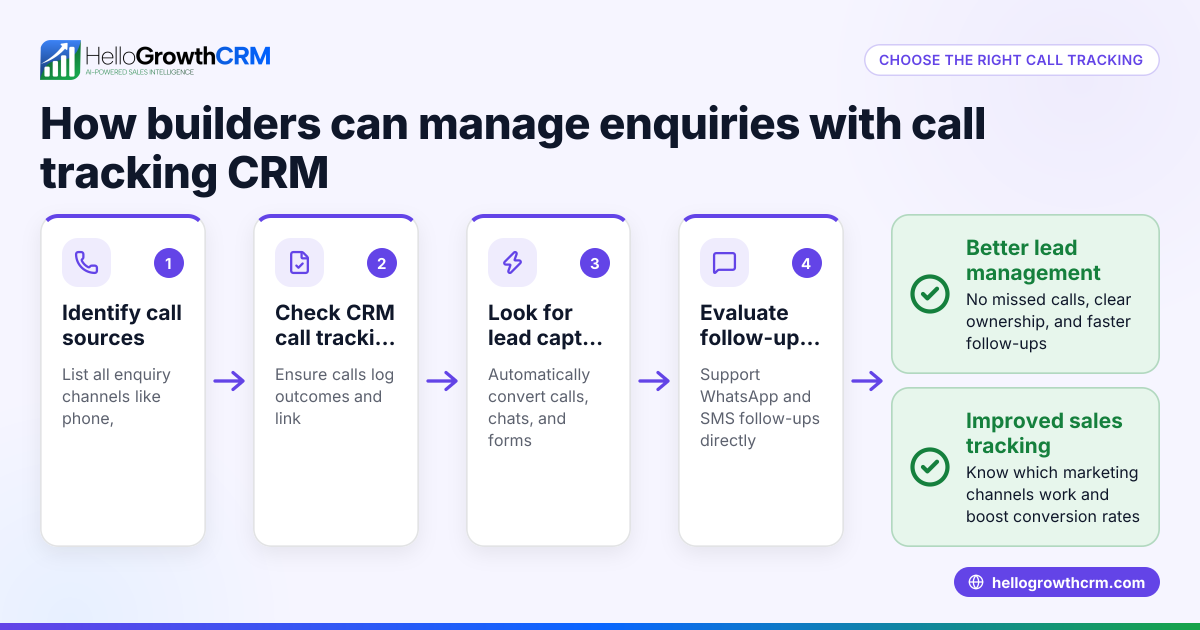
- Identify your business needs: Determine the volume of calls, team size, and channels used (phone, WhatsApp, SMS).
- Check for built-in dialer capability: Choose a CRM with a built-in dialer that lets your telecallers call directly from the CRM and automatically logs call outcomes on the lead record. This reduces manual work and errors. Learn more about the built-in CRM dialer.
- Look for WhatsApp and SMS integration: Since many Indian SMBs use WhatsApp for sales, a CRM that logs WhatsApp conversations on the lead record and allows follow-ups via WhatsApp or SMS helps keep all communication in one place. See details on WhatsApp and SMS CRM.
- Consider AI assistance: Some CRMs offer AI agents that draft follow-up messages after calls, which your sales reps can review and send. This saves time and standardises communication.
- Evaluate user-friendliness: The CRM should be easy for your telecalling team to adopt, with simple call logging and follow-up workflows.
- Test data syncing and reporting: Ensure call logs are linked to leads and deals, and that you can generate reports to track sales performance.
- Review pricing and plans: Check if the CRM’s automatic call logging features are available in your budget and plan.
Example (fictional figures)
Consider "ABC Electronics," a small business in Delhi with 5 telecallers making 50 calls daily to leads.
- Each call takes about 3 minutes plus 2 minutes for manual logging.
- Without automatic logging, each telecaller spends 50 × 2 = 100 minutes daily logging calls.
- Total daily logging time for 5 telecallers = 100 × 5 = 500 minutes = 8 hours 20 minutes.
By adopting an automatic call logging CRM:
- Logging time reduces to near zero, saving 8+ hours daily.
- Telecallers can make more calls or focus on quality follow-ups.
If the average sales value per closed lead is ₹15,000 and automatic logging helps close 2 extra leads weekly:
₹15,000 × 2 = ₹30,000 additional weekly revenue.
Over a month (4 weeks):
₹30,000 × 4 = ₹1,20,000 extra revenue.
This shows the potential ROI of automatic call logging.
Common mistakes
- Choosing a CRM without integrated calling: This forces manual call logging, defeating the purpose. Prevent by selecting a CRM with a built-in dialer like HelloGrowthCRM’s built-in CRM dialer.
- Ignoring WhatsApp communication: Many leads prefer WhatsApp, so not logging WhatsApp chats causes lost context. Use a CRM with WhatsApp integration, such as HelloGrowthCRM’s WhatsApp and SMS CRM.
- Not training the team: Without proper training, reps may not use automatic logging features correctly. Prevent by dedicating time for onboarding.
- Overlooking AI features: Not using AI agents to draft follow-ups can waste time. Consider platforms that offer AI-assisted messaging to speed up workflows.
- Failing to monitor call data: Not reviewing call logs and outcomes means missed opportunities for improvement. Regularly check reports and pipeline updates.
Doing this in HelloGrowthCRM
HelloGrowthCRM offers a built-in dialer that lets telecallers work through lead lists inside the CRM. Each call’s outcome is automatically logged on the lead record, ensuring no data is lost. WhatsApp conversations with leads are also logged, and follow-ups can be sent as WhatsApp or SMS messages. Additionally, AI agents in HelloGrowthCRM can draft follow-up messages after calls, which reps only need to review and send, saving time and improving consistency. Learn more about these features on the built-in CRM dialer and WhatsApp and SMS CRM pages.
Frequently asked questions
What is automatic call logging in a CRM? Automatic call logging means the CRM records details of calls—such as time, duration, and outcome—without manual entry, linking them to the correct lead or deal.
How does automatic call logging help small businesses? It saves time, reduces errors, and keeps sales data organised, enabling faster follow-ups and better sales tracking.
Can I log WhatsApp calls and messages automatically? Some CRMs, including HelloGrowthCRM, log WhatsApp conversations on the lead record and allow sending follow-ups via WhatsApp or SMS.
What should I check before choosing a CRM for automatic call logging? Look for a built-in dialer, WhatsApp/SMS integration, AI assistance for follow-ups, ease of use, and reporting capabilities.
Does HelloGrowthCRM support automatic call logging? Yes, HelloGrowthCRM includes a built-in dialer that logs call outcomes automatically and integrates WhatsApp and SMS conversations on lead records.
Key takeaways
- Automatic call logging saves time and prevents lost leads by recording call details without manual entry.
- Choose a CRM with a built-in dialer and WhatsApp/SMS integration to unify communications.
- AI agents can draft follow-up messages, speeding up sales workflows.
- Proper team training and regular monitoring of call data are essential.
- HelloGrowthCRM offers these features tailored for Indian SMBs.
Start improving your sales calls and follow-ups today. Start on the Free Forever plan (200 leads, no credit card).
Ready to put this into practice?
Set up your pipeline, WhatsApp follow-ups, and AI lead scoring in minutes — free, no credit card.
Try HelloGrowthCRM freeGet CRM tips in your inbox
Join thousands of sales professionals who get weekly insights on CRM strategy, AI automation, and pipeline optimization.

The HelloGrowthCRM team publishes guides on CRM strategy, AI sales tools, and revenue operations for small business sales teams.